











 39✽
Hello Ladies and Gentlemen...
I a a proud owner of the Husqvarna Viking Designer One ( Floppy) and have VIP customizing 6.2, but have misplaced my Manual and cannot load my software. I need the installation code from the manual. If anyone out there has a copy of this software or the manual i would be very happy if you would share the installation code so i can get back to embroidering... its in the book in the first few pages.
Thanks ! Richard the Sewing Bear
Comments (6)
 145311✽
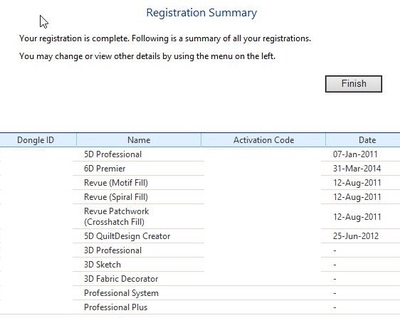
The registration code can not be shared, it is unique for each user. If you are the first owner and registered your software you can find your registration code online - mine are all there for the packages I bought and upgraded too - you normally access it via the smart update button, which you can't when you have not installed the software.
I added a picture but blanked out the sensitive information like dongle id and codes.
I had a look at the HV website. You can access the software registration page using the link below. Hope that helps.
I added a picture but blanked out the sensitive information like dongle id and codes.
I had a look at the HV website. You can access the software registration page using the link below. Hope that helps.
1 links:
[1]
software registration
www.6dembroiderysystem.com
318687✽
by
dragonflyer
16 May 2015
+6✽
Hi Richard...and Welcome to Cute...I see Martine has already answered your question...good luck with getting the code you need..
 255070✽
 234615✽
Hi Richard, I agree with Martine. I also have an Husqvarna Sewing machine,my model is the Designer 1 SE. If you bought this from a reputable dealer go and visit them and explain what has happened. I would also have a real good search for that Manual. Good luck with it all. Love Chris, Newcastle, Australia.
P.S. A big Aussie welcome from me.
P.S. A big Aussie welcome from me.
 145311✽
I see the link gives an error message.
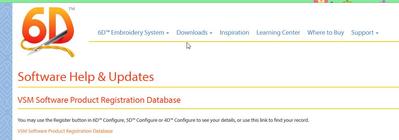
The link below works, it gets you to picture 1, choose Support, then Software Help & Updates, which brings you to picture 2 and click on the link given at that page.
The link below works, it gets you to picture 1, choose Support, then Software Help & Updates, which brings you to picture 2 and click on the link given at that page.

1 links:
[1]
start here
www.6dembroiderysystem.com
1 comment
And you will not find the code in the manual, it always came on a separate leaflet.
 145792✽
Welcome to the cute site Richard. I hope Martine was able to help you. Let us know//LillianUSA,Alabama