







360672✽
i know this is totally dumb but i honestly don't know***
I hear you all saying i will book mark that ,how or what on earth does this mean ,how can you bookmark on a computer???See i told you it was daaaaaa.Carolyn
Comments (18)

6279✽
It is saving the web page to favorites so you can access it easily in the future. It is called favorites in internet explorer and bookmarks in firefox and chrome. At least that is what I think it is. Computer lingo sounds funny at times to our generation. Hugs, Barba
1 comment
It sure does thanks

96365✽
by
dailylaundry
09 Jun 2015
+13✽
I believe it depends on what browser you use. They are my favorite places to go. Cute Embroidery is right up there. (actually, for me, my bookmarks are on the left of my page and I can just click on it and it takes me to that page. Hope that makes sense. Hugs, Laura*
1 comment
Sureeeeeeeeeeeee

29726✽
I just click on favourites and add it to a folder. I have one called embroidery sites.
1 comment
Thanks

145791✽
So now you know. I had to ask my daughter the same question about 3 yrs ago. We did not grow up with computers Carolyn so I guess we just have to ask.. My 7 yr old Great Grand son probably knows more about them than me. He had them at home,pre school kindergarten, 1st grade and has them so my daughter says throughout the rest of his yrs in school. I'll never catch up with him/Lillian
1 comment
I,m with you Lillian i never even learned typing in school .I only learned since i got this embroidery machine.

234568✽
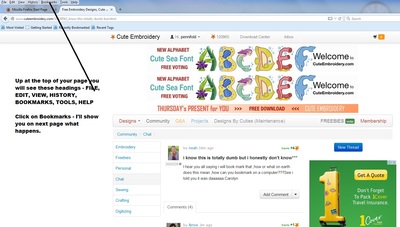
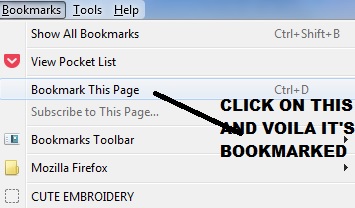
It's easy Carolyn - I've put up a couple of pictures of how to do it. Love Chris
4 comments
ok i will try it thanks i love and need those pictures thanks again***hugs
You won't believe this Chris but i DONOT have that line at the top of my computer???weird
What system are you using? I have MOZILLA FIREFOX - so it may make a difference. Love Chris

Mine also looks totally different Chris. I use Google on my desk top and Safari on my iPad
10990✽
Ok, you already have an answer. I think Apple calls it a bookmark. I ask lots of questions about computers, I have DH and DD that can usually answer. When I had to learn Apple machines, I actually called Apple support when my technology department couldn't help. It all changes so fast.
1 comment
yes for sure.thanks

57675✽
Look for a "star" symbol
You might find one on the left or the right of the (top) address bar (where you type something in to go to a site)
You might find one on the left or the right of the (top) address bar (where you type something in to go to a site)
2 comments
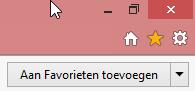
If you are using Internet Explorer -- you might find a "Star" between a "House" and a "Gear" (looks like a machine gear or a tool) on the top right of the screen.
Yes thats were it is thanks
7806✽
Oh Carolyn you are so sweet and I am glad you asked :)
Well it will help a lot more if we can have a peak of the top of your internet browser as we can exactly pinpoint you to where you can find the 'bookmark' or 'favourites' option in your case! :)
I would like to mention that it is a really helpful feature to use as we have so many embroidery sites we would like to remember and this option can easily do this for us! Good luck Carolyn :)
Well it will help a lot more if we can have a peak of the top of your internet browser as we can exactly pinpoint you to where you can find the 'bookmark' or 'favourites' option in your case! :)
I would like to mention that it is a really helpful feature to use as we have so many embroidery sites we would like to remember and this option can easily do this for us! Good luck Carolyn :)
3 comments
By the way. ...have a look at the youtube videos...those might help as there are lots of them!
e.g.Technologyguru77 has one on chrome bookmark management on you tube, call you tube on new tab and search for it
Thanks girls got it worked out now

45071✽
Noah dear..... no question is dumb!!! Even if you didn't know how to bookmark on your computer YOU do such lovely and wonderful machine embroidery!!! Every Cutie appreciates the help you give us!! I hope you got the answer you needed, huggs Dolly
1 comment
Well HELLO DOLLY ***yes i got it now thanks
24331✽
by
sandralane
09 Jun 2015
+6✽
Carolyn, not a dumb question, I see you have a few answers I hope are helpful. Have just bought a new computer Apple laptop , had some lessons from my son at the weekend, I have to learn a whole new language, bookmarks on mine. However favourites on others both the same things and are very useful if you use lots of embroidery sites. Depends what program you are running as to what things are called and everyone has their own opinion, I am typing away here with errors and this new computer even picks up spelling mistakes .As I am still learning on this mac, embroidering will have to wait for a while, until I organise how to actually get a pattern into my machine.Hope that you can finally work it out. Good Luck. Sandra.
1 comment
Yes Sandra i got it now thanks
318615✽
by
dragonflyer
09 Jun 2015
+6✽
So, Carolyn...lots of answers to your questions...BUT, did you actually figure it out on your computer? If not...let us know and we will try to redirect you so you can "bookmark" or mark your favorite sites so you can get them at a click of the mouse..
1 comment
yes i did get it thanks!!!
66927✽
by
graceandham
09 Jun 2015
+7✽
Boy, does it depend on your browser I had it figured out in the old Google, but then I was persuaded that Google Chrome was better by a techie. I found in Google help a section called something like "Where did my bookmarks go" instructing me how to get them back. It made no sense, so I gave up on it. Progress can be awesome,, or awful.
3 comments
please do not give up, if you find them, save in a word document and refer to that at worst case 8-)
You may have been using Internet Explorer with Google as your home page. You can import your favorites from Internet Explorer to Chrome.
Try using YouTube to find the answers
Try using YouTube to find the answers
yes thats what i think Cory(my Son) did when he set this up for me??Not fully sure thanks
10474✽
by
brittanycooper
09 Jun 2015
+8✽
The only dumb question is the one NOT ask.
Now the easiest way for me is to do the keyboard shortcut. Hold down both the Ctrl and d key at the same time. You'll get a popup on the top of the page. Their should also be a Bookmarks heading on the top menu. Just play with these and see what is best for you. I have maybe 200 bookmarks in my file. Good luck.
Now the easiest way for me is to do the keyboard shortcut. Hold down both the Ctrl and d key at the same time. You'll get a popup on the top of the page. Their should also be a Bookmarks heading on the top menu. Just play with these and see what is best for you. I have maybe 200 bookmarks in my file. Good luck.
4 comments
wow works for me with firefox and I can add an index word too tks vor the shortcut
thanks sew much, had no idea!
Yes this also works thank-you!!!!
Thanks! Didn't know that one.
Always willing to learn as those computer programmers keep changing things.
Always willing to learn as those computer programmers keep changing things.

20463✽
Hi Carolyn, do not run chrome here but can ask tomorrow and find out if you have not found a solution by then, smart lady your questions educate us all, just learnd about that happy little shortcut from brittany
1 comment
Thanks Sue i am still learning this ole beast!!Hugs

145307✽
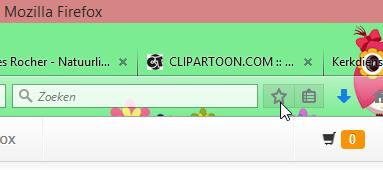
I use Firefox as a browser and there you find two symbols next to each other, the star places a bookmark (or use Ctrl+D), the symbol next to it gives you your list (or use Ctrl+Shift+B).
Internet explorer has a star symbol at the right (and sorry, it's set in Dutch) - see picture 2 - or use Ctrl+D.
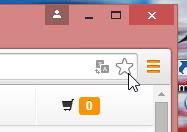
Google Chrome has a star at the right as well - see picture 3 - and guess what, Ctrl+D works there as well. If you want to see your bookmarked sites click on the star again and you get to see them all.
On my iPad I have the symbol of an open book.
Internet explorer has a star symbol at the right (and sorry, it's set in Dutch) - see picture 2 - or use Ctrl+D.
Google Chrome has a star at the right as well - see picture 3 - and guess what, Ctrl+D works there as well. If you want to see your bookmarked sites click on the star again and you get to see them all.
On my iPad I have the symbol of an open book.
2 comments
Yes this is what i got and how i am working it.Not sure why i ended up with this but thanks i got it now
Ctrl+Shift+b doesn't work for me. But Ctrl+b does.
Thanks for the info.
Thanks for the info.
1941✽
by
Patricia109
12 Jun 2015
+4✽
Carolyn, you have done so well up to now, not having your favourite web sites bookmarked/saved-in-favourites.
1 comment
yes i got them as headings across the top

85867✽
Carolyn , I don't use Book mark either. I had typing in High school only because it was required. We did not even have electric typewriters so I don't know the function of keys on the key board or the short cuts. Where on earth do people get the shortcuts from? I complained in a software class once that she was using shortcuts and I wanted to learn where to find it in my software.. People in these classes don't realize that if you are 50 or older that we did not grow up with the internet and computers. I have even seen some of the ladies bring their granddaughters with them. Kay
1 comment
oh brother wish they had classes here i might take one but then****i would half to drive one hour or more one way plus pay for the class lol SO I GUESS I will just ask here hugs

34246✽
noah...by c;icking on the star you can acually select the folder you wish to save the link /page/whatever in...you can also create a new one to save it to...I use google
1 comment
ok thanks hugs