








145791✽
I need some Embird help please. With the new 2015 how do I add a name from Cute fonts(individual letters) on old embird I simply clicked the folder under merge in toolbar for each letter can't seem to do it with this Have a Halloween design in Editor and want to add Caleb's name but haven't been able to.thanks Lillian
Comments (3)

318615✽
by
dragonflyer
22 Sep 2015
+2✽
Hmmm...I have 2015 Basic and I just use Merge to add one letter at a time not sure why it is not working for you..
1 comment

Me too.

8073✽
by
cathiejones
26 Sep 2015
+1✽
Hello Lillian,
I have just checked for you:
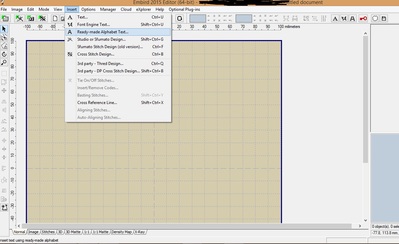
1-Open your Embird Editor.
2-Click on "Insert" and choice "Ready-made Alphabet Text (Image 1).
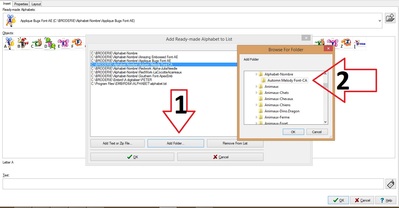
3-Click on the right (Image 2)"Add Ready-made alphabet to list".
4-Click on "Add folder". (Image 3)Another window open where you will choice your alphabet files THE file/font your want to use. e.g for me: "Autumn Melody font-CA". CLICK OK.
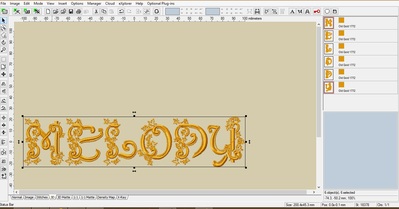
5-Type your text. At the top left you will see "Properties" where you can change the size and in "layout" you can change shape & other.
6-(Image 4) You have your name.
I hope it helped. Have fun !
Cathie Jones
I have just checked for you:
1-Open your Embird Editor.
2-Click on "Insert" and choice "Ready-made Alphabet Text (Image 1).
3-Click on the right (Image 2)"Add Ready-made alphabet to list".
4-Click on "Add folder". (Image 3)Another window open where you will choice your alphabet files THE file/font your want to use. e.g for me: "Autumn Melody font-CA". CLICK OK.
5-Type your text. At the top left you will see "Properties" where you can change the size and in "layout" you can change shape & other.
6-(Image 4) You have your name.
I hope it helped. Have fun !
Cathie Jones

4 comments
This is a great tutorial, but I don't think Lillian wants to use the Embird fonts.
Ooops !?
I don't understand the question ??
I thought your instructions were for the Embird Fonts. I've had a look and discovered that they aren't. My apologies for confusing everyone!
I would use the Merge function as dragonflyer said.
I would use the Merge function as dragonflyer said.

3597✽
Hi Lillian I have just had the same problem bringing in a new font and it just wouldn't type it out correctly ...I have sat for days with this problem ...and have now overcome it by changing the name of each font as some brought fonts use long names ...ie truefontAlarge....change to A for upper or a for lower case and open as you normally would ....I hope this make sense to you ....if not PM me your details and I will try to explain again ....regards Denise