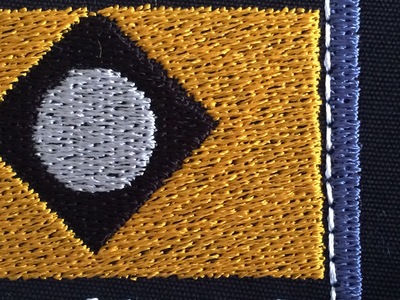
Pull compensation help please. I've made a satin frame and then there is a filled rectangle inside it. When I stitch out the rectangle the outside edges overlap the frame just a bit and I can see that it's pulling the frame edges in a little. Do I reduce or increase the pull compensation of the inside filled rectangle?
This is on a medium weight cotton. Stabilizer is 2 layers of tear away.
First picture is my most recent attempt and you can see on the right where the gold has overlapped the white outline. I also have some loopy loose stitches in the gold on the right corner area and the left corner area and I'm not sure why since that didn't happen on my previous attempts. (The only difference is that this one used prewound bobbins.)
Second picture is one of the previous attempts. Since that one I have reduced the size of the rectangle just a touch and reduced the density of the gold area. But you can see how much the blue frame has pulled in on this picture.
I'm afraid if I stitch the frame last then the gold edges will look curved. So my next thought was to change pull compensation but I'm not sure which way to go: increase or decrease. I also reduced the size of the rectangle just a bit more for the next try which I haven't stitched yet.


- I would stitch the filled rectangle first and then the frame.
- have you created an underlay for your rectangle?
- is your stabiliser OK
- your tension might be a bit high
- what is the angle of your stitch direction? Avoid 0, 45 and 90 degrees.
- reducing the pull compensation reduces the size in the stitch direction, increasing it would increase your problem.
Hope that helps.
Two layers of stabiliser should be enough and the fill loks good s well.
My normal settings are D=4.5 (or 4.3 when I use white on a dark background); comp=0.2 or 0.3 . I use the higher value for circles, pull tends to make them slightly oval instead of round.
I always try to digitise/embroider from the center outwards, in this case I would stitch the frame last. It should not make a difference, but often it does. Or you could cheat and make the rectangle a tiny bit narrower and leave a small gap.
Frustrating when the design looks well in the software and stitches out less nice.
My pull compensation is at .02 (the automatic setting).

http://www.digitizingfactory.com/service/files/Embroidery_Push_Pull.pdf
If I were going to sell this or make it for someone else I might work on making the edge straighter but for my purposes it's perfect.
Thanks for the help!