








40✽
Comments (16)

85867✽
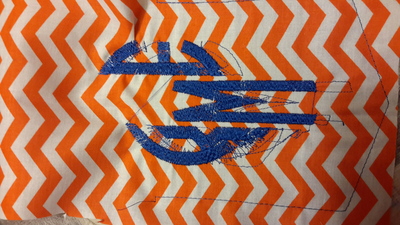
Oh my! Was this from your software to your machine? If so, were they grouped and all selected before they were sent to to the machine. Maybe just a really bad design. I hope this was a test stitch. What a mess! Sorry! Kay

109866✽
by
crafter2243
18 Jan 2016
+12✽
Oh my goodness. Happened to me once with the Baby Lock Elissimo. After shutting the machine down everything was fine, but it happened again after a few weeks. In the middle of the design everything moved overby 1/2 inch. The machine finally went to Baby Lock for repair because it had other issues that the dealer could not fix.

255063✽
I am so sorry but I cannot help, as I have never seen anything like this before.
Welcome to Cute.
Welcome to Cute.


57675✽
Does your machine do this with the designs built in to the machine?
From the way it looks -- it may be the design (corrupted) or something bumped or got in the way of the embroidery arm.
Welcome to Cute!
From the way it looks -- it may be the design (corrupted) or something bumped or got in the way of the embroidery arm.
Welcome to Cute!

234567✽
It's either a very badly digitised design, or maybe you knocked the hoop whilst in the machine. I did that once accidentally and ended up with a mess as the design was all out of alignment. I'd turn the machine off and reset it and try another sample piece to see if it happens again. Sorry, otherwise maybe a call to your dealer and see what they can offer re help. Love Chris, Newcastle, Australia.
P.S. A big Aussie welcome from me, where are you from?
P.S. A big Aussie welcome from me, where are you from?

24331✽
by
sandralane
18 Jan 2016
+8✽
Oh, my goodness, hope it was a test stitch out. Will probably need a few more details, is the lettering in your machine, a digitised monogram. Some one here may be able to help as i am unable, but welcome to cute. There is always a knowledgeable cutie around with lots of helpful information. Sandra.
45918✽
I can't help I'm afraid, just stopped by to say "Welcome". Marian Sydney/Australia

743359✽
Welcome to Cute, the great embroidery site to be with helpful people and friends from all over the world !!
I had this once with my Brother machine. with several designs. I took it to the dealer and it seemed the embroidery arm did not move well, so he oiled it and everything went well again with the same design , when I tried it again. ( I take my machine every year to the dealer for a check-up)
I had this once with my Brother machine. with several designs. I took it to the dealer and it seemed the embroidery arm did not move well, so he oiled it and everything went well again with the same design , when I tried it again. ( I take my machine every year to the dealer for a check-up)

7428✽
Welcome to cuties dear.
I have a Innovis 1500D and I also have the probleme once. Try to remove the embroidery arm and put it again, well locked, together, look also if there is something under it and remove. Worked for me.
Hugs Bela
I have a Innovis 1500D and I also have the probleme once. Try to remove the embroidery arm and put it again, well locked, together, look also if there is something under it and remove. Worked for me.
Hugs Bela
1 comment
Onother option is to Edith the design. If you have the program Wilcome true sizer, just open the design and save it again. Then transfer to the machine...Might work
318615✽
by
dragonflyer
18 Jan 2016
+7✽
Hi and big welcome to Cute...I have had this type of thing happen before...like Chris and some others have suggested, perhaps the hoop hit something an knocked it out of alignment...I always turn the machine off and back on again so the embroidery arm can re calibrate itself...hopefully that is all it is...come back and let us know how it all works out...
1931✽
Welcome to Cute. This hasn't been mentioned yet, but just to enter some levity into this vexing problem: did you walk away from your machine? You will find out from many of us that you cannot ever leave your machine alone or else it will start misbehaving. And, "That's The Truth" to quote Edith Anne (for those of us who remember her)....
In all seriousness, I had bumped the arm when I got up and the only way I could salvage it was to start all over. I was lucky it was just a block, yours looks like a blouse.
In all seriousness, I had bumped the arm when I got up and the only way I could salvage it was to start all over. I was lucky it was just a block, yours looks like a blouse.
18104✽
Welcome to CUTE!
We have all had something of this nature one time or another.
Stay with your machine. If you have to leave, stop the machine. When you come back make sure your not touching the embroidery hoop or arm. Keep everything clear from behind your machine so the hoop doesn't get caught or have to push something. Make sure your hoop is locked in place. When hooping make sure stabilizers are taut and smooth.<br /><br />
Clean the bobbin area and start with a new proper needle. Make sure <br /><br />
you have threaded your machine properly. I have a brother innov'is 2500d that is to say the least possessed. But, I think I have finally had it exorcised LOL! Now, when you try this again use a scrap fabric and watch it very closely. May the sewing force be with you.
We have all had something of this nature one time or another.
Stay with your machine. If you have to leave, stop the machine. When you come back make sure your not touching the embroidery hoop or arm. Keep everything clear from behind your machine so the hoop doesn't get caught or have to push something. Make sure your hoop is locked in place. When hooping make sure stabilizers are taut and smooth.<br /><br />
Clean the bobbin area and start with a new proper needle. Make sure <br /><br />
you have threaded your machine properly. I have a brother innov'is 2500d that is to say the least possessed. But, I think I have finally had it exorcised LOL! Now, when you try this again use a scrap fabric and watch it very closely. May the sewing force be with you.
2 comments
I love this Theresa, well done. Love Chris
Thanks Chris. Sent you a p.m.

2822✽
by
marianamin2003
19 Jan 2016
+4✽
Welcome! When you're embroidering, make sure your machine is sitting on a level table. If the table surface is slightly warped or bowed the design will be off. I had a similar problem yesterday. I was making fsl hearts and the design was "off" at the same point every time. I looked at my machine and realized it isn't sitting flat on the table because the table is bowed ever so slightly. Good luck!
2822✽
by
marianamin2003
21 Jan 2016
+3✽
I'm wondering if you found a solution to your problem. I'm still having the same problem. Sometimes the design stitches out well and other times it's all off.
2822✽
by
marianamin2003
09 Nov 2016
+3✽
If anyone ever has the problem with their machine where it stitches out of register, please don't try to fix it yourself. Take it to a professional. My machine a Brother Innovis 4500 did this and I spent countless hours of research trying to figure it out myself out of necessity because i'm currently in Egypt and I bought my machine in Dubai. I happened by chance to meet the Brother Technical Manager for the Gulf Region at a brother exhibition at a smaller mall in Dubai while I was visiting there. He told me he was traveling to Egypt the following week to train employees but he needed a machine to train them on. Of course I offered him my machine letting him know my machine is my baby. In return he repaired it for free. I'm so grateful to Brother for their excellent customer service. In the end my machine needed a new inner bobbin, which I had an extra one of, and it just needed a good cleaning. It was very dusty on the inside of the embroidery arm which prevented the x and y axises from working properly (whatever that means). And now there is an authorized Brother dealer in Egypt who will be able to help me in the future. And I have the Brother Technical Manager's phone number. He told me to call him anytime should I need anything.
16529✽
by
vickiannette
09 Nov 2016
+3✽
Hi to you from South Australia. Would like to know if you have found your problem? Looks a bit like some of my first efforts, when I knew very little about the correct stabilizer, threads and in particular the "IMportance of the Bobbin" good luck.
1 comment
Greetings! I found the problem. Yes the inner bobbin was the main problem. Even though I found out about online, I am stubbourn and refused to admit it. That and the embroidery arm was extremely dusty from the inside. Thank you and happy stitching :-)