








117✽
Forgive me if this has been discussed before. I received a used Viking Designer I (1) for Christmas. I love it!! Have done 5 shirts for gifts already. I've reached the stage were I am ready to download designs. I have new floppy disks, an external disk drive for my laptop and a floppy drive in my desktop computers. Here is the part I am confused about. Will my machine read .HUS files as well as .SHV files without conversion software? If I need conversion software what is the best free software available? Thanks in advance for any advice. Cris
Comments (5)

5271✽
by
sandyqueen
17 Mar 2016
+2✽
OESD has a free program ARTSIZER.<br /><br />
<br /><br />
This program allows you to size, rotate, mirror and convert designs to another home format. It reads and writes most embroidery formats: .art, .arx, .pes, .pec, .emd, .gnc, .hus, .shv, .vp3, .vip, .jef, .sew, .exp, .pcs, .pcd, .pcq, .pcm, .csd, .xxx, and .dst.s a free program Artsizer.<br /><br />
<br /><br />
I use for looking at designs as I don't need a dongle and it is handy on my laptop. It works on JEF format which the free Bernina PROGRAM DIDN'T.<br /><br />
<br /><br />
SQ
<br /><br />
This program allows you to size, rotate, mirror and convert designs to another home format. It reads and writes most embroidery formats: .art, .arx, .pes, .pec, .emd, .gnc, .hus, .shv, .vp3, .vip, .jef, .sew, .exp, .pcs, .pcd, .pcq, .pcm, .csd, .xxx, and .dst.s a free program Artsizer.<br /><br />
<br /><br />
I use for looking at designs as I don't need a dongle and it is handy on my laptop. It works on JEF format which the free Bernina PROGRAM DIDN'T.<br /><br />
<br /><br />
SQ
2 comments
Thank you all for your very helpful suggestions. I was looking at 3D Sketch on ebay. But I will try some of your suggestions first. Cris
Hi Cuties. I downloaded and installed OESD Art sizer. Downloaded the free rose design. Saved it to disk set as .shv format. Design is on the disk and readable in Art sizer with the warning "is not a Grade A or B Art file. Resizing this file 10% larger or smaller may produce poor quality embroidery." Ok, no problem as I just want my machine to read the file. I'm not resizing it. I put the disk in my D1 and get the message "File not found". Grrrrrr. What step have I missed?

145307✽
The designer1 can read .SHV files only. I downloaded hus as well as vip formats and the Husqvarna software had a module called DiskManager which automatically changes hus and vip to shv when it wrote to the card. I do not know if the newest HV-software still has that capability - all their software from system 5 (late 90s) to 6D had it, but I did not upgrade to the newest (which is not even available yet in the Netherlands where I live).
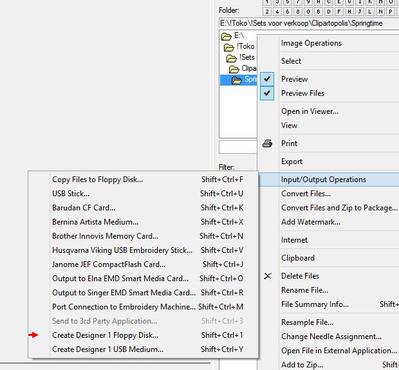
But you don't have to use such expensive software, Embird lets you do the same, in two steps - first format a diskette, then send designs to it. This is what Embird says:
Create Designer 1 Floppy Disk Use this command to write selected designs to blank formatted floppy disk. This will automatically convert the designs to .SHV format and create all folders and files required be Designer 1 embroidery machine. Before you start using floppy disks written in Embird with Designer 1 machine, make sure that the machine has the latest firmware. If not, download and install the update from http://www.husqvarnaviking.com/us/3190_6597.htm
Hope this helps.
But you don't have to use such expensive software, Embird lets you do the same, in two steps - first format a diskette, then send designs to it. This is what Embird says:
Create Designer 1 Floppy Disk Use this command to write selected designs to blank formatted floppy disk. This will automatically convert the designs to .SHV format and create all folders and files required be Designer 1 embroidery machine. Before you start using floppy disks written in Embird with Designer 1 machine, make sure that the machine has the latest firmware. If not, download and install the update from http://www.husqvarnaviking.com/us/3190_6597.htm
Hope this helps.
66927✽
by
graceandham
17 Mar 2016
+2✽
I see you have an expert answer already. Welcome to Cute and I gave you a flower.
6257✽
by
kathymourie
17 Mar 2016
+2✽
Welcome!!! The ladies in the group are the best. Very smart and will always help.
Kathy
Kathy
318615✽
by
dragonflyer
18 Mar 2016
0✽
Hi Cris and Big Welcome to Cute....you will always find someone here to help you with anything...and I see you already have the answer you needed...I also suggest you check out the Q&A tab which is up near the top of your screen...it has lots of helpful information to help you navigate and understand the site and it's capabilities...also, if you haven't already done so, please take time to read the Terms & Conditions of this site so you understand fully what our responsibility is to participate here...the link is at the very bottom in blue...TERMS & CONDITIONS...again, Big Welcome!