








20088✽
I am so frustrated!!!! I have been trying for weeks to get a farm name in an arch layout on my Diamond and it is not working!! I called the shop and he "talked" me thru it......I am about to give up. The book is so incomplete when it comes to this and some other steps.
Comments (9)
20088✽
I am trying to "curve" the farm name to stitch out over the cow head that Vicki digitized for me........................................UGH!!!!!!!!!!!!!!!!
2 comments
Maybe Vicki could help
I don't need a farm curved just the words of the farm name. ex. Boston redsox

145307✽
What program do you use to do the lettering? Or do you do it on the Diamond itself?
2 comments
I do it on the Diamond itself.
My Ruby does not have that feature, so I'm afraid I can't help. I use the arc/bridge in my software.
29726✽
Have you looked for a You Tube demo of how to do it?
I have found some helpful ones on this I have tried to do.
If I had a laptop I would take it to the shop and say "Show me how"
I have found some helpful ones on this I have tried to do.
If I had a laptop I would take it to the shop and say "Show me how"
1 comment
I looked on You Tube and didn't find anything that was of this nature. I am going to probably go to the shop and have him put it on my usb stick!
19✽
Have you used the arc feature of your software? You may have to adjust the arc a few times to get the right effect.
1 comment
Tried! It really doesn't arc....it's a circle that you have to tweak and I can't get it tweaked just right!
8230✽
You have me intrigued so when I get through here I will go up to my Diamond and see if I can figure it out. I usually use my software and it is quite easy to get a nice arch. I agree that the manual is of little help,
1 comment
I went back to the quilt shop again this a.m. and had the owner sit down and demo.....but he used an Epic. I am going to try again this p.m. and if not, well, one of the ladies is bringing her "dongle" on Friday and will do it for me! I am so frustrated and near tears over all this!

234567✽
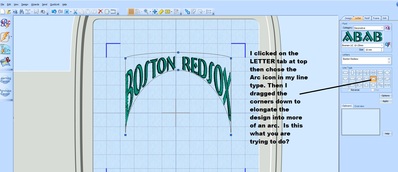
Hi Tonya, I have a Husqvarna Designer 1 and I'm sure the Diamond will have this too. I just went to the letter tab in my 5D programme and chose the first alphabet that came up for an example with the words you wrote. I then clicked on the Arch design and went from there, just elongating the design to an arch. I am not sure if this is what you want to do or not. If not, I'm sure there is a way and rachap will find it on her Diamond. Love Chris
2 comments

One thing I finally learned about this arch style...if you want it to be a large arch, like shown here, you have to use your cursor to "pull down" one of the corners! Then you can make it as curved as you want. So play with it some.
Yes, that's what I did, I just elongated the corners! Love Chris

122866✽
Hi Tonya, if you would care to send me the design you want the lettering added to I will do it for you.
Just PM me so I can give you my email address. I am sitting here doing nothing and bored to tears with television.
Of course you could ask Vicki first but if she is too busy I am sure she won't mind me helping out as we have been friends a very long time.
hugs n roses, Meganne
Just PM me so I can give you my email address. I am sitting here doing nothing and bored to tears with television.
Of course you could ask Vicki first but if she is too busy I am sure she won't mind me helping out as we have been friends a very long time.
hugs n roses, Meganne
133✽
I have a SewWhat program and I know that you can get a trial one, too. Anyway, I can go to an icon that lets me put an arch of letters on any pattern.
8230✽
Sorry I took so long to get back here-had a full day and then choir practice last night so this morning I had a go at it. i see you have offers to do this one for you but in case you want to do something in the future, here is what I figured out: I had to do one letter at a time but in the end it looked pretty good. 1.Select your font 2. type your first letter 3.When the letter appear on the screen go down to the bottom left and click your Position button-looks like a big plus sign 4. go to the right hand side and use your big Control Center button to move the letter to about where you will want it 4. Click your rotate button and again use the Control Center to move the letter into position 5. Go back to your font and select the 2nd letter , keep going until you have your design all set. Hope this helps.
4 comments
That is what I had tried too......
That's not what you a user-friendly process and even then it is only part of circlr, not a real arch. Doing it in (Husqvarna) software would be so much easier, as Chris showed.
I agree that with the software it is 1000% easier and faster and that is what I do but it appeared to me that she doesn't have software
Nope, I don't have software, just the machine and loads of designs! lol