










 255068✽
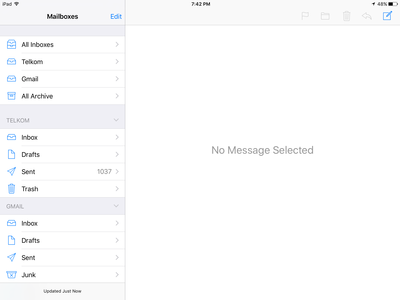
Just wondering if anyone can help me. Yesterday I DL the latest upgrade on my iPad. Many changes but I have found that it tells me that I have over 1000 'sent' e mails. There is no fact none. I would love to get rid of this message. Can anyone help??
Comments (5)
 158720✽
Type in Liar, liar, pants on fire and see if that makes it go away.
Just kidding, sorry I can't help, but someone will come along that's smarter than I to give you some aid. Hugs this morning (morning,for me)!
Just kidding, sorry I can't help, but someone will come along that's smarter than I to give you some aid. Hugs this morning (morning,for me)!
1 comment
Thank you Jerrilyn, afternoon for us.
 21044✽
by
carolpountney
12 Oct 2016
+2✽
I hope I got your question right if you go to apps then press my files on the left you will see all your records or downloads then press more which is normally at the top left then press edit, then press on what you want to delete then press delete I hope I have not confused you further
255068✽
Carol, thank you for trying to help me. I have taken this picture of what my sent email looks like. I am afraid that I could not get your suggestion to work.
2 comments
OK I see over 1000 emails on the top you see edit press on sent then edit OK you might have to do that the other way around depending on your ipad then after edit press delete that might help you have to see the emails before you can delete Hope this helps
Carol I have done that over and over again. Ther are actually no sent emails in the file
 10173✽
Have you looked in 'trash'? If the mails are actually there, then click edit upper right and delete bottom. An update once put over 10 months of mails back in my box...I had to delete them all again with the edit button ( that's what? Maybe 10 at a time? Have you done a shut down & restart or a hard reset?
2 comments
I would delete them one by one but they are not there. It is almost as if the reading is all the sent items since I have had my iPad. Very strange
Try a reset....hold "off" button at top and simultaneously the "home" button at the bottom for 10 seconds until the Apple appears. Hope this will do it. If not, there is an Apple support site you can search for answer.
318668✽
by
dragonflyer
12 Oct 2016
0✽
Gosh, Sarah...hope you solve your problem...sorry I can't help you...don't have Apple products....