
 17718✽
Help Please!!
I don't know what I have done to my Embird but suddenly all my designs I have on my desktop I have been working with are no longer showing but are all black. I have looked at my Iconizet setting and they all look ok. I haven't done anything to any of the setting to have caused this. Anyone have any ideas?
Comments (4)
 109974✽
by
crafter2243
06 Dec 2016
+5✽
Are you running windows 10 and was there a upgrade lately? They had once changed the property on me and it made all my files look as if they were corrupt.
 57675✽
Crafter2243 is right -- Windows 10 can mess with your preferences. Many other types of software (like Adobe) may also make changes.
1 comment
I would start at the link if you have not already tried it.
http://www.embird.net/sw/embird/tutorial/icontrbl/icontrbl.htm
http://www.embird.net/sw/embird/tutorial/icontrbl/icontrbl.htm
17718✽
by
scrappinhappie
08 Dec 2016
+5✽
Thank you I will give this tut a try. I am still running Windows 9 and have done nothing as far as updates or anything to have done this. I'll keep you posted.
 122866✽
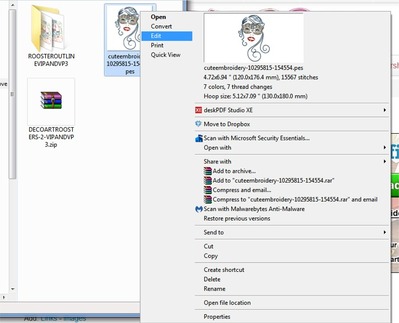
If you open your files in Explorer, choose any one of your designs and right click on it to show Properties (see pic 1)
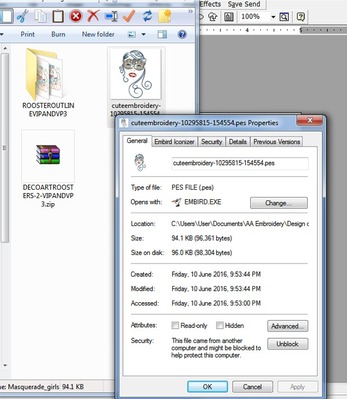
Click on Properties and see that it still displays that it opens with Embird, (see pic 02) If it doesn't, click on the "CHANGE" box and search for Embird.exe.
This MIGHT help.
hugs n roses, Meganne
Click on Properties and see that it still displays that it opens with Embird, (see pic 02) If it doesn't, click on the "CHANGE" box and search for Embird.exe.
This MIGHT help.
hugs n roses, Meganne