













25533✽
I have a question for you
I have a design with several colours. I want to remove all the stitch of one or two colors with my software (Studio 6D), and obtain the new design. Do you know how to do that? I think that the method is the same with any software.
Comments (4)

145307✽
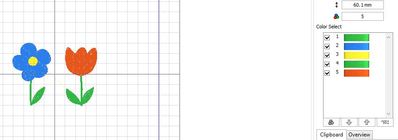
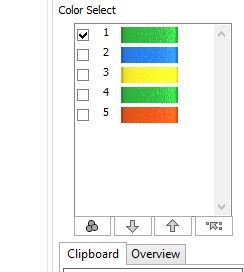
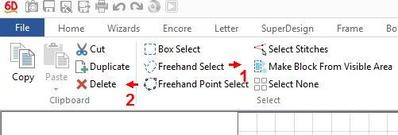
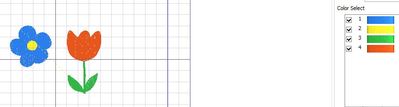
In 6D Embroidery click the edit tab. You see all colours at the right (see picture 1). Deselect the colours you want to keep by clicking at the check mark (picture 2) For demonstration purposes I want to remove the stalk and leaf from the blue flower. Now you choose "Make block from visible area" (number 1 in picture 3), then click "delete" (#2) and it is done (picture 4).
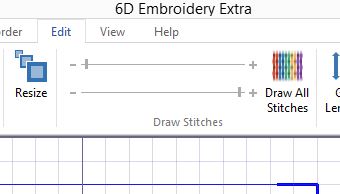
You can also use the slider in the top bar (picture 5) to isolate the colour but using the colour blocks is easier.
I have my 6D set to English but the place of the tools is the same in any language.
Success!
You can also use the slider in the top bar (picture 5) to isolate the colour but using the colour blocks is easier.
I have my 6D set to English but the place of the tools is the same in any language.
Success!

66927✽
by
graceandham
17 Jan 2017
+4✽
In Floriani Total Control Universe, highlight the color,.hit delete.
33641✽
You should be able to separatethe colors, then delete the one you don't want. I don't have Studio, but most software will have that function. You might be able to find it in the help files.
25533✽
by
claudenicolas
17 Jan 2017
+3✽
Thank, dear mops
I have suceed, before, I had not undesrstant that i had to click on the colours that I wanted to keep.
Hugs from claude
I have suceed, before, I had not undesrstant that i had to click on the colours that I wanted to keep.
Hugs from claude
1 comment
Glad it worked! My French just is not good enough but I thought the pictures would help.