







 12249✽
With the jumping marks I managed. :) But the first and last stitch from / to the middle I do not take away. What can I do here?
Can you help me again?
I am so happy. Now I have to make it exactly on the line.
:) :) :)
Comments (5)
 66948✽
by
graceandham
15 May 2017
+4✽
Congratulations. And, by the way, your English is very clear! My German has fallen into disuse!
1 comment
Thank you :)
 360672✽
 85867✽
 20463✽
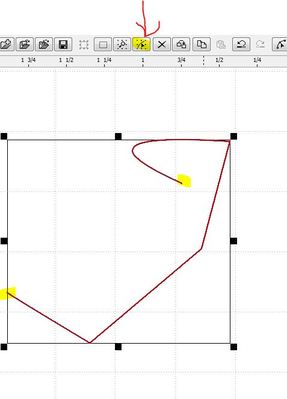
I have no idea if this is an elegant solusion... Vielleich ist das keine elegante Lösung. Wenn du das Symbol hast und das Objekt markiert ist kannst du die Punkte anfassen, festhalten und verschieben.
 145309✽
Verzeihung bitte, habe das erst jetzt gesehen.
In Editor/Optionen sehe ob "Sprungstich zum ersten Stich hinfügen" und
"Stich zurück zum Ursprung hinfügen" ausgeschaltet sind.
Make sure that in Editor/Options "Add jump to first stitch"and "Add back to origin stitch" have been unchecked. Default they are checked.
In Editor/Optionen sehe ob "Sprungstich zum ersten Stich hinfügen" und
"Stich zurück zum Ursprung hinfügen" ausgeschaltet sind.
Make sure that in Editor/Options "Add jump to first stitch"and "Add back to origin stitch" have been unchecked. Default they are checked.
1 comment
Thank you :)