













57324✽
Help me, please.
I updated to Embird2017,
then Iconizer isn't showing my design icons properly.
My Iconizer number is registered and tried Iconizer setting again and again.
But no hope now.
I am so sad.
I was so upset,
I uninstalled Embird2017 and reinstall 2016.
Now it's OK.
Thank you.
Comments (6)

57675✽
Embird default settings (when you install it) take possession of all embroidery files. That removes them from all other programs. I am not where I can look it up, but I think if you install Embird 2017 and then re-install Iconizer, you can get them to work together. I know both companies have really good support. Maybe another Cutie that experienced this will come along to help.
1 comment
Thank you!
I tried but 2016 is working good now.
Cuies are kind and helpful.
Thank you.
I tried but 2016 is working good now.
Cuies are kind and helpful.
Thank you.
318643✽
by
dragonflyer
24 Aug 2017
+7✽
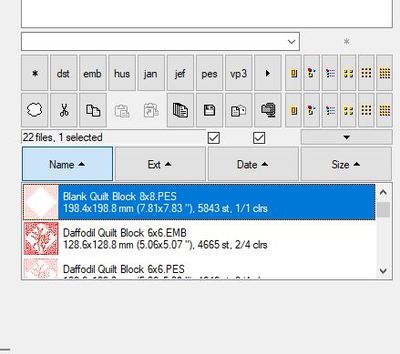
In Basic Embird, there are two little boxes on the right side in the middle, just below the format file list boxes...if both of these squares are not checked with a check mark, you will not see images of your designs...
6 comments
Thank you for helping another Cutie. I am very glad you did. I knew someone would know the answer.
Thank you for your help.
Cuties are the best.
Cuties are the best.
Were you able to reload Embird 2017 and have your Iconizer work properly? If not PM me and I will try to help further...
Thank you,
I reloaded Embird2016 and works fine now,
Maybe update to 2017 later later someday.
I am chicken.
I reloaded Embird2016 and works fine now,
Maybe update to 2017 later later someday.
I am chicken.
Just remember those two boxes both need to have check marks in them in order for Iconizer to work properly...
Yes, thank you.
I will.
I will.

76409✽
I am having the same problem and using windows 7
1 comment
Oh you too, mine is windows10-64bit.

6279✽
Thank you Dragonflyer! I was having the same issue with the 2017 update and you have solved my dilemma. Hugs, Barba
2 comments
Cuties are helpful and very kind, are they?
They make us happy!
They make us happy!
Sweet...glad it helped you solve your problem...
76409✽
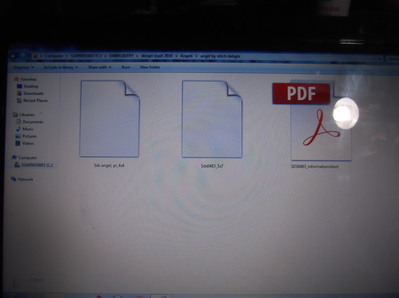
I cannot get a pic of design when I open a file When I click on the blank pic it opens Embird and I can see pic but they did before the upgrade
1 comment
I think you can send PM to Dragonflyer for help.
318643✽
by
dragonflyer
27 Aug 2017
+3✽
raels011...not sure if this is your problem, but you need to have check marks in the TWO BOXES right above the "Date" box......here is a picture to help you see what I am referring to...if these two boxes are not checked, you will not see the pictures of your files...Also, after you check them, to the "Options" tab and run the Iconizer settings again...Hope this helps...I have had no problems with Basic Embird Ver. 10.25 which is the latest version... and I am running Windows 10...
2 comments
Thanks but All that does for me is make the box with the icons half the size and puts a pic underneath
Hmm...I notice you are not seeing the Adobe PDF view either...this looks more like a Window setting not an Embird setting...You might need to look at your View settings...Not sure...