












 7✽
7✽
I have a Janome with several sizes in hoops. My format is Jef. My largest hoop is 5x7. The design I bought is 3.86 x 6.46. It will not fit to actually place it in a file to embroider. I have reduced by 75% and the design gets smaller but has not been formatted correctly to help with this problem. It stays in the same place on the screen which is outside the lines of acceptence. I can only move certain things. Any suggestions. Theresa
Comments (5)
 57675✽
Welcome to Cute!
It is possible that the design was corrupted when it traveled through the internet.
Have you tried re-downloading it?
Which Cute design are you talking about?
We would love to help you with any design from this website.
It is possible that the design was corrupted when it traveled through the internet.
Have you tried re-downloading it?
Which Cute design are you talking about?
We would love to help you with any design from this website.
2 comments
It is design Id: #10423495
Yes I have tried reloading it several times.
Yes I have tried reloading it several times.
It continues to tell me that it exceeds the hoop limit. I have a 5x7. This should fit.
 145309✽
I don't understand when you say it won't fit in a file to embroider. Given the format is right, jef in your case, the files can be used straight away, you don't have to put them in your software first, unless you want to add some lettering.
2 comments
You are correct but it will not let me write it directly onto my card either. It says it exceeds the hoop limit. My hoop is 5x7 and the size of the design is 3.86 x 6.46. Even reducing does not help.
It could just be the orientation of the hoop so you might try rotating the design 90 degrees
145309✽
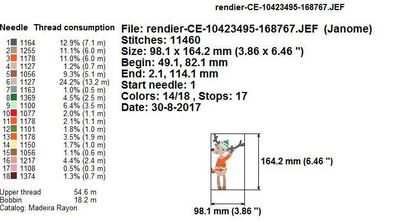
I had to rotate the design or rotate the hoop (depending on the embroidery software I tried it in, Embird and 6D respectively) to get it to fit in either the 100x170 or the 130x180 (5x7") hoop - here's part of the info sheet I got in Embird after rotating.
I could also load and rotate in my machine, but that is mainly because the maximum sewing field is wider than the design in the horizontal position.
I hope you can rotate in your s.w. and stitch it out!
I could also load and rotate in my machine, but that is mainly because the maximum sewing field is wider than the design in the horizontal position.
I hope you can rotate in your s.w. and stitch it out!
2 comments
I can rotate in my machine and once it is in a file on the computer I can rotate. But to actually save directly to the card or a file rotation is not available for me just reduction. Thank you so much for your time and effort. It is greatly appreciated.
Thank you for adding this information. It will help with a solution. The owner has been notified.
 109974✽
by
crafter2243
01 Sep 2017
+1✽
One more idea since it happened to me before. I could not get it on the card because (MY first brother machine) I had the smaller frame size listed in the computer program. By any chance do you have with your machine a smaller hoop? That might be the reason.
66947✽
by
graceandham
10 Sep 2017
+1✽
I'm hoping everyone else helped you solve your problem. I'll just add my two cents worth, in case. I've noticed that with my Janome, if the design is not exactly centered, sometimes it will say it exceeds the hoop. So, try centering it in your design program - left to right and top to bottom. Aren't the Janomes a great machine?
1 comment
I agree!