













33641✽
I hope this is not a too technical question, but how does pull compensation work? When I look at a design is there a way to tell the difference between whether or not pull compensation cause the problem vs stablizer issues?
Today's free design

A free embroidery design every day
Cute Embroidery gives away one design every day, and the community votes for tomorrow's.
Comments (3)

145308✽
Pull compensation (p.c.) is added in the digitising stage, in increments of a tenth of a mm.
In an existing embroidery design the computer generated picture of the design might show the outline being a tiny bit inside the fill stitches.
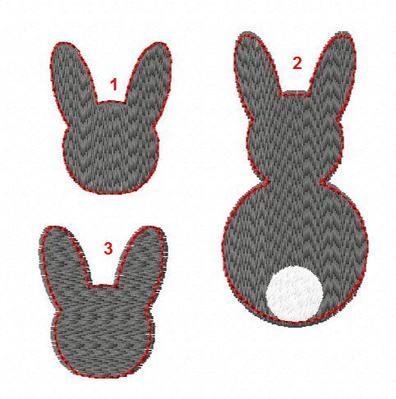
I digitised an example. For demonstration I set the p.c. very high at 1 mm, usually I don't go higher than 0.3 mm. As you can see the compensation is added only in the stitch direction.
1 - no compensation;
2 - with compensation;
3 - with compensation, different stitch direction.
Adding p.c. to an embroidery design can be done in Embird Basic, but as far as I know it can't be done in 6D. So have a look at any customising software you might have.
In an existing embroidery design the computer generated picture of the design might show the outline being a tiny bit inside the fill stitches.
I digitised an example. For demonstration I set the p.c. very high at 1 mm, usually I don't go higher than 0.3 mm. As you can see the compensation is added only in the stitch direction.
1 - no compensation;
2 - with compensation;
3 - with compensation, different stitch direction.
Adding p.c. to an embroidery design can be done in Embird Basic, but as far as I know it can't be done in 6D. So have a look at any customising software you might have.
4 comments
Thanks! A picture is worth a thousand words!
Thank you
Ok. Is #1 with compensation and #2 without? Or is my monitor playing games with my eyes?
as I wrote above #1 is without, #2 with compensation - see the top of the ears.
318659✽
by
dragonflyer
02 Apr 2018
+4✽
Here is some information on Push and Pull compensation...
https://www.impressionsmagazine.com/embroidery/design-digitizing/how-to-work-with-push-pull-compensation/
https://www.wilcom.com/Hatch/Blog/TabId/3573/ArtMID/8936/ArticleID/234/What-You-Need-to-Know-About-Pull-Compensation.aspx
https://www.youtube.com/watch?v=G1rQ1XWNCks
https://www.impressionsmagazine.com/embroidery/design-digitizing/how-to-work-with-push-pull-compensation/
https://www.wilcom.com/Hatch/Blog/TabId/3573/ArtMID/8936/ArticleID/234/What-You-Need-to-Know-About-Pull-Compensation.aspx
https://www.youtube.com/watch?v=G1rQ1XWNCks
4 comments
If you understand Push and Pull compensation, you can look at a design in digitizing software and see if the digitizer of the design has allowed for push and/or pull. If they have not, the design can usually be edited to add them where necessary. This would not generally be something that you could add or adjust in your embroidery machine.
The Wilcom one is very informative. Thanks.
Thanks! Those links were helpful.
Thank you
9760✽