
59631✽
My Quatro 3 came with its own hoops. I have other hoops I have purchased for it. But my sewing machine doesn't recognize them. I end up having to use one of the original hoops, even though they are too large. Does anyone know how to get my machine to recognize the other sized hoops? Thank you for reading this, and helping me if you can. Jan
Comments (8)

14637✽
by
kustomkuddle
02 May 2018
+5✽
Someone on here should be able to help. Good luck.
1 comment
Thank you :-)
33641✽
Machines only recognize hoops made for it. Were the hoops you purchased made specifically for the Quartro 3?
1 comment
They were....
1931✽
Is your design smaller than the 4x4 hoop? Brother sells the sock type that is 2 inches. Otherwise the hoops that came with the machine are specific to that machine. I have a Brother 4000D and it will not take the 6x6 hoop that came with the Quattro 1. It's a shame but we will probably see this trend from now on. But you could try sending the other hoops back; even if you have to pay a fee you will still get something back. Good luck.
1 comment
I've had the hoops for over a year. I'll get it to work, even if I have to show up on the Brother's door!

57675✽
Isn't there as update feature on your machine that allows adding hoops? I'm not at my desk, but I would think there would be instructions on how to do that in your Manuel or online.
2 comments
I was thinking, too, that there might be an update that allows for these other sizes. That would be a question for your machine brand's rep.
You are making some good points. I'll check my owner's manual! Thanks

234507✽
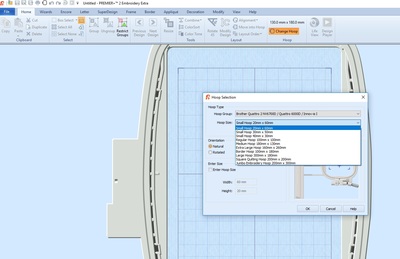
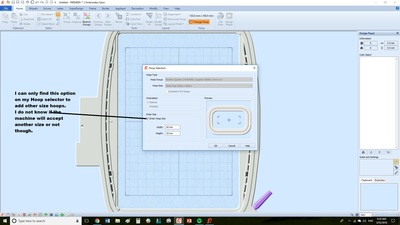
Hi Jan, I don't know the Quattro 3, but I've just had a look at my Quattro 2 and have only found this option. Maybe check online with Brother to see if you can add extra hoops. I purchased a generic hoop that was supposed to work - but the machine won't recognise that either! Love Chris
3 comments
Brother seems to like the propriety items. The pictures help a lot. That took some of your precious time.
Thank you for the help.
Thank you for the help.
I didn't know there was a hoop selecter.
No worries Jan, I just put in a made up number in my HOOP SELECTOR and it went in no trouble. Make sure to uncheck the Hoop box though when going back to your normal hoops. Love Chris

109774✽
by
crafter2243
02 May 2018
+3✽
I am pretty sure they have to be the same size in order to work.
1 comment
Thank You
11271✽
What size hoops did you order and are they generic or brother branded?
1 comment
They are Brother hoops, from their distributer. I'm wasting too much stabilizer having to use the larger hoops.
Thanks
Thanks
3568✽
by
crazystitcher
03 May 2018
+4✽
Hi Jan,
1. My first suggestion is that you check on the Brother web site under the support section for this machine for any machine software updates that might allow for additional sized hoops. If there is one, you will usually need to download it to an empty USB stick and then follow instructions either from the web site or in your owner's manual to perform the upgrade.
2. My second suggestion, only if there are no helpful machine software updates available, is a workaround I use, just from my own experience with my Quattro 2.
I bought some magnetic hoops 5'' X 7" a while back that were made for Quattro 2 - they fit into the machine ok so they are useable but, in spite of all available updates being installed, the machine's built-in software only recognises them as standard larger 8' hoops, so, after choosing the 7"X 5" hoop in my separate design software on my computer to make sure the design fits that hoop, I set up my project in the 7" by 5" hoop on the machine and select the 8" hoop in the hoop options on my machine, then still have to be careful to do an outline trace first before stitching to make sure design is centred and the embroidery foot is not likely to hit the hoop at any stage of stitching.
Wish you well with getting lots of use and fun from your new Quattro 3.
1. My first suggestion is that you check on the Brother web site under the support section for this machine for any machine software updates that might allow for additional sized hoops. If there is one, you will usually need to download it to an empty USB stick and then follow instructions either from the web site or in your owner's manual to perform the upgrade.
2. My second suggestion, only if there are no helpful machine software updates available, is a workaround I use, just from my own experience with my Quattro 2.
I bought some magnetic hoops 5'' X 7" a while back that were made for Quattro 2 - they fit into the machine ok so they are useable but, in spite of all available updates being installed, the machine's built-in software only recognises them as standard larger 8' hoops, so, after choosing the 7"X 5" hoop in my separate design software on my computer to make sure the design fits that hoop, I set up my project in the 7" by 5" hoop on the machine and select the 8" hoop in the hoop options on my machine, then still have to be careful to do an outline trace first before stitching to make sure design is centred and the embroidery foot is not likely to hit the hoop at any stage of stitching.
Wish you well with getting lots of use and fun from your new Quattro 3.
1 comment
Thank you for the suggestions. I'll go to the site, I have some blank USB thumb drives.