













505✽
I would like to learn to digitize, got the Embird software for years but never got around to digitize with full time working now since am going to stop working soon I would love to learn to digitize. I got lessons for Embird from Kathy that I bought long ago but I would like to learn how the 'magic wand' work as I try to use it to make outlines for quilts but it seems to be a mess never tried embroidering it ... I would like to know how I get the stitches to not have that many jumps and at least follow each other.. any ideas where I can buy a lesson to teach me that?
Today's free design

A free embroidery design every day
Cute Embroidery gives away one design every day, and the community votes for tomorrow's.
Comments (1)

145308✽
The tutorials Embird offers deal mostly with the fill and column parts of the magic wand and are meant for their latest update (2018 - I still use 2017). I would never use it for outlines/quilt patterns.
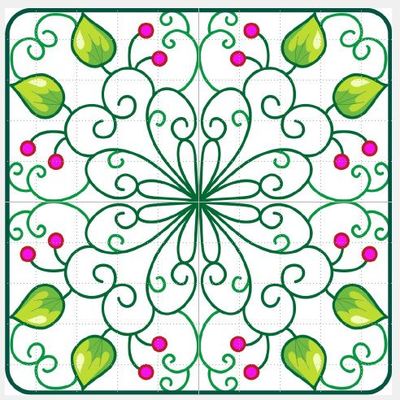
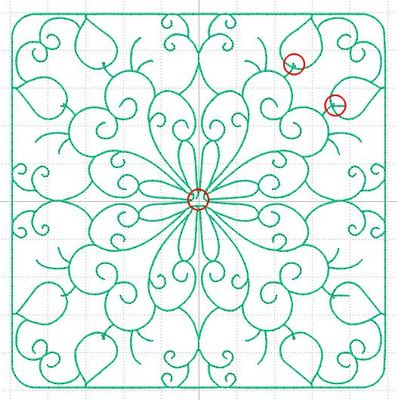
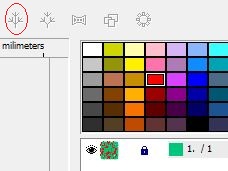
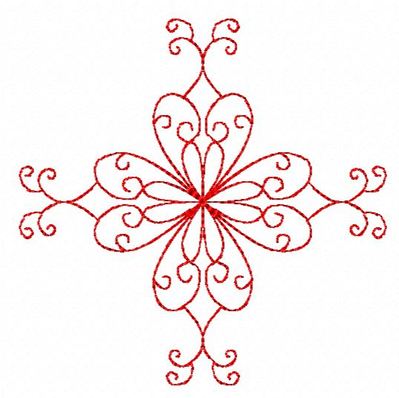
But I used an old Clipartoon design -pict 1- and tried out the magic wand on it. The result is reasonable but far from perfect especially in the centre - see pict 2. It has 296 different pieces which can be combined to a double stitching line by using the 'tree' icon -pic 3 so it then stitches in one continuous line.But the ugly centre would have to be corrected first and that involves quite a few lines!
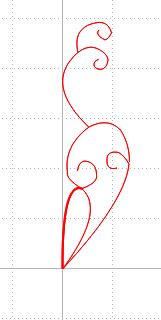
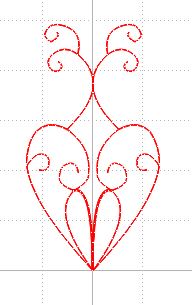
It is quite easy to digitise it manually. It did only a part to demonstrate - see pict 4. I made one line as long as possible, making sure there are square nodes at every crossroad. Then did several shorter branches.
I used the tree icon to Combine the parts, then Copy, Paste, Mirror horizontally - pict 5 - and finally used Auto-rotate 4 times in circle followed by Transform, Snap to previous object.
Finished.
It takes longer to type the explanation then to digitise.
The animation shows the stitch order.
But I used an old Clipartoon design -pict 1- and tried out the magic wand on it. The result is reasonable but far from perfect especially in the centre - see pict 2. It has 296 different pieces which can be combined to a double stitching line by using the 'tree' icon -pic 3 so it then stitches in one continuous line.But the ugly centre would have to be corrected first and that involves quite a few lines!
It is quite easy to digitise it manually. It did only a part to demonstrate - see pict 4. I made one line as long as possible, making sure there are square nodes at every crossroad. Then did several shorter branches.
I used the tree icon to Combine the parts, then Copy, Paste, Mirror horizontally - pict 5 - and finally used Auto-rotate 4 times in circle followed by Transform, Snap to previous object.
Finished.
It takes longer to type the explanation then to digitise.
The animation shows the stitch order.

7 comments

Thank you for taking the trouble to post this comprehensive answer. It has shown me just how much I have still to learn!
Love the animation!
Love the animation!
The animation is done in Manager. Right Click on the embroidery file and play a bit with the parameters in the pop-up menu. I set the size a bit larger (300 instead of 200) and the animation sequence lower (50 in this case but I think 25 would even be better with a redwork design)). And it always is so nice to see.
Thanks. I can only see the sew simulator which I use a lot. How do I save the animation?
Select the embroidery design in the list. Now either choose Export, then Export Animated Image or choose Alt+B. In both cases you get the pop-up menu to set some parameters, click OK and a new 'Save as' menu let you save the animation as a gif-file.
Thanks you very much for your explanation... much appreciated. It seems I will have to learn to manually digitize as it will give the results am looking for. I got the cd's and started on listening to them and applying what I learn. For now I just learn to digitize as am not retired yet will be retire soon ... am a system engineer and dont want to sit at home not keeping busy and digitizing sound like the ideal thing to keep me busy. I will surely read through your mail and get myself acquainted to more information on how to digitize manually
You dont perhaps got a course on CD or online that you sell? I looked for a course near me that I can go and learn digitizing but nothing nearby so online or CD is the way to go ... I got the Embird digitizing software newest version will just have to start doing it in my free time.. thank you very much again for sharing your knowledge
I am not near by, unless you happen to live in the Netherlands. But I have made tutorials on the different tools etc. Just send me a PM when you need specific information and I'll be glad to help.