
 360✽
360✽
Rookie here. Can anyone tell me how to change the background color in My Editor? It is set to black. Thanks.
Comments (3)
 57675✽
If I remember right
Find the color wheel -- top left.
The screen splits but shows the colors.
Select the color you want.
Select OK
Find the color wheel -- top left.
The screen splits but shows the colors.
Select the color you want.
Select OK
1 comment

Great, I didn't know that
Thanks !
Thanks !
 66947✽
 10173✽
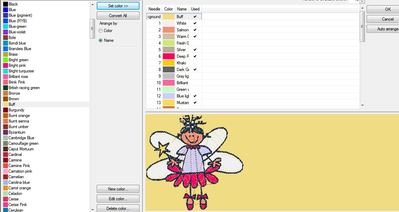
Open 'color mgr' (the color globe)
click the <back color at R top
Choose your desired bground color from list on L
Click "set color" at top L
Then "OK" top R.
Silver is a good bground color for me.
(the design is mine)
click the <back color at R top
Choose your desired bground color from list on L
Click "set color" at top L
Then "OK" top R.
Silver is a good bground color for me.
(the design is mine)