











173695✽
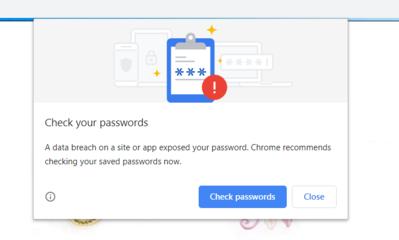
I have been receiving message from a pop up in chrome that states my password may have been breached and to change it. I confirmed this is a real message and the technology was rolled put last October. If you receive this message it would be a good idea to change your password.
Today's free design

A free embroidery design every day
Cute Embroidery gives away one design every day, and the community votes for tomorrow's.
Comments (4)

8230✽
I learned the hard way and early on to never click on any link in a message like that which I receive. There are so many clever spammers and phifshers who use "look like" legitimate logos,name sites,etc that it would be safer to go to the site yourself and change your password through them.
1 comment
I do not think I clicked on anything, however it is better to be safe than sorry.

109935✽
by
crafter2243
27 Dec 2019
+5✽
rachap is correct. Do not click on the popup. Go to the site itself and change the password. Better save then sorry. I received them as well and that is what I do.
1 comment
I am not sure how this happened, however I will do as recommended here.

57675✽
I've never heard of a popup like that being legitimate. Do you have the extension that is supposed to look for your information in any data breeches?
Your computer has probably been breached. If you do any banking online, you need to go to the bank in person and change your password.
Always contact the entity directly for any password changes. Change all/any passwords every 6 months or more often to be safe. The password here is an exception as there in no personally identifiable information. If your account needs a password change, just follow the instructions in the Q&A.
Your computer has probably been breached. If you do any banking online, you need to go to the bank in person and change your password.
Always contact the entity directly for any password changes. Change all/any passwords every 6 months or more often to be safe. The password here is an exception as there in no personally identifiable information. If your account needs a password change, just follow the instructions in the Q&A.
1 comment
I will do as you suggested and go to the bank and change my password there. At first I thought it was malware that popped up, then after checking I believe it to be technology installed in chrome last year.
57675✽
It is being used by Chrome and Firefox. It is supposed to have the ability to turn it off but that isn't available now.
It really isn't very informative and should have been added with information about it, but that didn't happen.
Basically, if it pops up as you sign into a website it will either mention that website specifically as one that was compromised or just the log in information. They recommend you change just the combination of that log in user name and password on any websites where you use them. If you use the same one for many websites, you will need to change for all those websites as the pop up does not list compromised websites.
It is midnight my time, so I am off to sleep... I hope the information here is not too confusing. I added a picture so you can see what it looks like.
It really isn't very informative and should have been added with information about it, but that didn't happen.
Basically, if it pops up as you sign into a website it will either mention that website specifically as one that was compromised or just the log in information. They recommend you change just the combination of that log in user name and password on any websites where you use them. If you use the same one for many websites, you will need to change for all those websites as the pop up does not list compromised websites.
It is midnight my time, so I am off to sleep... I hope the information here is not too confusing. I added a picture so you can see what it looks like.
1 comment
I am getting them on nearly EVERY ONE of them. Pain in the ars