








22✽
Hi to all of you, I have an issue here when I run the iconizer from Embird: the names of folders and subfolders are now unreadable because they are now very very small. I don't know how to fix this. Do you have suggestions? Any idea is welcome.
1 images:
[1]

Comments (4)
45918✽
Welcome! Sorry I can't help but one of our tech savvy people will be able to help, be patient we are situated all over the world so some might be still sleeping. Marian

234573✽
One suggestion is to hold down the CONTROL key near the bottom left hand side of the keypad and if you have a roller ball mouse move that forward till it's a bigger size.
"Rescuer" is very good with computers and when she is awake may be able to help you.
Meg is also good with Embird, and she may be able to help. Love Chris
"Rescuer" is very good with computers and when she is awake may be able to help you.
Meg is also good with Embird, and she may be able to help. Love Chris

145307✽
I have Embird 2017, but I think it works the same in newer ones.
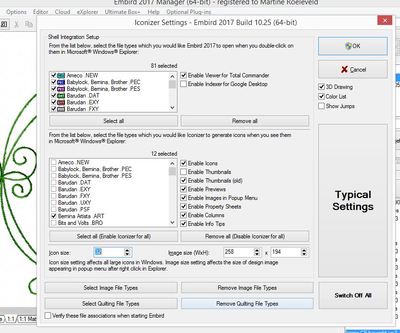
Go to Manager and choose Options. That opens a menu - choose Iconiser settings. That opens a new panel - see picture
Near the bottom you can choose the size of your icon - I have mine set at 32 (the blue figure). Try the size you want it to be.
Good luck.
Go to Manager and choose Options. That opens a menu - choose Iconiser settings. That opens a new panel - see picture
Near the bottom you can choose the size of your icon - I have mine set at 32 (the blue figure). Try the size you want it to be.
Good luck.
1 comment
Wow, that looks fabulous Martine. I know Meg has shown me from time to time all the things that the digitising programmes can do and I'm happy to say - I'm glad there are people out there like you, Kim, Vicki who can do it! Love Chris

6279✽
This has been an issue for quite a while. I also had my text so small it was unreadable. I believe I had to disable iconizer and then reboot my computer. Rescuer posted this link that helped me. Hope you get it fixed. Hugs and blessings, Barba
1 links:
[1]
http://www.cuteembroidery.com/10653886_hello-updating-embird-version-problems.html
www.cuteembroidery.com