













11860✽
I purchased a couple more designs from Kreative Kiwi and one of the projects has a decorative stitch that looks like it would be perfect on a crazy quilt. The stitch was used on the spine of a notebok cover and a gift card holder. I'd love to use that stitch on another project, but I don't know if: a) is that ok to do? and b) how do I do it? The stitch isn't one of my built-in stitches on my Brother. Thanks.
1 images:
[1]

Comments (6)

145307✽
Just isolating part of the design would not help you do anything other than stitching it out in the shape it is in.
The stitch looks very much like a standard line-design in Embird. - see picture. If you have that software you can use it for any shape of line.
In Husqvarna software (as in Embird) you can draw your own shapes for a line-design.
The Husqvarna software (I only have the older 5D and 6D versions) let you export such a self-made stitch to a Husqvarna sewing/embroidery machine as an optional stitch to be used in the sewing mode. I have done that for Christmas as well as Easter to beI used as a decorative stitch on placemats.
I do not use Brother software, but I would be very surprised if they did not offer the same feature for their Brother machines.
However, in all those cases you need the digitising part of the embroidery software.
The stitch looks very much like a standard line-design in Embird. - see picture. If you have that software you can use it for any shape of line.
In Husqvarna software (as in Embird) you can draw your own shapes for a line-design.
The Husqvarna software (I only have the older 5D and 6D versions) let you export such a self-made stitch to a Husqvarna sewing/embroidery machine as an optional stitch to be used in the sewing mode. I have done that for Christmas as well as Easter to beI used as a decorative stitch on placemats.
I do not use Brother software, but I would be very surprised if they did not offer the same feature for their Brother machines.
However, in all those cases you need the digitising part of the embroidery software.
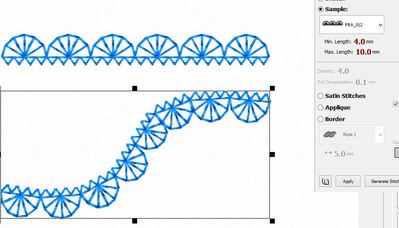
2 comments
Thank you. That helps very much. I have PE Design Next but I’ve never done a new stitch. I will work on that.

It is a pretty stitch. I have older Brother machines and mine doesn’t have this stitch either. This would be great stitch to use on top of crazy patch blocks.

1213✽
contact Heather at KK she is VERY helpful.
Cheers
Hilda
Cheers
Hilda
1 comment
Thank you. I’ll try to do that. I didn’t see an email address to contact but I may just have overlooked it.

59631✽
by
hightechgrammy
12 Feb 2020
+2✽
That IS really pretty. If you figure out how to do that, would you please let us know? Thanks. What is this?
318642✽
by
dragonflyer
12 Feb 2020
+1✽
I believe you could select one motif from this pattern and then use the Programmable Stitch Creator that is in Palette Next to make this one element a Motif that can be used just like any other built in Motif in Palette...That would allow you to create any shape and either have it used as a single line element or a motif fill design.
2 comments
I will need to study my manual to figure this out. Thanks!
Try the on line manual.
318642✽
by
dragonflyer
17 Feb 2020
0✽
Here is a YouTube Video for using the Programmable Stitch Creator....
https://www.youtube.com/watch?v=bK7HCZUUxZc
https://www.youtube.com/watch?v=bK7HCZUUxZc

57675✽
Please be sure to get permission from Kreative Kiwi Embroidery before you modify or replicate one of their designs.
They are nice people, they may offer to do what you need done.
They are nice people, they may offer to do what you need done.
1 comment
Contact them from your emails. You should be able to reply to them. They do have a "help" email address.