








360672✽
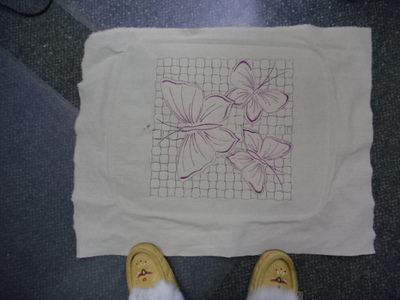
I got for C/mas The Frame for my Husqvarna Designer Epic called Majestic hoop.I can understand how to sew there designs off the sewing machine BUT how do i sew mine?I keep getting the message Please remove design.A color block had been placed on both hoop sides of the turnable hoop .Anyone know how to help me?Thanks Carolyn I did it My first Try :):)
2 images:
[1]
[2]

Comments (8)

8230✽
I'll be watching and hope someone has the answer. I have that huge hoop and have never used it as we moved cross country and now don't have a close by dealer. I do remember there was something about splitting designs---maybe in the 6D software ???
2 comments
Thanks
It may be like my original Plus Hoop on my old Husqvarna where I had 3 sections and you stitched each section, then stopped and moved the mechanism to next block and so on to 3rd block. You can merge designs but you have certain perimeters you had to stay within. On 'File' you had to click on Merge to bring up your next design and when you were happy with the results you had a button to click on that was for combining the whole design BUT you must move the hoop mechanism to each postition--they labeled them P1 [top section] P2 [middle section] and P3 [last and bottom section] to be able to stitch out a larger design. I hope this helps.
29726✽
I can't help with instructions but did find a lot of You Tube tutorials on the Magestic Hoop hope it helps.
1 comment
yes i listened but no help

234573✽
Hi Carolyn, I just had a look at a tutorial on Youtube and they showed that you turn the hoop after stitching a section, as there are connections to your embroidery arm on both sides. Maybe have a look at them as Barbara mentioned in her post below. Love Chris
1 comment
i have listened to many and they are helpful but DONOT explain what i need to know .

158720✽
If you are on Facebook, go search for Husqvarna Designer Eric groups and ask them, since you haven't gotten an answer here. I would think that they would be helpful.
1 comment
ok i will try that thanks

25212✽
by
killiecrankie
30 Dec 2020
+1✽
It has been awhile since I used this hoop.Basically one half of the design is sewn out at a time.When all the colour blocks for that side are sewn out , you undo the hoop , turn the hoop around so the other side can be embroidered.DO NOT unhoop the design.<br /><br />
I think the message <br /><br />,Please remove design A means that you undo the hoop from the machine ,turn it around & start sewing the other side probably design B .The colours for this side depending on the design could be exactly the same as for Design A..The design will be one large design when finished.
I think the message <br /><br />,Please remove design A means that you undo the hoop from the machine ,turn it around & start sewing the other side probably design B .The colours for this side depending on the design could be exactly the same as for Design A..The design will be one large design when finished.
1 comment
thanks i am trying one shortly
11927✽
I think what you are looking for is the design has to be compatible. This means you must have either purchased a design that is already split for this hoop, or you must take your design into software that has the capability to split the design for you. In HV software, you can choose to let the software decide how to split or you can manually split how you want, within the parameters of course. Not sure if other softwares have this ability. Hope this helps a bit. Hugs. Nan
1 comment
yes it does thanks
115784✽
by
asterixsew
30 Dec 2020
+1✽
Interesting. What is the size of the finished stitch out? Thanks for showing the stitched design
1 comment
13x13.5
29726✽
Looks like you are working it out pretty fast.
This looks perfect to me.
This looks perfect to me.
1 comment
thanks but it is not lined up 100% I will keep trying lol hugsxx