








255066✽
Hoping that some clever Cuties can help me.
I use a memory stick to transfer designs from PC to my embroidery machine.
Yesterday I decided to buy a new memory stick. Downloaded the designs, named the file, checked the designs were on the stick. When I went to use the stick my machine gave a message ‘Please insert memory stick’. This has happened before with 2 memory sticks my daughter gave me but I thought that might have been because they were old.
My machine is a Bernina Deco 340.
It is a total mystery to me.
Today's free design

A free embroidery design every day
Cute Embroidery gives away one design every day, and the community votes for tomorrow's.
Comments (18)

66927✽
by
graceandham
24 Feb 2021
+7✽
Some machine brands are touchy about which specific sticks they can read. Ask your Bernina dealer which brand and size of sticks you can use. If the stick memory is too large, this causes the machine to struggle. It is not a specific problem with Bernina, as I have had trouble with Janome.
13243✽
Some machines require the usb stick to be formatted in the machine before you place any designs on them.

145308✽
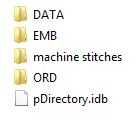
Can you look at the USB stick you used to use and see if there's a file you don't recognize. For my HV Ruby the stick needs to be formatted for the machine and that puts a .idb file on it and the ORD and EMB folders - see picture.
Designs are put in the EMB folder and everything else I want to save I put in a new folder, called data on this one. The machine only shows the EMB folder.
For my other machine that uses .jef that idb file is found in every folder, not in the menu.
Your user's manual should tell you how to format a USB stick that did not come with the machine.
Designs are put in the EMB folder and everything else I want to save I put in a new folder, called data on this one. The machine only shows the EMB folder.
For my other machine that uses .jef that idb file is found in every folder, not in the menu.
Your user's manual should tell you how to format a USB stick that did not come with the machine.
1 comment
Mops thank you for trying to help. The manual is useless. I have been on Google so much trying to get help. Nothing seems to help.

4453✽
if you put the designs in folders, the machine will not read it, or if too many designs, too big for the machine memory to read it all. Hope it helps
29726✽
Sounds like the memory stick may be too large. I remember years ago when I could only use a stick no bigger than 1gb if you tried using a 4gb if wouldn't work.
Or as someone said if it isn't in the emb file.
Or as someone said if it isn't in the emb file.
2887✽
by
BeckyAndersen
24 Feb 2021
+6✽
This happened to me too. I formatted the stick in the FAT format in my computer and was then able to use it. Also, make sure you didn't load zipped files. (Ask me how I know that doesn't work)
2 comments

That was my thoughts, it may have been in the wrong format. you will find the same problem with videos on USB sticks.
I didn’t know about the zip files, although I have never tried to load one. I will just have to try again. Thank you for your post.
20247✽
Many machines will not work with a datastick over 12GB, I prefer 8GB on brother, hope the info helps you.
2 comments
For my machines I use anything between 256 kB(!) and 8 Gb. I use subfolders to get faster access than when the machine has to load a large folder.
My Brother reads at least up to a 128 GB.... so that probably isn't the problem with Brother.....
5431✽
by
clintonmiss22
25 Feb 2021
+5✽
My Deco 340 doesn't care if I use a large memory stick, but as others said, it must be formatted to an emb folder that will hold your design. Hope you figure it out soon.

52047✽
I also have a Deco 340 and these machines will not read a Memory stick with a large capacity! Try using the smallest one that you can find & use that for just your Deco AND delete everything once you have completed your projects so that you have an empty stick for your next project!
You will find it will also open up quicker in your machine!
ALSO : your designs should be in a file named EMB when trf from your software to your stick - this file is automatically created by your software! IF NOT your Deco will NOT recognize/be able to read the designs!
You will find it will also open up quicker in your machine!
ALSO : your designs should be in a file named EMB when trf from your software to your stick - this file is automatically created by your software! IF NOT your Deco will NOT recognize/be able to read the designs!
1 comment
Thank you. Trying to buy a small memory stick these days is hopeless. I always delete the files after I have used them. The only stick I do not delete is my Pug Rescue one. My files on my memory sticks that work are called Emb/F5.
318660✽
by
dragonflyer
26 Feb 2021
+5✽
Sarah, did you get this sorted out and now are you able to use your memory sticks?

360672✽
I send all off the stick to an external hard drive then I can keep on using one usb stick No problem:):)
115807✽
by
asterixsew
26 Feb 2021
+5✽
Sarah hope you have some answers that help. After doing ME for over 15 years one would expect it to be straight forwards but seems not to be the case. I too have been having problems dl designs that then dont open... Life is fun
1 comment
I just do not understand it. I desperately need one of my clever grandsons.
255066✽
Since writing my post a dear friend has given me a very old memory stick. I reformatted it and it works perfectly. I just do not understand it at all. Thank you all for your time. Flowers for all.
2 comments
Glad you got it working!!
yeah! It's probably a USB2!

20463✽
Hi Sarah,
only thing I can think of is: new sticks are to big (over 4MB) or have new usb (3.0) and your machine has 2.0. Donot nail me on this, but I think in one of my manuals it said 4MB limit to usb. If this is right ???? keep those 4 MB sticks save gals!!!! Hope some smart cokki can figure this out.
only thing I can think of is: new sticks are to big (over 4MB) or have new usb (3.0) and your machine has 2.0. Donot nail me on this, but I think in one of my manuals it said 4MB limit to usb. If this is right ???? keep those 4 MB sticks save gals!!!! Hope some smart cokki can figure this out.
1 comment
Gosh, I never knew this! I'll have to remember which sticks go with each machine.

32948✽
by
jofrog2000
10 Mar 2021
+1✽
You can find 1G usb sticks in many places. I got some from Amazon

59631✽
by
hightechgrammy
10 Mar 2021
0✽
Hi Sarah,
There are more than one USB thumb drive systems. Most often we use USB2, but they are now making mostly USB3. The difference is not the actual size that goes into the machine - it is the speed at which they can transfer data. There is a chance you have USB3s trying to be read by sewing machine that reads USB 2s. So.... my recommendation is to find some UDB2s as they are still available. Give that a try!
There are more than one USB thumb drive systems. Most often we use USB2, but they are now making mostly USB3. The difference is not the actual size that goes into the machine - it is the speed at which they can transfer data. There is a chance you have USB3s trying to be read by sewing machine that reads USB 2s. So.... my recommendation is to find some UDB2s as they are still available. Give that a try!
3 comments
Something else.... There is a chance the USB drive may have been formatted for a different system. Mine works fine on a Mac, but only on a Mac formatted USB. Perhaps you can reformat your stick to whatever format you use..... My Brother reads both Mac and Windows, and I think most machines do.
One more thing to remember... If you have a machine that ONLY stitches 4x4 designs, it may not ready any of the designs even if there is just one that is over 4x4.
You can use the "cheap" USB2 sticks, you don't need one of the expensive ones.
59631✽
59631✽
by
hightechgrammy
20 Mar 2021
0✽
Sarah, did you figure out what was going on? were you able to solve your problem?