








by
Cutie #8325825
06 Nov 2008
( edited Dec 21'08 13:47 )
+38✽
Here is the original post
http://answers.cuteembroidery.com/1780952/Does-anyone-know-why-design-would.html
Comments (16)
by
Cutie #8325825
06 Nov 2008
+4✽
before picture
and
after with some freehand machine embroidery and a black marker lol
and
after with some freehand machine embroidery and a black marker lol

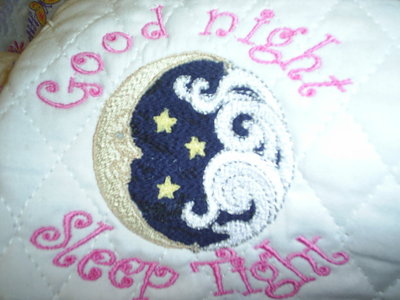
2 comments

You did a great job fixing this one it looks great.
by Cutie #8325825
21 Dec 2008
TYVM I had to do something that is design # 15 of 30 I wasn't about to scrap it lol. *
by
Cutie #8325809
06 Nov 2008
+5✽
you resized this design?
2 comments
by Cutie #8325825
06 Nov 2008
no I did not resize the design I did nothing except add the words to it. I created the text and then merged the design onto it
by Cutie #8325809
06 Nov 2008
well that should not have bothered it

20582✽
by
emily16838
06 Nov 2008
+5✽
Good save...was the design faulty?
1 comment
by Cutie #8325825
06 Nov 2008
It must've been, it looked good in simulator but it sure didn't stitch out good.*

60484✽
What a great way to save the design...*****
1 comment
by Cutie #8325825
06 Nov 2008
ty Maria I didn't know what to do*

7293✽
I'm glad you got it fixed. Sometimes software acts up for no apparent reason and there's no fixing it. I had a design save upside down. It would load in DP correctly but evertime I saved it, it inverted. I even tried inverting it then saving it, it stayed upside down, so I had to hoop the fabric upside-down and stitch it out that way.
4 comments
Strange!! Gremlins!! Does your machine not rotate a design also?
by Cutie #8325825
06 Nov 2008
crazy *
Yes, if the design is not to big, but this one it wouldn't. It was wierd.
Sometimes, especially with Embird, the software saves those darn trim codes... if you have them taken off when you save, the design will save normally. I couldn't for the life of me figure out why my SW did odd things... finally figured out it was those unnecessary codes.

14353✽
nice save. good job
1 comment
by Cutie #8325825
06 Nov 2008
ty had to do something*

85867✽
I'm not sure about #1 photo. Did stitching skip a place? Do you have the ability to sequence foward and backward in a design?
1 comment
by Cutie #8325825
06 Nov 2008
It stitched out starting with the bottom of the blue then went up to the top and started working down, I kept watching and waiting for it to get back to that area and then it went to the next color change I can fwd colors and stitches I did go over the color again with the needle advance to see and it just did not stitch out that little block that I highlighted in red

8431✽
Well done, you did a great save on the design.
1 comment
by Cutie #8325825
07 Nov 2008
tyvm*

145791✽
U did an excellent fix it job charlene *
1 comment
by Cutie #8325825
07 Nov 2008
ty Lillian I did the best I could hopefully it will blend with the other designs.*

44905✽
by
dlonnahawkins
06 Nov 2008
+2✽
That was a good save - sometimes those little gremlins get it into their minds to mess us up, and there is not anything we can do but go along with them. Wonder if they had been playing with the Sprites?
1 comment
by Cutie #8325825
07 Nov 2008
lol I see that gremlin I will choke him*

27071✽
Not sure if anyone else received this email, you might find Elizabeth's comments interesting...
"You know members I just made an interesting discovery....There have
been many times I have given a design to a test sewer and my stitch
out and the testers always came out different. She would have a
stitch line that would not cover and mine would sew out perfect...or
visa versa! never could understand why the difference and thout it
in the stabalizing. I also noticed that sometimes the photo of the
test design sent to me was positioned different in the hoop than the
way it was digitized, but that did not compute in my mind....Today
it did!
I put a design that was digitized for the 4x4 hoop in to a large
6x10 hoop and positioned 4 of the designs to fit in that hoop in
different locations. To my amazment, 3 sewed out differently and had
different imperfections .The stitches were off line in each one....
all but the one that was placed in the hoop in the same position it
was digitized, and it was perfect!..I did this on 2 machines so I
could get 8 FSL at one sewing...the same thing happen on the second
machine also...
So the moral of the story is if you purchase a design and rotate it
in your machine from the way it was digitized and given to you you
will have outlines that are off, and different little glitches in
the design. So if you have little problems with your designs, this
could be one of the reasons other than stabalizing.
Has anyone else experienced this?
Elizabeth"
"You know members I just made an interesting discovery....There have
been many times I have given a design to a test sewer and my stitch
out and the testers always came out different. She would have a
stitch line that would not cover and mine would sew out perfect...or
visa versa! never could understand why the difference and thout it
in the stabalizing. I also noticed that sometimes the photo of the
test design sent to me was positioned different in the hoop than the
way it was digitized, but that did not compute in my mind....Today
it did!
I put a design that was digitized for the 4x4 hoop in to a large
6x10 hoop and positioned 4 of the designs to fit in that hoop in
different locations. To my amazment, 3 sewed out differently and had
different imperfections .The stitches were off line in each one....
all but the one that was placed in the hoop in the same position it
was digitized, and it was perfect!..I did this on 2 machines so I
could get 8 FSL at one sewing...the same thing happen on the second
machine also...
So the moral of the story is if you purchase a design and rotate it
in your machine from the way it was digitized and given to you you
will have outlines that are off, and different little glitches in
the design. So if you have little problems with your designs, this
could be one of the reasons other than stabalizing.
Has anyone else experienced this?
Elizabeth"
3 comments

You should be able to move the design around and not have a problem. I have had a design not line up is I copied it using the sewing maching. So I usually try to load the original design in for as many as I need and them move them around.
by Cutie #8325825
07 Nov 2008
I find that explanation rather flimsy to say the least. It is almost a cop out of anything that is wrong with a design is not the designs problem, but the stitchers. I did nothing to alter this design to have the out come I had. If someone wants to call themselves a digitizer then they already know all of the variables out there as far as machines, hoops, fabrics, stabilizers and threads. I would not call the stitch out I had with this design a "little problem" it was an enormous one. I stitched out 30 designs same fabric same hoop same machine same stabilizer one BAD design.
Sorry I posted ....not being into digitizing just thought it might be something to think about....will keep my thoughts to myself next time ....

27382✽
Sorry I did not see this sooner.
You should be able to move the design around with out making any difference to the stitch out. HOWEVER, if you use more then one design in the hoop, you will increase the overall stitch count. So use more stabilizer! Always check the stitch count before stitching out a design!
You should be able to move the design around with out making any difference to the stitch out. HOWEVER, if you use more then one design in the hoop, you will increase the overall stitch count. So use more stabilizer! Always check the stitch count before stitching out a design!
2 comments
by Cutie #8325825
21 Dec 2008
Yes Ricky you did answer to my original post about the design and how to "fix" it. I did not alter the design at all. I did merge the text to it. As you can see I did "fix" it by doing some freehand embroidery and a marker. THX *
ooopppps, I did too. That was before I saw the photos.
Just remember, when you combine designs, check the stitch count and add more stabilizer if necessary.
Just remember, when you combine designs, check the stitch count and add more stabilizer if necessary.

33575✽
by
simplyrosie
21 Dec 2008
+1✽
wow... I've never had this happen..so I can't lend any suggestions, but let me tell you Charlie, you did an AMAZING job fixing this! And you say you don't want to get into digitizing... You'd be rather good if you ask me... I can't even tell by the second photo that you even had trouble! good job!!!
1 comment
by Cutie #8325825
21 Dec 2008
awwww ya sweetheart you! *

33871✽

3439✽
What a great job you did fixing the design. I can't tell there was ever a mistake.

12843✽
by
quiltgrama
21 Dec 2008
0✽
the fix looks great wouldnt even know there was anything wrong. I sometimes have gremlins too in my machine choke mine for me too if you catch him. Lisa