








88650✽
Embird Plus digitazers, I need help. Sometimes when I fill an area, I got broken stitches, a bald looking, and I cant get it right. Thanks in advance for any tip.
Comments (6)

by
Cutie #8325809
07 Nov 2008
+3✽
what is your stitch density set at?
3 comments
set at 4, it is a default one.
by Cutie #8325809
07 Nov 2008
hm that is what mine is set at how about the fabric is it set to the fabric you are embroidering on
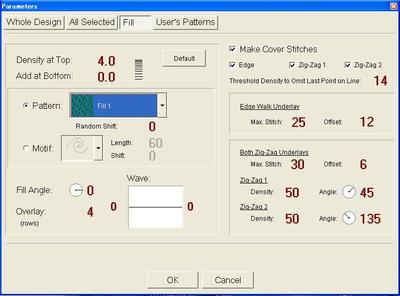
I am afraid this version doesnt have that setting. But, I got this screen. (see pic)

145791✽
This is a digitizer answer, MM should b able to help u *
1 comment
Thanks Lilian!
88650✽
screen:
1 comment
by Cutie #8325809
07 Nov 2008
ok opening mine to see whats up here
by
Cutie #8325809
07 Nov 2008
+3✽
hm trying to help u here that is exactly what mine is set at
1 comment
Thank you for trying, Mary, that is so kind of you.

122866✽
Hi Yoriko, I was investigating your Embird PLUS, as I am confused by your picture, which looks nothing like the Parameters screen on the latest version of Embird.
How old is the version you are using?
I did find an Embird Plus help group but it is no longer operating.
hugs, Meganne
How old is the version you are using?
I did find an Embird Plus help group but it is no longer operating.
hugs, Meganne
4 comments
Hi Meganne, it's very old(2003). This is very 'primitive' comparing with another Japanese software I have, which saves only in JHE format and can't be converted in any other in use out there. I know I need a newer one, hopefully next Xmas. Hugs Yoriko
Oh, also, thank you, Meganne.
Perhaps you should investigate upgrading, which is not as costly as you may think. In fact I just checked it out for you... http://www.embird.com/sw/embird/fees.htm
take a look, you might be pleasantly surprised. hugs, Meganne
take a look, you might be pleasantly surprised. hugs, Meganne
Wow, Thank you so much, Meganne!!! Hugs
122866✽
If you want to send me the design I could have a look and see if I can fix it for you;
or is it happening in more than one design? Sometimes a design does that when it has odd corners, or rounded edges. Try changing the "FILL ANGLE".
Create your stitches and set the design to 3D so you can see it, Select the segment of fill you are having problems with, open the parameters and change the fill angle starting at the top on 90* (then apply) maybe you don't have apply on your version so select OK, see how it looks and repeat the process until your stitches are satisfactory.
In the new versions you can do this repeatedly and see the changes without having to keep closing the paramaters box. It's much better.
Hope this helps
Emad is in my profile. hugs n roses, M
or is it happening in more than one design? Sometimes a design does that when it has odd corners, or rounded edges. Try changing the "FILL ANGLE".
Create your stitches and set the design to 3D so you can see it, Select the segment of fill you are having problems with, open the parameters and change the fill angle starting at the top on 90* (then apply) maybe you don't have apply on your version so select OK, see how it looks and repeat the process until your stitches are satisfactory.
In the new versions you can do this repeatedly and see the changes without having to keep closing the paramaters box. It's much better.
Hope this helps
Emad is in my profile. hugs n roses, M
2 comments
Thank you so much, Meganne! It's so nice to know that we get so many kind people trying to help you here.
It happens when the design has many areas to fill. I dont have any trouble with Japanese hiraganas I've been uploading at 'design by cuties' as I think they are simple ones. I tried following your instructions, but it is still broken. Gotta get a new software. :( Thanks again, Meganne!