








35675✽
has says they are there, but they will not come up to be opened. It's all my farm animals! Any suggestions for this not so smart with computers gal!? I have tried to view the files on 3 different computers, none will show they are there. Tks!
Comments (6)

14148✽
I "lost" some designs on a cd once, I was told that you have a better chance of recovering them if you did not put anything else on the CD after the files were lost... Also perhaps there is a way to find them on your computer itself..

211088✽
by
shirlener88
26 Nov 2008
+3✽
Gerry, Meg would have more info on this - than I do - but I think taking it to a PC place might get your further ahead - than trying something that you don't know if it will work or not.
1 comment

Thanks Shirlene.
Yes if I was there with you I could probably retrieve them for you as I do use Nero Pro, amongst other things I could try on my own PC.
If the files are really important to you, I would immediately take the CD to your nearest PC repair (not just sales) shop, the people who work in the pc repair industry do so because they love the challenge of just this sort of thing and they usually charge less than your files would be worth if you have to replace them.
Hope this helps, Meganne
Yes if I was there with you I could probably retrieve them for you as I do use Nero Pro, amongst other things I could try on my own PC.
If the files are really important to you, I would immediately take the CD to your nearest PC repair (not just sales) shop, the people who work in the pc repair industry do so because they love the challenge of just this sort of thing and they usually charge less than your files would be worth if you have to replace them.
Hope this helps, Meganne

27382✽
You got a greater chance of recovering the files if you do it immediately. The longer you let it go the harder they are to retrieve. Also if they have been overwritten makes it harder.

6653✽
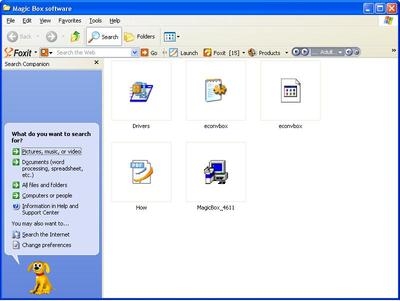
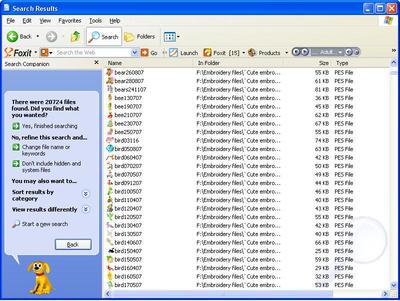
Are they zipped or unzipped? If they are unzipped, you might be able to do a search for them to find them. Just open any folder that you have on your computer (it doesn't matter what it is) and look at the top, where the Standard buttons are. There should be an option for "search". When you click on it, your screen should show you something like image 1. Choose "all files and folders" from the choices on the left side of the screen. Type in your file type (mine would be .pes) and select your cd drive to search (I'm searching drive F which is where I have my designs backed up, see image 2). With any luck, it will find all the designs that are on the CD and list them in a window (image 3) so you can just click on them to open them. I really hope this works for you!

2 comments
Thank you. I tried & all I could find was the 3 or 4 I could pull up. I tried hus and vip, but nothing. Most of the files are in a seperate folder. Should I look for the folder??
Couldn't hurt! It's not as though you are changing anything about the disk by doing a search. =] I so hope you are able to recover at least some of them.

3246✽
This sounds as though the disk has multi-sessions on it, i.e. if new files were added, a new session has been created. Mostly, the CD reading programs on home computers do not read multi-sessions but higher end versions of say, Nero, will. If you can find some-one with a professional CD reading/creating program you can probably (if this is the reason) save them to another CD. Regards, Bev.

52007✽
I was also told once that if you use the 'cheaper' CD's it can cause this type of problem - since then I ONLY use well known 'expensive' 'brand' name CD's for all my back-ups! Never had this problem since!!
NOT saying this is why that happens though! BUT.... Also not going to risk anything! :-)
*4U!
NOT saying this is why that happens though! BUT.... Also not going to risk anything! :-)
*4U!