







33451✽
If you ask a quetion in Community, the only way to add photos, etc. is by answering your own question. Post the question, then click on 'reply' as usual. Then put in something like "here is the link" or "here is the photo". You will see tabs under your answer for photo, link, and video. If you click on the 'photo' tab, it will allow you to search your files for the photo you want to upload. If you click on 'link', it will allow you to easily add a link.
Comments (17)

31942✽
33451✽
by
marjialexa
23 Mar 2009
+6✽
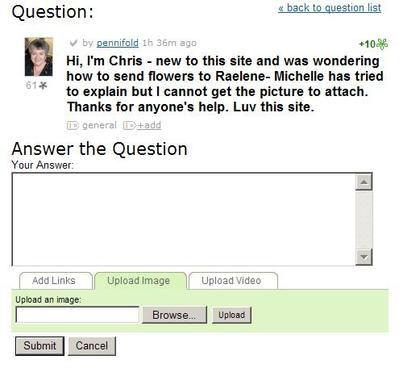
I'm using Chris's quesiton as an example of how to add the photo. You'll see that under the "Answer the Question" box, there are three tabs. I've highlighted the "Upload Image" tab, by clicking on it. Browse your computer for the image you want, then click on the "upload" button to attach it to your answer. You must have some sort of answer in the box for it to work. Best of luck to everyone uploading your pix and links!!! Marji
4 comments
This is so good of you Marji, You're great
To add a link, click the link tab, and put the link in the space provided. You must hit "upload" on links & photos BEFORE you hit "submit". Make sure you see your link or photo uploaded before you submit your answer, or it won't be there when you submit.
ttt
ttt

58029✽


145307✽

158720✽

70914✽

33451✽
by
marjialexa
06 Sep 2009
+3✽
ttt for the newbies here. I saw someone say they didn't know how to do this, so, here it is! Hugs, Marji
67271✽

13558✽
Well done Marji sweetheart, love and hugs, and thanks for taking the time to do tutorials for everyone. Love you sweetie.

27683✽
33451✽

145791✽
You are coming through loud & clear dear marji & I know this will b a big help to many, thanks *

743363✽
I bring this back to top, for all new cuties, thanks for your post!
1 comment

Thank you Gerry

46919✽
Obrigado marj, essa explicação é muito importante para quem esta entrando agora na Cute.
Você é um encanto de pessoa! Que DEUS lhe abençoe , por tanta generosidade. A vida é assim..." É DANDO QUE SE RECEBE"
Te abraço com carinho.
Você é um encanto de pessoa! Que DEUS lhe abençoe , por tanta generosidade. A vida é assim..." É DANDO QUE SE RECEBE"
Te abraço com carinho.
1 comment
Obrigado tambiem, Dilceia! Marji

2765✽
2765✽
you guys are the best
1 comment
We try, glad to help, hugs, Marji
33451✽
by
marjialexa
24 Jul 2011
0✽
Just bringing this back because looks like maybe some newbies are having trouble posting pictures in the Christmas in July thread. Hugs, Marji