












 670✽
670✽
What software is available to only view and or view and organize designs? I heard of a couple recently but have lost my notes to find them again. Thank you for your help.
Comments (13)
 33575✽
by
simplyrosie
30 Mar 2009
+5✽
I use Designer's Gallery Studio... not too expensive and does the trick. :-)
1 comment
Thank you so much.
 145792✽
Heed Rosie she has given u a good one *
1 comment
Thank you
 57815✽
by
edithfarminer
30 Mar 2009
+2✽
To organize as well go to Ann the Gran.
Catalogue Express, Can try for free for a month
Catalogue Express, Can try for free for a month
1 comment
Wow, so many possibilities. Thank you.
 8733✽
8733✽
I have a 4D organiser, it lets me view and use designs in zip files without me having to first extract the files from the zip. It has a file converer build into the program allowing me to convert formats in one clic to suit my needs. I added some links if you would like to have a look at them. Here in Austria you can pick them up for round about Euro's 300 on ebay. I would strongly recomend shopping around for the best price before buying.
2 links:
[1]
http://www.pfaff.com
www.pfaff.com
[2]
http://www.husqvarnaVikingSoftware.com
www.husqvarnavikingsoftware.com
 11259✽
I use the sew iconz..you have a 7 day free trial and to purchase it is only 20.00..try it free..You will love it! had mine for about 1 year now and I can't imagine living without it...<br />http://www.sandscomputing.com/id18.html It recognizes all embroidery formats and is very easy..just install the downlowad and you'll be viewing your designs in a second!!
11259✽
and here is the organizer as well..I do not have this one though...It also has a free trial period along with many other embroidery programs..sewart sewwhatpro..with free trial periods..
http://www.sandscomputing.com/id17.html
http://www.sandscomputing.com/id17.html
 8321✽
8321✽
by
memasanders
30 Mar 2009
+2✽
Thank you guys from me too. I sure can use the info thanks again
8321✽
by
memasanders
30 Mar 2009
+2✽
Thank you guys from me too. I sure can use the info thanks again
2713✽
I really like the way sewcat. The way it lays out in the three panes on the computer screen makes it really easy to work with.
 27269✽
by
evajungermann
30 Mar 2009
+3✽
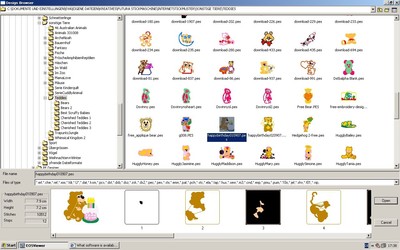
I love this one<br />http://www.eos3.com/index.php?en<br />You can view files, create new ones, put them around, delete whole files, rename designs or files, convert formats, change sizes of design etc.<br />You see the color sequences, stitch count + size of design.<br />You can simulate a realistic view. And I think it is very clear structured. Have a look here.<br />I like, that you can interact between the two windows just with drag and drop. It is so fast.<br />And not the only feature it has.<br
OOps, I forgot to tell you the best: it is FREE.
OOps, I forgot to tell you the best: it is FREE.
1 comment
And to think I paid $799 for my program that does the same thing...Groan!
602✽
by
scraphappy7
30 Mar 2009
+2✽
Looking at http://www.eos3.com/index.php?en, you have to go to Downloads and register in order to download the viewer. You can also download an .exe file of about 5 free designs!
602✽
by
scraphappy7
30 Mar 2009
+2✽
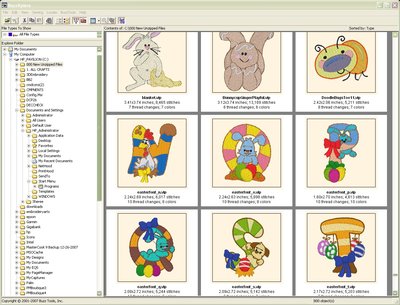
I've had Buzz Explore for several years and I love it. I have 3D organizer but I don't really like it. It just came with my 3D software. Tried SewIconz but it drained my memory and took forever to load the images. Sounds like the one evajungermann mentioned does the same stuff as Buzz Explore and it's free! I'll have to look at it. Buzz Explore was about $100 but it was worth it to me!
 34304✽