









 1612✽
1612✽
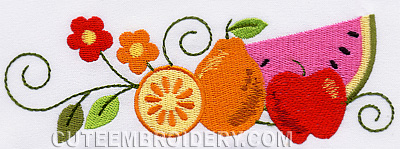
now that I have gone to the folder I had it in, it is only an image file. What could I have done and has anyone else had this problem. here is a pic of the design I really wanted to do for the June challenge.
Comments (6)
1612✽
 16434✽
Did you save it in your own format?? I do not know what format you are using. Need more information about your downloading. Where are you keeping your designs? H&*.
1 comment
I always save in pes format. Can't imagine what happenned that now I only have an image file.
 17461✽
by
michele921
27 Jun 2009
+3✽
I don't know what happen you must have saved it as a jpg not an embroidery file. the one i DL is a design only does not have a pic with it. so sorry
try doing a search for the file name and see if that brings you the embroidery file it might work.
try doing a search for the file name and see if that brings you the embroidery file it might work.
3 comments
the original file should be cutes.... but now it has a funny long number and letter file name and is only an image file. Oh well, thanks for your imput.
my file name is JACOBEANFRUIT2875782 I did not change the name of my file this was the dl name
OMG! michele921, thank you for the name of the file. I found it. I can do a search for it and yet when I bring up my program to view the designs it does not show up in the folder it is in. Very strange. Yay! Thank you very much for your help.
Judy Mc
Judy Mc
 122866✽
It is only a matter of time before it will be available as a daily freebie again and if not you could always put in a request to Letvia who will make sure we all know when to vote for it for you.
hugs n roses, Meganne
hugs n roses, Meganne
 211088✽
by
shirlener88
27 Jun 2009
+1✽
DL it again - unless you were getting it - when it was a freebie. Good luck!
 33451✽
by
marjialexa
28 Jun 2009
+1✽
Jude, try doing a search with your computer. Go to "start", click on "search", and put in what to search for "all files ending in .pes". You might have a lot to go thru, but if you kept the original name you should be able to find it. I'd be interested to know if you can actually see the image in the file, is it a true image file? I would think if you accidentally changed the suffix to .jpg, I'd think your computer would warn you that you would lose information trying to save it that way. I may try it, just for the heck of it, and see. Hugs, Marji
1 comment
Ok, I tried this. When you download, you choose the file type, (pes), then click the download button. That takes you to the download page, where it shows your design, and the format you've chosen, you hit download again. The computer asks in the grey box screen if you want to save or run the file, you hit save. Then it gives you a choice of where to save it, I assume you went to your Jacobean folder. But when you see the file name, and the box beneath it, it says "save as .pes document". Your only other choice is "all files", which will still save it as a .pes. The only way it can save as something else is if you physically go in and change the file name and suffix. You can't do it accidentally. Try that search, see if that helps. Hugs, Marji