








28916✽
I posted my first flower in the designs by cuties. 1- How do I take out the outline? 2- There is a line in the down right corner, how do I erase it?
Comments (10)

27608✽
I will bring you to the top
1 comment
thanks

132773✽
Michelle, you can't amend it .You can only reload the whole thing and put a note under comments on the old one to say that you have done an up- date to the design.
Hugs Yvonne
Hugs Yvonne
1 comment
thanks...I have never done a desing myself so I post my first and ask if one digitizer can tell me how to do this flower in a better way
28916✽
It works now, so, Is there someone who can tell me how to fix that design(that I posted in the designs by cuties)...What do I have to do to take out the outline of that design...What do I have to do to erase the line that is in the lower right corner??

145307✽
I downloaded the design and looked at it in my software and I see what you mean. What programme did you use to digitize it? I know how to get rid of unwanted elements in 3D and in Embird; both use different ways. If you let us no what programme you used, one of us would be able to give you specific advice.
1 comment
pedesign7
132773✽
Michelle, it depends what system you are using to do your digitizing .
I have just down loaded your design,
1. all I have to do to erase, the line on the right corner is highlight it, it is the 47th object in your design and then press delete.
2. to delete the whole outline, I click on the first black object and hold down the ctrl key and it highlights all the black stitches and then I press delete.
Maybe if you let us know, which system you are working on , someone will be able to help you further.Yvonne
I have just down loaded your design,
1. all I have to do to erase, the line on the right corner is highlight it, it is the 47th object in your design and then press delete.
2. to delete the whole outline, I click on the first black object and hold down the ctrl key and it highlights all the black stitches and then I press delete.
Maybe if you let us know, which system you are working on , someone will be able to help you further.Yvonne

33451✽
by
marjialexa
30 Jul 2009
+4✽
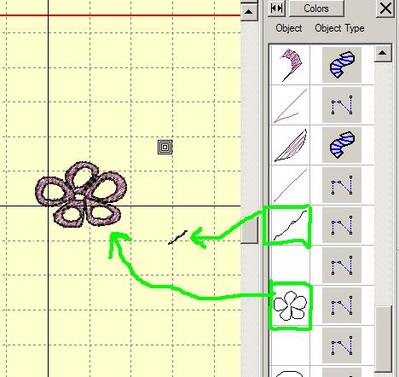
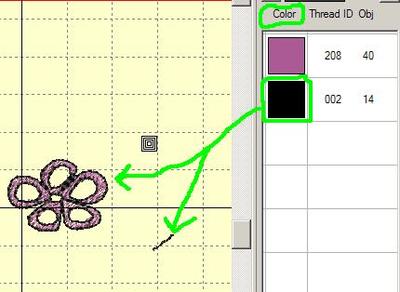
Michelle, in Designer Pro, I can look at the colors, and I can look at the separate objects. Since everything you want to get rid of is black, you might be able to select black and delete it. Or, you could go into the objects screen, and delete the black objects one by one. If you wanted to keep the outline of the flower, but get rid of that stray black line, you would go to objects, find that line, and delete it. Hope this helps. I have to go to work now, or I'd do some screen shots to give you a better idea. I'll check in later to see if you got it solved. Hugs, Marji
1 comment
*4U
132773✽
132773✽
33451✽
by
marjialexa
01 Aug 2009
+4✽
Michelle, I'm attaching 2 screen shots from my Digitizer Pro. I'm not sure what your PEDesign looks like, but this is the way I'd get rid of the black lines you don't want. The first shot is of the "Objects" screen, I have circled the objects you want to delete. In my program, I just highlight the object, either in the hoop or on the object screen, and hit "delete". The second shot is of the "color" screen. Since both things you want to delete are black, I can select the black color, and just hit delete. I do hope this helps, and that you can begin to figure your program out. Digitizing is such fun when you get the hang of it!! Hugs, Marji
1 comment
thank you for taking the time to show me

12707✽
Congrats on your first flower!
1 comment
thank you so much