








360672✽
now my first quetion,now i am a member can the person who explains things with pictures (they circle instructions) please tell me how i begin.So far i have just downloaded freebees Thanks .Carolyn
Comments (8)

211088✽
by
shirlener88
02 Sep 2009
+5✽
Carolyn, that is Marji - perhaps she will see this - *4U Shirlene

1 comment
thanks i tryed to e,mail you & it comes back??
360672✽
I got some of it going i think i will be ok this is fust sew great!!

145791✽
As Shirlene has already said. Marji is who u are looking for Noah & I'm sure she'll be along directly. *4U

33451✽
by
marjialexa
03 Sep 2009
+5✽
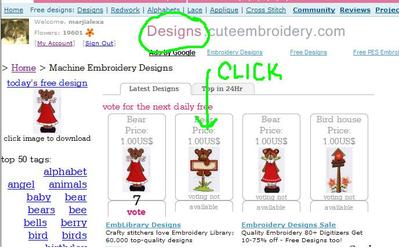
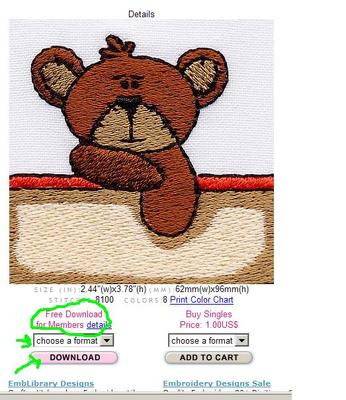
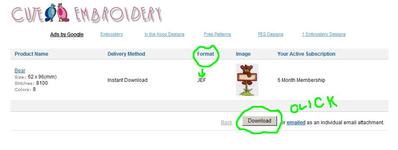
I'm here, Carolyn!! Here's your pictures! Just remember, when the site starts running slowly, we'll know it's you downloading all those designs, hee hee hee!! Ok, the first picture is the one you get when you click on "designs", up in the blue bar near the top of the page. I've chosen to double click on the bear with the sign, because that's not a free design, or one that can be voted on. Image 2 is the page you'll get when you click on that bear. There's his 'closeup', and on the left below the bear's photos is "download for members". You choose your format there in the box, and then you click the 'download' button. Photo 3 is the page you'll get when you have clicked that download button. It shows you which format you've chosen (do check this, I've occasionally clicked on the wrong format), a picture of the design you're downloading, and a "download" button. Click that download button, and the screen will pop up asking whether you want to save or open the design. Save to whichever folder you want on your computer. Since this is a set of bears, for example, in my folder Cute Embroidery I'll make a subfolder entitled "teddy bear red dress set" to put all these designs into. I keep the original name of the design, but just before the ".jef" on this design I would add "bear with sign". Since Cute designs have numbers instead of names, that will let you know what the design is, but keeping the numbers will allow you to look and see if you've downloaded it already, preventing duplication. Hope this helps you, Carolyn, and do have a bang up time downloading all the wonderful designs here at Cute!! Congratulations again!! Hugs, Marji
3 comments
Wow thank-you I just can,t believe all the great designs.I wanted to buy earlier but i couln,t understand enough about all this.Your pics & circles are what i CAN understand Thank-you!!I was told on Wed.& thursday we can download other alph. were is this at?? God Bless you for taking time to help someone else out.Carolyn
I read the answer to this on my last question thanks !!Carolyn
Glad to be of help any time, Carolyn! Just give a holler if you need any other "pics & circles", hee hee hee, I enjoy doing that to make it clearer for folks! Hugs, Marji

12707✽

122866✽

27608✽

743365✽