115786✽
As I logged in to read all about Cute one of my cats rushed across the keyboard. The result is that the screen has been reduced by 50%. It is now difficult to read the screen so I cant read about you all. Does anyone have any ideas to hepl me restore the screen? I have tried a few idea but they have not worked. Thanks to all for their ideas as all will be greatfully accepted
Comments (11)

88650✽
:) have you tried to restart the computer?
I cant imagine how just rushing across the keyboard can reduce the screen???
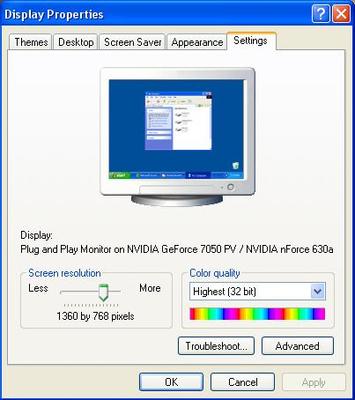
Try go to your desktop, right clik and set the screen. This should work.
Mine is configurated as follow:
I cant imagine how just rushing across the keyboard can reduce the screen???
Try go to your desktop, right clik and set the screen. This should work.
Mine is configurated as follow:
1 comment
Thanks Yoriko for your detailed help. The problem was still there after shutting down and restarting later. While it is now back to the correct size of print there is a gap at the bottom of the screen. I will try to solve this later

92391✽
I would try going into the "View" section and click on "Zoom" and then 100%. Maybe that would work. **
2 comments

Just worked for me--the other day somehow my text got huge, and I just didn't take the time to figure it out. Thanks!
Thanks to both of you

3705✽
by
mmgreyhounds
03 Sep 2009
+2✽
If you have windows vista there is a magnifying glass with the % and an arrow way down in the right corner just above the time. If you click on that arrow you can change it back to 100%.
1 comment
Thanks mmgreyhounds this worked but I am not sure how I got there. Now to find out how to get rid of the view of the desktop at the bottom of the screen. I am fine at the bits of computing I need to know and not good at the rest.
6982✽
On my computer, the CNTRL key and + will enlarge type and CNTRL and - will reduce type size. Is that the problem, or is it the window size, or is it the size of the whole lit up area of the screen that you mean. Hugs and *, Lois
3 comments
This sounds very logical but it was not the answer

This is exactly what I would have suggested. My son just taught it to me last month. LOL
works for me also
666✽
Try going to top right-hand corner of your screen and clicking on the middle square between the dash and the x. This should alter the size of your picture.
1 comment
No not this as I ended up with a even smaller view

109890✽
115786✽
by
asterixsew
03 Sep 2009
+1✽
Thanks all for your brilliant answers. The screen is back to normal and the cat is sitting watching me on the laptop
1 comment
Good *4u

2810✽
Don't be too upset with your kitty....maybe he was just trying to catch a mouse! <snicker>
by
Cutie #8325863
04 Sep 2009
+1✽
man computers can be so tricky glad u got it working right again

20661✽
Try clicking in the box next to the X at the top right of the screen that is showing....may need to do it a couple of times. If this doesn't work try rebooting and if all this fails restore your computer to the day before this occured.

743365✽
hope it works already,I don't know that much about computers sorry.