60✽
Do I need to buy a lettering software and then save the 'name' as a project? I hate to rush into buying the software (it costs > $100) if I don't need it. Any help would be much appreciated!
Comments (9)

11500✽
I have a Brother 8200. I use the PED Basic to download my designs unto a memory card which then displays them on the machine. Yours may have the USB cable and port, which I know nothing about...One of the Cuties will come along that will know...Have you checked out the Brother Web site? They will have instructions there.
1 comment
Yes, I have the USB port but still need to get the PED Basic (as you stated) - I'll be up and running soon! Thanks!!!

211088✽
by
shirlener88
08 Sep 2009
0✽
bogancp, WELCOME to the CUTE family. From what I can tell you are asking - I am assuming you are wanting to use an alphabet that you have bought or downloaded - you want to know how to creat a name to stitch out on your machine - am I correct?
Anytime - that you have a puchased or free design that you want to alter and not take directly to your machine - you will need softward to edit it. The purchase of that software is a must for you to combine your designs, as well. Good luck and hope to see a project posted - made from your new brother, soon. *4U Shirlene
Anytime - that you have a puchased or free design that you want to alter and not take directly to your machine - you will need softward to edit it. The purchase of that software is a must for you to combine your designs, as well. Good luck and hope to see a project posted - made from your new brother, soon. *4U Shirlene

1 comment
Thanks so much for the quick reply. Can't wait until I can whip up something as cute as yours!! I will definitely post a project (probably not my first but one)....

31942✽
you need the PED basic that has a card to transfer ANY design from a file to your machine!!
1 comment
Thanks so much for the quick reply. I have a store close where I can get the software - I'll be going soon!
2533✽
by
1allamericangirl
08 Sep 2009
+1✽
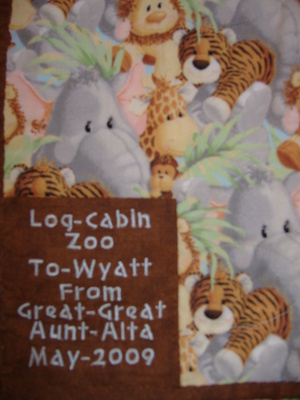
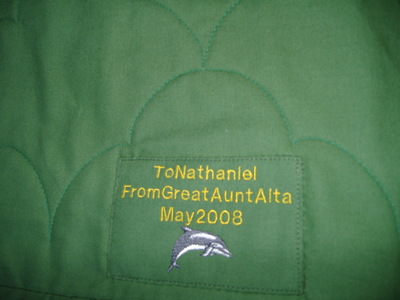
Hi I have a Brothers 270D embroidery machine and it has letters & numbers built into the memory as well as other designs. I can program my machine to stitch out a quilt label using the letters and numbers in the machine or names for shirts and so on. If you have this feature in your machine which I think you do you can make names right from your machine you will have to look at your book that came with the machine to see how to program it to make the pattern name you wish to embroidery. See a few of the fonts I have in my machine below. If you wish to use letters from another source such as this site yes you will need to have a ped box if your machine takes the ped card (Ped Box & Card cost over $100 I know I have one)or if you have a USB port machine you can down load to your machine from the Internet site. Alta

743365✽
I have a brother and use PE-design to make a design of the letters I need.after reorganizing the letters I can use a memorycard of the PE-design or use an usb-stick to load the design for my embr.machine. and welcome at cute!


3554✽
Hi and welcome to the cute family. If you have a USB Port, you dont really need PED-Basic, you just need to hook up your machine to your Computer, get you some Software, one of them would be Sew What Pro and SewIconz,or Embird, and you would'nt have to worry about any Cards.
115786✽
by
asterixsew
08 Sep 2009
0✽
Hi and welcome to Cute. You will probably have gained a new addiction in your life by coming here as well as to your machine.
I have a Brother but it uses floppy discs. I also have PE design and would not be without it. By having it I can use any font in my computer which extends my choice greatly. I use it to plan all the layouts of work before I put it into the sewing machine. I can enlarge and reduce work too. I can also put a picture with letters...the list could go on. Happy sewing and look forward to seeing projects and hearing what you decide to do
I have a Brother but it uses floppy discs. I also have PE design and would not be without it. By having it I can use any font in my computer which extends my choice greatly. I use it to plan all the layouts of work before I put it into the sewing machine. I can enlarge and reduce work too. I can also put a picture with letters...the list could go on. Happy sewing and look forward to seeing projects and hearing what you decide to do

52672✽

132773✽
I don't have a brother machine, but see you have been given advise - Good luck
And welcome to "Cute"
And welcome to "Cute"