








20✽
Comments (6)
5755✽
I just downloaded the flower in the PES format without any problems. What format are you downloading? You might try right clicking on your downloaded file, click on priorities and uncheck the box that says read only. Please let me know if this works. If not, I'll see what else I can figure out. ***

33451✽
by
marjialexa
29 Sep 2009
+4✽
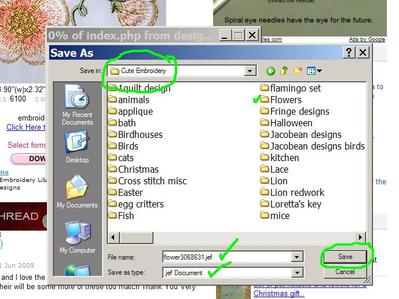
Maesy, click on the free flower on the home page. That will take you to the designs page, with the free flower in the upper left hand corner of the page. Click on it again. That will take you to the download page. Choose your format in the space provided, then click on download. I have added photos. You will see in the first photo the gray screen pop up that prompts you to run, save, cancel, and what file you're saving, and where it's from. The second photo is what happens when you click 'save'. I chose to save the flower to my folder CuteEmbroidery, and would open the sub folder flowers. You can see that it is a JEF file, which is what I chose, and the file type is called JEF document. I don't know why it says 'document', it's a stitch file. Then just hit 'save' and it will save it to where you've told it to. If you have any more problems, just ask, someone will be able to help more. Hugs, Marji
1 comment
Put your pointer over the photos and click to make them larger.

211088✽
by
shirlener88
29 Sep 2009
+3✽
maesy, follow Marji's instructions - you shouldn't go wrong - you will enjoy the design.

2810✽
Maesy, sorry for your challenging intro to Cute! Glad that found your help here. May you enjoy Cute Embroidery as much as we do! Blessings and Welcome... a * for you!

70914✽
by
jacquipaul
29 Sep 2009
+2✽
Welcome to Cute; follow Marji's suggestions and you'll learn to do this. Come to the Cute site often!
*4u!
Jacqueline
*4u!
Jacqueline

743365✽
welcome to cute, follow the leads of our dear Marji, she's the expert in the house