








793✽
Is there an easier software than Winzip? It was so easy in XP.
Comments (4)

5868✽
I am having a problem with windows 7 i am running Sewiconizer, the icons appear in Janome customizer but not in Windows Explorer. I have not unzipped a file so far, i will get a friend to send me one to see what happens. will get back to you when I see on the computer what action it takes.
5868✽
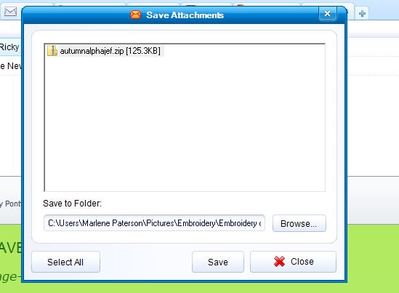
I had a friend send me a zip folder and it opened up ok. just click on 'save' and it will give you an option to where you want to save it.
i saved it in "picture library" in a folder named "embroidery files" and the zip folder was saved in there. I just opened 'Embroidery files folder' and extracted the files and another folder came up with the extracted files. i hope this has helped you.
If you have any ideas on seeing icons instead of blank files i would appreciate the help.
i saved it in "picture library" in a folder named "embroidery files" and the zip folder was saved in there. I just opened 'Embroidery files folder' and extracted the files and another folder came up with the extracted files. i hope this has helped you.
If you have any ideas on seeing icons instead of blank files i would appreciate the help.

85867✽
I have a new Gateway computer with windows 7 and things are different. i first noticed there is no my documents. it is called libraries. I made a new folder in Libraries for Kay's designs because my Bernina software calls their folder My Designs. You can make as many folders as you like such as my pictures and etc. my problem is with the photos I have downloaded all have this shoreline beach type photo and I don't know what is behind that image. You can right click to preview, but just if are attaching a photo file or posting here on projects, you don't know what is behind that beach scene. Sweetie, if you figure all this out, let me know too. Kay
2 comments
I had that problem also so I started changing the pictures one by one is customize folder. And all of a sudden all the folders changed back to the pics of what i have in the folders. But my biggest problem is no icons of designs even though i have installed sewIconizer. the designs will show up in customizer but not windows explorer. if you know how to fix this problem i would be grateful.
THANK YOU, dear ladies for your replies. You have given some ideas to research. Perhaps someone else will respond with more ideas. I love this site!

32948✽
by
jofrog2000
13 Dec 2009
+1✽
I was lucky enough to get XP by getting my laptop through the small business section of Dell. Those with SewIconz should contact Sands computing or join the SewWhat Yahoo group for answers. I joined it to read a lot first, before buying their products, and Steve is right there fixing problems and answering questions. Seems to be a super "hands on" programmer.