








96370✽
Now, the Embird bird is displayed on all the formats. I use the PES format so the little icon made it easy for me to make a quick distinction between all the formats. Hehehe... I am not sure if this question makes any sense to anyone!! But, I want to figure out how to get that icon to show up again - I haven't any idea why it disappeared!!! Any help on this would be greatly appreciated!!! I have not upgraded to the latest version of Embird.
Comments (7)

200127✽
by
sissibrode
20 Jan 2010
+3✽
It happened the same to me (on Windows XP)... allowed the bird to make a difference and one day .... it disappeared! but I did not find why !!! (I have not upgraded Embird)
But with my PC running Vista, the bird is here....
VERY MYSTERIOUS....
But with my PC running Vista, the bird is here....
VERY MYSTERIOUS....
4 comments
Acutally, I only have had Vista - no changes there for me! Thank you, though, for the response....I wasn't sure if my question made any sense!!!! Hugs, Laura

IHAVE EMBIRD AND I ABUSULATLEY HAT HAT IT. I CANT GET NOTHING TO WORK.I HAVE ALL THE TURTIALS AND THEY DONT TELL YOU MUCH.STUPID ME BOUGHT STUDIO AND SUFRANO AND IT MADE EMBIRD VERY BAD,ALWAYS WONTS TO SHUT OFF, VERY FRUSTRATING TO DOWNLOAD TO A PC STICK....FRUSTRAITING
I am sorry, Lucy, that you are frustrated with Embird! It really is a wonderful program. Perhaps you should try downloading the whole program again? My problem is small and quite honestly, it is probably my fault, hehehe!! Don't give up on Embird ... there are many successful users right here on this site!! And, I am not an expert but, I learn something everyday while using it!! Good luck!!*
Lucy, Embird is set up in different modules and it is supposed to shut down when going from one to the other but it is not actually shutting down it is just transforming.
You can compare it to like going from one book to another book and shutting the first book before you open the second book.
One book might be on how to plant and grow a rose bush, the second book might be on how to cultivate roses to create new varieties. Does this make sense?
Please don't give up on Embird there are many groups you can join to get help to learn how to use it.
http://groups.yahoo.com/group/DigiStudio/
http://groups.yahoo.com/group/flyingneedle_studio/
Each of these groups gives a free monthly lesson and you can purchase a more detailed lesson for a few dollars.
Hugs n roses, Meganne
You can compare it to like going from one book to another book and shutting the first book before you open the second book.
One book might be on how to plant and grow a rose bush, the second book might be on how to cultivate roses to create new varieties. Does this make sense?
Please don't give up on Embird there are many groups you can join to get help to learn how to use it.
http://groups.yahoo.com/group/DigiStudio/
http://groups.yahoo.com/group/flyingneedle_studio/
Each of these groups gives a free monthly lesson and you can purchase a more detailed lesson for a few dollars.
Hugs n roses, Meganne

122866✽
Let me sleep on it.
Have you installed ANY programs recently?
HNR, M
Have you installed ANY programs recently?
HNR, M
3 comments
I do use I-tunes now...and I wonder if there might have been a microsoft update - but I don't think so. Please, don't have nightmares about this!!!! Hugs, Laura
If you installed I-tunes, go into the preferences and make sure it hasn't taken over control of your viewing preferences.
Let me know how you get on and I'll check back after I've had some sleep. HNR, M
Let me know how you get on and I'll check back after I've had some sleep. HNR, M
The file preferences have Embird viewing preferences. Meganne...what should my Iconizer options looks like in Embird? I have been playing around in Embird...I wonder if I changed something there that I shouldn't have.

827✽
I understand you, but am not sure how to get the bird back on the icon. I have Vista & Embird Ver.10, my icons have the bird. But I also routinely convert and delete the unwanted formats in downloads, since Embird can convert again if I should need to do so. This way everything in my files is PES only.
1 comment
The tiny PES icon was just very handy ... I could make a quick distinction as to which designs were PES. I can live without it - but, it was handy...

6491✽
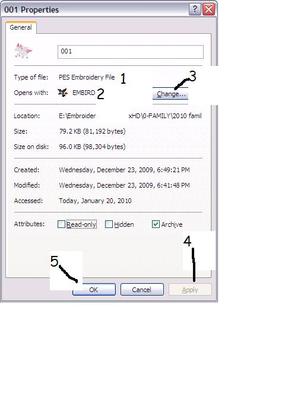
If you have downloaded any programs, or pictures and installed them and got a pop up saying which program would you like to use to open this sometimes when you make a choice that program thinks it can take over all things you view. I suggest right clicking on the pes file that now shows a bird and go to properties it will say there what program is used to open it. I have added a pic of what my properties looks like for a pes design. Check 1,2,&3 IF #3 doesn't say opens with embird then click on change choose embird and #4 apply and #5 OK If this works you may have to do it with every design I can't remember if there is a pop up that says should you use this program for all associated type files IF one does come up that says that click yes and then it should change them all. Hope this helps.
1 comment
My properties look like yours...but thanks!!

11329✽
by
debswebster
20 Jan 2010
+2✽
I do not have Embird, but I had a 30 day trial about 1 year ago, so I am not sure how it should operate with different formats. I see you have Iconiser....doesn't this provide you with visuals of your designs in place of the Embird Icon regardless of format?
7 comments
Yes, you are correct, it does show all designs...but before, it had a little icon in the lower right corner of the design which just identified it as PES.
Oh dear, what a pity you have lost this valuable tip. I know how frustrating it is to try and figure out stuff when things go awry. Maybe one has to re-install, but that is scary too!!
Good luck. I hope it comes right.
Thank you!!*
Now this is a completely different thing.
Mine has never showed itself in this way. Is your operating System XP or Vista?
And if it is Vista have you been playing with the folder view options?
HNR, M
Mine has never showed itself in this way. Is your operating System XP or Vista?
And if it is Vista have you been playing with the folder view options?
HNR, M
My operating system is Vista. Since the change - I have looked in the folder view options - but haven't changed anything.
Aah. the dreaded Vista, Sorry Laura I can't assist you any further, don
t know Vista but do know Embird Iconizer never liked it. HNR, M
t know Vista but do know Embird Iconizer never liked it. HNR, M

88650✽
Hi Laura,
I found this tutorial, it might be useful for you.
I found this tutorial, it might be useful for you.
1 links:
[1]
embird tutorial
www.embird.com
1 comment
Yoriko, we must think alike!!! I had just looked through that tutorial!!! But, it really doesn't solve my problem. All my designs show up beautifully - I have just lost the little PES icon. It was just useful - not a necessity! Thank you, my dear!!* Hugs, Laura
122866✽
AHA the penny drops after reading your answer below.
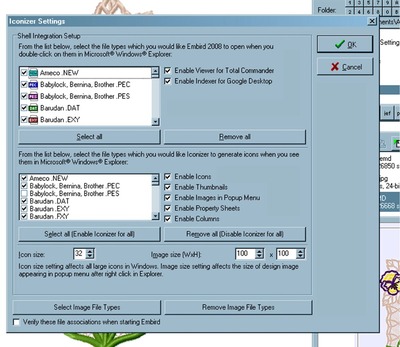
Open Embird, go to Options\Iconizer Settings\
In the bottom window uncheck the "Babylock, Bernina, Brother. PES" box
and make sure everything else is checked as you see it below.
Also make sure you press the "REMOVE IMAGE FILE TYPES" it doesn't actually remove them but it stops Embird from being you default viewer for them and opening every time you click on a picture.
Hugs n roses, Meganne
Open Embird, go to Options\Iconizer Settings\
In the bottom window uncheck the "Babylock, Bernina, Brother. PES" box
and make sure everything else is checked as you see it below.
Also make sure you press the "REMOVE IMAGE FILE TYPES" it doesn't actually remove them but it stops Embird from being you default viewer for them and opening every time you click on a picture.
Hugs n roses, Meganne
2 comments
When I set Iconizer options up with PES unchecked - it kept me from seeing the design at all in Windows. I am stumpted!
Yes, that's correct I thought you just wanted to see the PES, didn't realise you could see it in the corner of the designs until I read further down.
You need to join an Embird group as I know there was a fix for this problem but it had something to do with Vista.
Sorry Laura.
HNR,M
You need to join an Embird group as I know there was a fix for this problem but it had something to do with Vista.
Sorry Laura.
HNR,M