









 85867✽
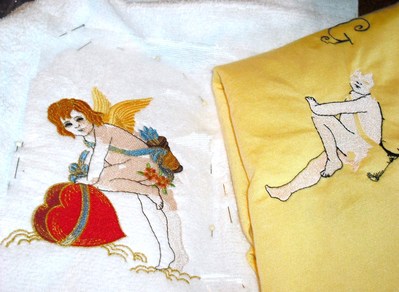
This was going to be a valentine gift , but I ruined it. The design is from here on Cute. Such a sweet cherub. when I started stitching. I completed the first color which was the flesh or skin and I had to turn the machine off to prepare dinner. When I came back later to finish, I didn't know anything was wrong until the last color which was the outline stitch. To make sure it was not the design itself, I stitched the first and last colors again on scrap and they line up perfectly.. What caused this to happen? I often turn my machine off when I know I will be away. I older Bernina 185 has a Eco or sleep mode just for this purpose, but the Bernina 730 doesn't. Has this happened to any of you????
1 images:
[1]
Comments (9)
 743381✽
as a matter of fact I had it a week ago, very frustrating as this happens, so a hug for you!
1 comment

that happen today to me after i stitch thousans so i threw it out and started again
 234609✽
Such rotten luck Katy - I know how you feel - I have a Husaqvarna Designer 1 and a few weeks ago I had to turn mine off as I had to go out and was in the middle of a huge design. I have a stitch counter which shows on the screen so I wrote down the number - but when I cam back to the machine later and it recalibrates - I had forgotten that I had upsized the design and so therefore the stitches would not align. So I threw it out and started a new one - we all learn by mistakes - so now I note down the size of the design in the width by length box and the stitch number I'm up to.
Love and blessings Chris
Love and blessings Chris
2 comments
I have made a design larger also and failed to remember so to keep that from happening again, I always save the changed design and go back and delete or send the original to a USB stick before I ever start stitching. I too have a stitch counter but if you stop at a color change, the the count should be the same. shouldn't it?
I have a Designer 1 as well. And I uasually note the way I replaced the embroidery, the percentage I enlarged it and the stitch count - preferably at a colour stop. But of course mishaps happen when just that one time I forgot to write down one of those...
 1931✽
1931✽
There are three possibilities for this problem that I can think of: stabilizer and no basting stitch to keep the fabric and stabilizer from moving. No spray adhesive is being used.
The proper stabilizer is extremely important for stitching out a particular design. Sometimes the design is very dense; sometimes the fabric is too thin or too thick. I have at least 10 different types of stabilizers to use. A very good tutorial on stabilizing is a CD from Floriani Embroidery. www.rnkdistributing.com Look for "Stabilizing Solutions" with Kay Brooks.
First I hoop the stabilizer and use a spray adhesive on it. Then I center the fabric on top of it. This technique is especially good when you want to embroider on heavy fabrics like towels or velvet.
I have a Brother machine. To baste around the hoop, I click "Embroidery Edit" at the top of the screen.
1. Pick a design and bring it to the screen.
2. Click "Set."
3. Click "Edit End."
4. Your original screen reappears.
5. Click the FRAMES icon. 10 different shapes appear.
6. Select the Rectangle shape. It then appears around the design.
7. Under the shapes are the stitches you can use. Pick the straight stitch. It looks very plain on the screen.
8. Click SET. 9. Click EDIT END. 10. Click SEW.
Since you want the basting stitch to stitch out first, advance your design until the basting stitch appears. Stitch it out and then your design should begin. As you know, the basting stitch takes the place of pins. Good luck.
The proper stabilizer is extremely important for stitching out a particular design. Sometimes the design is very dense; sometimes the fabric is too thin or too thick. I have at least 10 different types of stabilizers to use. A very good tutorial on stabilizing is a CD from Floriani Embroidery. www.rnkdistributing.com Look for "Stabilizing Solutions" with Kay Brooks.
First I hoop the stabilizer and use a spray adhesive on it. Then I center the fabric on top of it. This technique is especially good when you want to embroider on heavy fabrics like towels or velvet.
I have a Brother machine. To baste around the hoop, I click "Embroidery Edit" at the top of the screen.
1. Pick a design and bring it to the screen.
2. Click "Set."
3. Click "Edit End."
4. Your original screen reappears.
5. Click the FRAMES icon. 10 different shapes appear.
6. Select the Rectangle shape. It then appears around the design.
7. Under the shapes are the stitches you can use. Pick the straight stitch. It looks very plain on the screen.
8. Click SET. 9. Click EDIT END. 10. Click SEW.
Since you want the basting stitch to stitch out first, advance your design until the basting stitch appears. Stitch it out and then your design should begin. As you know, the basting stitch takes the place of pins. Good luck.
1 comment
Sounds like a good idea, but I seldom use a basting stitch on towels because I don't like to rip them out. I did use proper stabilizer and spray. If you can see all the pins, that towel didn't go any where.
 6491✽
6491✽
My guess it was just a hiccup and the memory in the machine forgot where it was. It happens. I can see you have proper stabilizer and it is pinned that is how I do my designs also. So sorry that it did get ruined :(
1 comment
Too many hiccups!!
 15289✽
Looking at your design I thought at first glance it was shadowed. It is a lovely design & I'm sorry it spoiled your gift project.
 145309✽
It has, as have a lot of other mishaps - usually my own fault. But the other day it was due to a software error and reinstalling that solved the problem.
I'm sorry for you, I know how frustrating it can be at times!
I'm sorry for you, I know how frustrating it can be at times!
 11791✽
This is why I never switch my machine off until I've finished a design! It's happened to me too, not as far off as this is (such a shame!) but enough to annoy me! I wondered whether mine did it because the time lapse gave the fabric or hoop time to 'relax' - only by a millimetre or so, but it's enough! Love and commiserations from Dianne x x x
85867✽
Well, I guess it is my kitchen towel now. I used to give my daughter my Boo Boos and my youngest granddaughter wanted to know why do we get the Boo Boos? That 's life!!
 145792✽
My dear Kay I do believe this has happened to most all of us one time or another, with me it was as Chris says I had changed the size & forgotten.. If at all possible I try never to turn machine off in the middle of design, but if I do when I turn machine back on it askes me if I want to resume & if I do it takes me right back to where I left off. Sorry about your mishap,but do not know why *