












 633✽
633✽
How to I get more than one design to show on my screen for a project? I have the Singer Futura SES1000 Embroidery Machine. I sure would like to learn how to do this. Thanks for any help. :)
Comments (14)
633✽
 145309✽
Best you can do is read your manual. I have several machines, some let you merge designs on screen, others like my Brother190D and VikingIris don't have that feature. Hope yours does and that the manual tells you how-to.
 29648✽
I have the Singer Futura CE250 and it doesn't merge...I'm not sure about yours. I went online and downloaded a trial version of Sew What Pro and with it I can merge and do lettering in different fonts other than those that came installed on my machine.
1 comment

Thank you for the info on the Sew What Pro.
 211092✽

 27269✽
by
evajungermann
26 Jun 2010
+4✽
With the standard Futura software that came with the machine this is not possible.
You will need a more powerful program.
Every machine brand has its own (sold separately and often in parts, depending on your plans to digitize), for Singer it is EOS, I think.
And some independent or industrial software is available. None of them is cheap- features are very similar.
After some intensive research on this I decided for Embird.
Greetings
You will need a more powerful program.
Every machine brand has its own (sold separately and often in parts, depending on your plans to digitize), for Singer it is EOS, I think.
And some independent or industrial software is available. None of them is cheap- features are very similar.
After some intensive research on this I decided for Embird.
Greetings
633✽
by
jesus4gives
26 Jun 2010
+4✽
Thanks for all of the comments and I have felt very welcome on this site and I visit several times a day.
rwalden.....I will look for the version of Sew What Pro and see if that helps. I am thinking my machine does but when I read the manual it seems to me that all the lingo is foreign to me. So that tells you I am not understanding most of it.
I am new at this and I am trying to get started on possibly a small, very small from home business. But I need to sigure out how to get the designs to merge, as some of you say, lol.
Thanks and I will let you know if I can get it done.
rwalden.....I will look for the version of Sew What Pro and see if that helps. I am thinking my machine does but when I read the manual it seems to me that all the lingo is foreign to me. So that tells you I am not understanding most of it.
I am new at this and I am trying to get started on possibly a small, very small from home business. But I need to sigure out how to get the designs to merge, as some of you say, lol.
Thanks and I will let you know if I can get it done.
633✽
by
jesus4gives
26 Jun 2010
+4✽
I thought I would add this.
I can get a design and then a name but not 2 designs. I am now going to look for sew what pro :-)
I can get a design and then a name but not 2 designs. I am now going to look for sew what pro :-)
 6030✽
6030✽
Hi I have the Singer Futura CE 350 and it does not merge 2 design at one time, you can have one design and add words/fonts with the designs. I have read tru all my manuals and went tru my softwear as well. Mine has an autopunch and that helps.
4 comments
What is the AutoPunch for? My machine has that.
AutoPunch allows you to take clipart and turn it into a design. (It's digitizes them)
Please forget about Autopunch from Singer, it is a waste of time, results are ugly.
Only feature from Futura I can recommend is the Hyperfont, which creates lettering from your computer fonts. This works well.
But will not help with merging.
Only feature from Futura I can recommend is the Hyperfont, which creates lettering from your computer fonts. This works well.
But will not help with merging.
I have a Futura 350 and you open a design then use paste command to open and position a second design. Trial and error to figure this out as not found in manual.
 360672✽
Well i just had to write & say I LOVE your Jesus 4gives :):)Carolyn
2 comments
Thanks and He does. Jesus is so wonderful, I jsut don't see how anyone can live without Him. Blessings :)
I agree !!!God Bless you to:):)
 39739✽
I used sewwhatpro & found it wonderful to change design formats, colours, cut and paste and merge designs. GREAT product.
Helen
Helen
633✽
by
jesus4gives
28 Jun 2010
+3✽
Thanks for all the help. I really appreciate it. Blessings <3
 88650✽
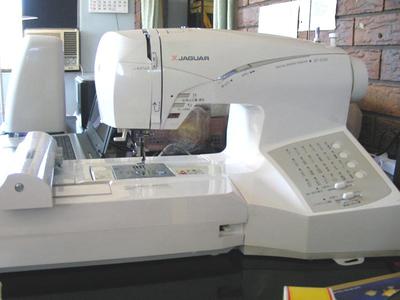
Hi, I have Jaguar, the same as Singer.
I open a new design, copy and paste on my screen. I believe that works for futura too.
Let me know if it worked.
Hugs,
Yoriko
I open a new design, copy and paste on my screen. I believe that works for futura too.
Let me know if it worked.
Hugs,
Yoriko
2 comments
Oh my goodness...it worked! Thank you, thank you, thank you! Reva
I'm so glad it worked :)
There are many wonderful features in this machine, I love it. Just would like to have a bigger hoop. :)
There are many wonderful features in this machine, I love it. Just would like to have a bigger hoop. :)
88650✽
I'm putting this to the top, as I dont want Jesus4gives misses this tip.
It worked for Reva, it may work for all singer users.
Hugs,
Yoriko
It worked for Reva, it may work for all singer users.
Hugs,
Yoriko
633✽
by
jesus4gives
30 Jun 2010
+3✽
I will try it Yoriko and I will let you know. Thanks so much and your machine looks exactly like mine.
2 comments
YES!!!!!!!!!!! It worked!!!!!!!!!!!!!!! Thank you so much. My gifts for Christmas are really gonna be great!!!!!!!!!!!!!! Did I say Thanks? Blessings!!!!!
Jesus4gives, I'm so glad it worked :)
You just made my day too.
Thank you,
Yoriko
You just made my day too.
Thank you,
Yoriko