
169064✽
organized. And coordinating the designs in the desktop and hard drive. Hmmmm.
Comments (5)

7568✽
by
honeychyle
20 Aug 2010
+5✽
I understand! I have so many designs I need to get organized my computer is a real mess!

33986✽
welcome to rehab ;o)
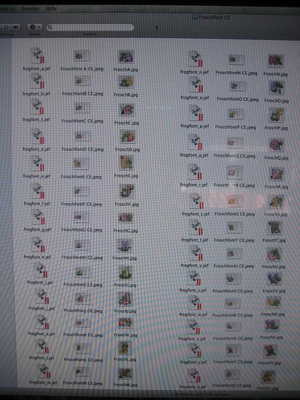
I have this resolution many times and always had a relapse. That's why new designs remain on my desktop until I know in which folder I will put them. In real life I'm absolut chaotic but my embroiderydesigns look like tin-soldiers all in a row :o)
I have this resolution many times and always had a relapse. That's why new designs remain on my desktop until I know in which folder I will put them. In real life I'm absolut chaotic but my embroiderydesigns look like tin-soldiers all in a row :o)
4 comments
This looks nice, what program/windows do you have? I like the pics/jpg at each entry.
From Bev
From Bev
Sorry,no windows ;o) I have an iMac and this is a regular new folder. I put the jef's and the jpg's with picture and with colorchart in there freehand; I could choose to put them in lines in alpahbetic rows but in this way I have a better overview *lol*
I have to admit that not all my folders look so organized. Some freebies I put in the folder with just a picture and didn't make an extra colorchart with embird (most freebies haven't a colorchart when you open them).
On my iMac you can choose between 4 options how the files should be shown: Like mine every single one where I put them manual, alphabetic (but there you nearly see no pics), from the biggest folder all the way to the single design or in a slideshow (sometimes useful and funny).
Greetings, Bettina
I have to admit that not all my folders look so organized. Some freebies I put in the folder with just a picture and didn't make an extra colorchart with embird (most freebies haven't a colorchart when you open them).
On my iMac you can choose between 4 options how the files should be shown: Like mine every single one where I put them manual, alphabetic (but there you nearly see no pics), from the biggest folder all the way to the single design or in a slideshow (sometimes useful and funny).
Greetings, Bettina
What kind of program on your desktop do you have? mine only shows the Jef file!
I have Mac OS X 10.5.8. In the bar on top of the screen I choose "buffer storage" (don't know the english terminus) and click on "new folder". I change the name (p.e. to Kids, Animals, Flora etc) and the I draw-out the dl-files in there and place it where I wanna have them. My program although shows just what I put in there. I have also embird (I use parallels for this cause embird didn't work with apple :o(.
In embird I have an iconizer that shows the size, stitchnumber, colors etc. but I didn't boot it up all the time I'm working on my mac. That's why I have colorchart and picture in my folders; help me to find things quicker :o)
In embird I have an iconizer that shows the size, stitchnumber, colors etc. but I didn't boot it up all the time I'm working on my mac. That's why I have colorchart and picture in my folders; help me to find things quicker :o)

7875✽
Good Luck with your endeavour, I am a good few weeks behind and can't see what treasures I have because they are still in their zip folders.
Happy treasure hunting!
From Bev
Happy treasure hunting!
From Bev

6491✽
It is an ongoing task staying organized. I try to organize as I download now, it took me years to figure that out hahaha

15874✽
by
quilter124
20 Aug 2010
+2✽
I collect until I have my desktop full, then I get my flash drives out and pull up one on the screen and download all that go into that one, then open up the next one and do it the same way, then give them to my DH and he makes a CD for me or adds to, with all of them on it for future needs. The CD's have saved me twice in the past 6 months as you never know what can happen, as the flash drive un-formatted itself or worse...Learned this from one of my embroidery club ladies.