








it AIMED at any ONE person. It is meant purely as sharing little tips I have learnt along the way that I think may help others improve the skills they already have.
Tip 1, please remember to lessen the density on designs for home embroiderers as a lot of domestic embroidery machines do not stitch out well when the density is too tight, which is the common default in most programs.
Tip 2, Running stitches are best set at a minimum of 2 - 3 mm, if they are too short they can actually act like scissors and cut the design right out of the fabric.
Tip 3, PLEASE don't forget to use tie on and tie off stitches on EVERY element of a design. There is nothing worse than having the stitches come undone when you start trimming the thread ends.
Tip 4, Plan your design stitch out. Start and end points of design elements are crucial to whether your customers will come back for more of your designs. It's easy to create the elements first, then tell your program where you want your starting and ending points to be so that the stitch out flows smoothly and there are no unnecessary jumps from the end of one element to the beginning of the next element.
There is nothing more annoying than jumping across an element to start the next one when it could be avoided with a little thought and proper planning.
Tip 5, Is along the same line as tip 4, but it is segment order planning, which is even more important. Placement stitches, especially, need to be carefully thought out. When are they needed in the design? at the very beginning, somewhere in the middle, will they hold the material in place when it is needed?
I use a notebook and make a map of the segments, changing their stitch-out order and thinking how each segment will appear in the finished design.
Then I will go back to the design and try the new stitch order using the sewing simulator.
It takes time doing these extra few steps, but the end result will not only look good, it will stitch out more professionally.
If you want to be a good digitiser, and not just another mediocre digitiser with great ideas and poor execution, you need to have some lessons on digitising with the software you use. There is so much to be learnt from the professionals, it will amaze you just what your software can do to make your digitising efforts stitch out perfectly and look fantastic. So many simple little tricks, like shading & stitch direction, that can help turn your designs into masterpieces. We all need instruction as new techniques are thought up every day and it makes all the difference to whether your designs have that "professional" looking edge to them or never improve from when you created your very first design.
One thing to always remember, if you don't really LOVE the whole process of digitising designs, then you shouldn't be doing it.
I have discovered that I actually prefer to be digitising than embroidering, or doing anything else, these days and I really love watching digitising tutorial videos, as I pick up so many ideas and I know they have helped me improve my skills, even though I still think of myself as a beginner.
Hugs and roses with the best of intentions, Meganne


Hugs Lee
Love your napkin ring designs, they were a big hit at all three of our Christmas get togethers. Hugs and Roses, Meganne


I will have to do all my digitising learning from the internet when the time comes.
I have watched one or two videos of designs stitching out in sewing simulators and they are fascinating. I can quite understand your enjoyment in creating them.
AlmaG.

I would love to know more about shading and blending . I always love those designs best, but can't get it right for my own .
From Bev
HNR, M

But I understand how all your advices are important, it is so much better to embroider with good digitized designs. You are kind to share all those tips.


Thank you for taking the time to share your tips :-) I too like you love digitising more then anything
I love seeing a design come alive.
It also makes me really appreciate another digitiser
hard work, like you say a good one.
Big hugs from London
Maria xx

emad: melide_menschen@yahoo.com.au
please put CUTE in the subject line
Hugs n roses, Meganne
Embird is my favourite as it is really user friendly, inexpensive compared to other programs, and has the best support of any program I have used in 30 years of computing. You can download a trial version to play around with for a time limited period, and once you pay for your licence the download you already have becomes your full version. You can pay for your licence for each section of the program separately, as and when you can afford it
hugs n roses, Meganne
Can't ask for more

I often don't have time to test stitch, especially if I've been up two or three whole nights digitising a design, but one can nearly always find someone who is willing to do it and it is the best thing to get someone else's opinion as you can be too wrapped up in your own work to see its flaws.
Hugs n roses, Meganne

You are very generous to share your expertise with those who are new and those that have had no formal training with this!
Now three years later, and a few online lessons with it, I am finding that first program is absolutely awesome and I use both it and my precious Embird, sometimes even on the one design. As the first program is a Professional program and has features that Embird doesn't and Embird is easier to do certain things with than Xpressive.
BTW, I too have cataracts starting and already notice that I need brighter lighting.
hugs n roses, Meganne

Another way to find help is to join Yahoo and search YAHOO Groups for those groups that are for specific programs or machines and find the one you have.
I hope this helps. Hugs and roses, Meganne


I do try very hard and give each design 100% of my knowledge and time. It is truly nice to be acknowledged.
Hugs and roses, Meganne

Lovely designs that I could in the end not use. Wished I new how to fix it myself.
Thanks.
Hugs and God bless
Marietta
It is not always the fault of the design, but can be that your tension needs adjusting for that particular design or that you need heavier weight, or two layers of Stabiliser, or even a different size needle or different brand of thread.
There are many variables that can cause even a, well digitised, design to go wrong and the more you can learn about embroidery in general, the easier it is to solve problems that may occur, that aren't the fault of the design.
Knowledge is the greatest gift you can give yourself.
hugs n roses, Meganne


Cheers
Sigrun


If you do need to put in jump stitches, which is unavoidable sometimes, try to make them as long as you can, even if it means jumping from one end of the design to the other end. Makes those pesky stitches much easier to cut.
The other thing is, to avoid jump stitches you need to use a run line, usually under the next lot of colour or along the edge. Don't use a dark colour under a light colour. It will show through. In this case it would be more practical to use a jump stitch.
I agree with Megs. Always scrutinize the artwork closely before starting to digitise. Then start with the bottom colours first. The ones that are underneath other parts of the artwork.It might mean you will use the same colour several times, but it will make for a nicer, more realistic look and, if you use an outline stitch in either triple, or backstitch,will give it a smooth, continuous line without dog legs in it.
Ricky
Hugs n roses, Meganne

I sometimes post designs at DBC that I have not test stitched, but always with the note that anyone having problems should contact me directly. One should never become too confident in their digitising abilities.
Hugs n Roses, Meganne
People need to know it is a skill, not something that is just all automatic if you have software - at least not if you want GOOD designs with nice stitchouts. It takes time and patience and work to learn any skill. Like success in any other craft, it is rewarding to be able to digitize a nice design but don't be surprised at how long it takes in the beginning :-)
I think we need to appreciate those who are kind enough to share their designs, yet realize that many are just learning so we need to test them first before using on a garment.
Jean
Many people just do not understand how much work is involved in creating a great design. They see people churn out designs one after another in rapid time and think it must be so easy to digitise, but if they compare the stitchout of such designs, with those that have been created by the more experienced and caring digitiser, they will come to understand why their designs are more expensive.
And I don't like making comments like this because some Cuties take it the wrong way and think the comment is directed at them, when it is ABSOLUTELY NOT directed at any one person but a general comment of several years observations and learning.
Hugs n roses, Meganne

Alice
To me these are the two things that identify and separate great digitisers from mediocre ones.
Of course, when you are first learning, it can take awhile before you start "automatically" thinking like a digitiser and mapping every picture you see. LOLOLOL!!!
Hugs n roses, Meganne

Jan aka hightechgrammy
"I will wake up and write down any great ideas I dream of"
You might surprise yourself.
If you have Embird there are many helpful tutorials already available, some free, some not and the best place to learn is from
http://www.flyingneedle.ca/ ................
http://groups.yahoo.com/group/flyingneedle_studio/
And if you can't digitise the designs you think up (and remember) share your ideas with a digitiser who can bring them to fruition.
Hugs n roses, Meganne
It is mostly poor planning on the part of the digitiser and in all the FSL designs I have that have had jump stitches they could have been avoided.
I was very disappointed to discover FSL Angels I had purchased from a well known digitiser were full of jump stitches, she obviously hadn't planned her designs at all.
Yet another set I purchased I could actually see huge gaps where the stitching did not even meet up with the outline and I had to edit the stitches individually, I still haven't been game enough to stitch them out.
There may be the odd time when a jump or two are unavoidable but for the most part it is undesirable in FSL.
Some designs can be fixed, it is very time consuming unless you are the original digitiser as it means moving or creating one stitch at a time and inserting stitches in place of the jumps. This is where Patience is the greatest virtue.
Hugs n roses, Meganne
I hope you were able to communicate this to the digitizer so she can improve her designs.


I'd love to learn to digitize one day, but I now realize how much work and talent goes in to creating each design.

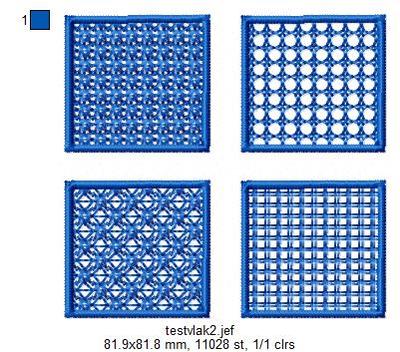
A point to add is ALWAYS make test stitches. Not only of the finished design (that's a part of the digitising process) but of fill samples, experiments with new stitches or specialty needles. Digitise a number of squares of fill stitches, same pattern, different densities and/or stitch lengths, sew them out and see what you like best in your program. Keep the tests in a folder for reference, it makes digitising so much easier, especially if you created your own FSL fills - just have a look in your folder and decide what would go nicely in your designs. Here's a picture showing what I meant.
I have started checking all my "purchased" and freebie designs now and I usually fix them before I stitch them out. It is surprising just how many are open to improvement.
It makes me wonder if some digitisers take on more than they handle and rush the designs through just to keep enough money coming in to maintain their websites?????
You make some valid points. hugs n roses, Meganne