








24342✽
embrd2k10b88c - with iconizer. I already had the earlier version installed and it worked fine. My question is: when I download an embroidery design and it has a .txt file details about the design maybe colors used, I put that in the same folder as my design. Well I installed the latest Embird and it has Quilting formats as well now. Quilting has one that has .txt extenstion. Now embird thinks all my .txt are embroidery files and tell me this in not an embroidery file or is corrupted. Can anyone advise me how to rectify this? I have actually uninstalled and reinstalled earlier 2010 version so I have them back.
Comments (2)

122866✽
Yes it's a damnable nuisance.
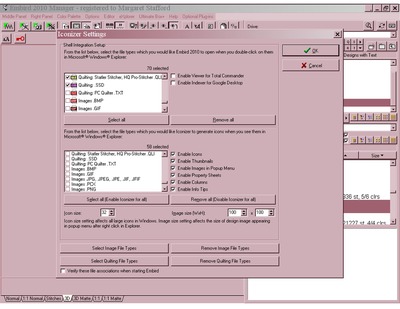
Firstly you need to open the settings for Iconiser and disable it from control over Text files.
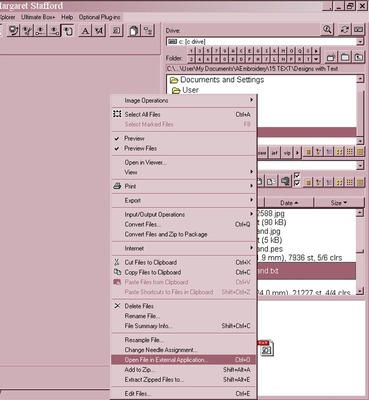
Then, when you wish to view a txt file from within Embird you will need to right click on it and scroll down until you see the choice: "Open file in external application".
Select that and then choose Windows, Notepad.
If you click on the photo's below, you will be able to zoom in and see them better if you need to.
Hope this helps, Hugs n gumnuts, Meganne
Firstly you need to open the settings for Iconiser and disable it from control over Text files.
Then, when you wish to view a txt file from within Embird you will need to right click on it and scroll down until you see the choice: "Open file in external application".
Select that and then choose Windows, Notepad.
If you click on the photo's below, you will be able to zoom in and see them better if you need to.
Hope this helps, Hugs n gumnuts, Meganne
1 comment
Oh! meganne thank you I really love embird and was stressing because I couldn't read the text...thank you Hugs Sally

10073✽
I love my embird programme - I just hope they sort out this problem in the next update.