













17488✽
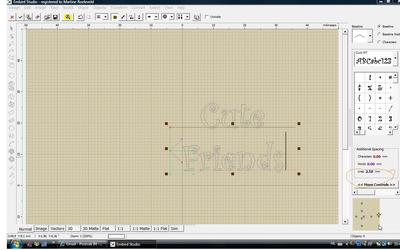
I'm trying to do a double line of text. I can get it all to work except, I can't figure out how to leave more space between the two line of text. They end up over lapping each other a little. I have been working on this for about 5 hours, and It might be something simple, but I just can't get it.
Thank you for any help with this.
Mary Ann
Comments (2)

145307✽
It is fairly simple. Are you doing it in Studio? In the right hand coloumn you see 'Additional Spacing' with 3 options: characters, words and lines. Increase the distance for the last one.
If it is in the Basic module it's even simpler as you get two different files and move the lower one manually.
Hope this helps.
If it is in the Basic module it's even simpler as you get two different files and move the lower one manually.
Hope this helps.
3 comments
I only see the picture when I click on it.
Thank you for your help. It's so much appreciated. I thought there should be a way to do the multi line, but I just couldn't get it to work. I ended up doing each row separate. Than I came on here and saw that you also did it that way. I was able to move it down so it looks good.
I worked on my project all day. I just bought Font Engine yesterday, and what I have seen of it so far, I really like it. I hope to be able to work on my project again tomorrow and get it finished up.
Again, Thank you so much for taking the time to help.
Mary Ann
I worked on my project all day. I just bought Font Engine yesterday, and what I have seen of it so far, I really like it. I hope to be able to work on my project again tomorrow and get it finished up.
Again, Thank you so much for taking the time to help.
Mary Ann
Glad you worked it out. FE is great to work with.
17488✽