













I have a question for everyone.
Hopefully someone can help.
I hear from many people who use a Ped Basic, which often have problems with Pes files, that he apparently can not see and handle.
I get this complaint often heard. I want those people to help, but I do not know how.
I’ve heard that if you e.g. Hus download, and convert it to Pes that it succeeds.
But apparently not everyone.
Who knows this problem and how to solve it.
I have no Ped Basic and can not find out.
People ask me all my patterns in other formats to be delivered, but there are thousands and I have really no time for.
How can I help people.
I once had a Ped Basic and as soon as he entered, he went out again.
That bad thing, I could not work with.
Thanks for your time and advice.
Greetings 10tje

Anyway, thanks for your reply.
seit ich die Bilder mit 7 Zip umwandel habe ich keine Probleme mehr! Vorher ging es mal und mal nicht.Mit der 5 D Embroidery geht es auch hervorrragend ich hoffe sie können das Problem lösen.
Viel Glück und vielen dank für die vielen Bilder

I hear from a lot of people using PED basic that they often have problems with PES files, apparently the software cannot convert the files. I want to help these people but I don’ t know how. I have heard that you can convert HUS to PES. But only occasionally it would appear that it is not consistent. It would seem the software is not reliable. I don’t have PED basic so I can’t test it. People often ask me for files in many formats but there are so many formats I can’t manage this.
I had PED basic but I could not use it. I could not work out the error.
I would appreciate any help in order to assist with this problem.
The biggest problem to be shown that the Ped Basic, pes sometimes not able to read.
And some people, my patterns can not use.
Why can the Ped Basic, not read those files?
Yes it is sometimes a problem so difficult to explain in English.
Unfortunately I have not found a solution, so I keep looking.
Alice
A Ped Basic is a Brother Card Reader / Writer ..
And format, that brother used: pes.
So it would certainly be a pes read / write.
http://eembroiderydesigns.com/social/

So that problem is not solved with my pattern.

there are many reasons ..
1, go to brother and download latest softwear I am running version 1.07.
2, when you have your ped basic open on your desk top. select your hoop size (4x4 or 5x7)this will then only show files that fit inside that hoop.
so perhaps your design is to big ??
3, make sure you have selected the correct location to transfer the design
I have taken this image from my desk top
it may help :-)
Big hugs from London
Maria xx
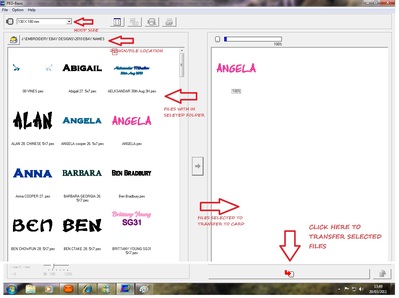
I'll pass it to the person who always encounter this problem.
Thank you very much

I have PED basic version 1.0, which has since been superseded, but I've had no problems so far. The problem seems to be designs that are made with newer versions of PE-Design.
Husqvarna software can read pes versions 2-8, it writes pes version 2 if the design is smaller than 130 x 180 mm, as version 6 when larger.
Embird can read PES version 1, 2, 2.5, 4.0, 5.5 and 6.0 and write PES version 3 and 5.
So I can imagine reformatting through one of those might do the trick if your PED-basic can only handle lower versions of PES.
10tje, I don't know what software you use, but can't you do a batch-conversion straight from the design file to as many formats as you want? I can't in 3D, but can in 5D as well as in Embird. I usually do 8 formats and it does not take much more time than doing one - just an extra click to say 'yes' to saving them.
Groetjes, Martine
So I use on my website, one size.
Would I do, I can offer anyone much less.
But thanks for your response, so it is very clear for people.

Even those made by my old program.
This is not no problem.
It is the Ped Basic who has problems.
There have been many funny faces made. and they are all made with that old program.
It could well be that my old program. and ped basic, do not mix. But I can remember that some patterns are seen.
But luckily you can finally make what you wanted to make.
greetings 10tje
However, I have completed the burp cloth with the funny face #68 and will email you a copy as well as put it in projects. Thank you for your help. Karen
http://projects.cuteembroidery.com/7065273/Monkey-burp-cloth.html
I get this very often hear from others.
I find this very sad, I would love to help that person.
Also the design data must fit within the hoop selected, if the design is slightly too large then there is a picture of a resizing hoop over the design, meaning that if its resized then it can be transferred but if the design is too large for the hoop selected it'll have a picture of a crossed out hoop over the design (meaning they cant transfer it to the card) if this is the case then the design will have to be resized smaller.
I just tried, and my PED Basic wont allow me to open or convert hus files, only pes files. (Yes, my version is current).
PED-Design is Brother's digitising software which will import hus files so they can be converted to pes, but as this is digitising software it has a hefty price tag - your clients might be better off converting with free software such as Pulse Ambassador or Wilcom's TrueSizer, if all they want to do is convert hus to pes, or pes files to a lower version (eg: pesV6 to pesV4).
I'll add the links to the upgrade for PED Basic for xp, TrueSizer and Ambassador.
I hope this helps you & your clients, thx for all you offer on your site :) xXx
I have the link sent to her.
Then she can see for herselve how she can best do.
Thanks for your help and your clear explanations.
oops I see a typo in my post. PE Design not "PED-Design" as I had written, is Brother's digi software. xXx
Fully tested by: Barbnic
So all credit to her.
She has written especially for anyone who also has problems.
Hopefully now everyone helped.
Hopefully this works for everyone.
Greetings 10tje
1. Make sure you can unzip rar files --winrar.
2. Set up 3 files that you can work out of.
3. Download Pulse Ambassador free from Ann the Gran.
4. Go to website --choose design--download to file 1.
5. Right click on rar file and choose the second extract that contains the file
Name. Then click on file folder and this may take another click to see
Pes design files show --usually has a green ball out beside these files.
There will be a file for each size.
6. Bring up Pulse ambassador and click on yellow file folder in upper left
Corner. A box will appear that says look in --select the file 1 that you
Just down loaded to.
7. Go to Files of Type and change to pes.
8. Hit open.
9. You will see design appear in box icon preview.
10. This will take you back to screen that has yellow file on it-- go to top of
Screen that says file and click on save as. This will take you back to
box that lets you change design format--change to hus.
11. Then close on dropdown under file
12. Change all the files listed in the box to pes repeat step 6-11. Starting
Clicking on the yellow file.
13. When finished making format changes open file 1.
14. Move all hus files into file 2. Do not copy. These files will have the
extension .hus on them. Choose file 2 in Pulse Ambassador.
15. Now do step 6 through 11 and this time change to pes 1.0
16. Once you have converted these files to pes go to ped basic. Find
File 2 --click and your pictures of the design will appear. If there are
Multiple sizes only the ones that your ped design and machine can use
Show.
17. Once you make sure that the designs are there --move all these files to
Files 3 which is your working pattern file. Then once you have your
Designs there go and delete all files in file one and start over. This is
A work around to download any older software.

If she needs a dongle (card reader/writer), you could buy PED Basic from ebay USA. It cost me around US$100 and even after adding postage was much cheaper than buying here in Australia - something like AU$300 without the card was the price I was quoted from Brother AU (the card is an extra AU$130). The PED Basic package I got had the reader/writer, the cd, the manual and a blank card included in the genuine Brother box. Be aware that the reader/writer probably wont work with PE Design but its still a way to transfer designs to her machine if hers is older (like mine) and doesnt have the USB port. :)
