













255066✽
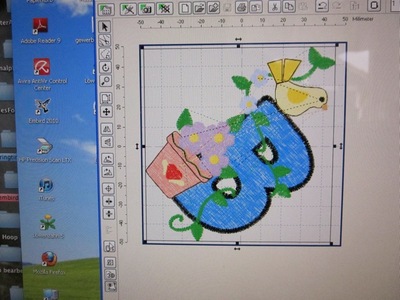
Very sad..... Just DL letter 'B' of the lovely Springtime Alpha and it is too big for my 4x4 hoop. The 'A' was just fine. Any suggestions?? Sarah.
Comments (9)

57813✽

211088✽
by
shirlener88
30 Mar 2011
+6✽
Sarah, I would suggest seeing if you could make it smaller.

19430✽
by
fannyfurkin
30 Mar 2011
+5✽
I think you have been given the answer.What software do you have? You should be able to reduce the size as long as you don't reduce it by anymore than 20%. If you don't have any software to resize you could try wilcom truesizer. I don't use it but I have heard that people like it and it is free
1 links:
[1]
http://www.wilcom.com.au/PRODUCTS/TrueSizer.aspx
www.wilcom.com.au

33350✽

23222✽
If you don't have software maybe your embroidery machine will allow you to resize. I have a Designer SE and my machine allows me to resize designs a bit.

92391✽
I can use it in my 5X7 hoop, but to keep it 4x4, I thought of moving the bird down beside the B. Hope these thoughts help you. I feel it would mess up the design to reduce it that much. I may be wrong. Hugs, Judy
255066✽
Thank you for all your answers. Unfortunately I have a very old machine that does not have any of the software to reduce a design. I do have Wilcom Trusizer and I will try that. *4 all.
255066✽
I have just tried the Trusizer and it seems to have worked.......Hooray!! It has also reduced the stitches. I now have to see if it will DL on my card. Thank you all for your help. Sarah.

33986✽
I'm always very careful with resize designs. Something like this letters with so many small details can get really worse while stitching (my janome loves to make big bubbles of thread at the backside).
If you just need a single letter than it works to minimize 10% and turn it to the right side so the bird is in the corner and not at the top. Had seen this trick at a webpage and thought what an easy trick if you have a design with a high peak :o)
Greetings, Bettina
If you just need a single letter than it works to minimize 10% and turn it to the right side so the bird is in the corner and not at the top. Had seen this trick at a webpage and thought what an easy trick if you have a design with a high peak :o)
Greetings, Bettina
1 comment
Thank you for this - what a great idea.