













17488✽
I know we have several digitizers here and I hope someone can help me out with this.
Thanks
Mary Ann
Comments (13)

7875✽
I like to scan a pic that I draw on paper (simple black line drawing works better).
PE Design allows one to import the pic directly from the scanner. Then digitize and also save pic as a bmp or jpeg.
I have also drawn some pics in "paint" Microsoft.
From Bev
PE Design allows one to import the pic directly from the scanner. Then digitize and also save pic as a bmp or jpeg.
I have also drawn some pics in "paint" Microsoft.
From Bev

20463✽
beginner ;-)<br />I use Corel Draw,Paint or my Photo SW depends. <br />Try to use what you already have at first and see how far it brings you or if you have the possibility go to your local school and test what they have there. Our school has a programm for "old" folks and the jung enjoy showing off.
You can import JPG files to Embird to digitize them and Corel can export the drawings to JPG. Hope this helps, regards Sue
You can import JPG files to Embird to digitize them and Corel can export the drawings to JPG. Hope this helps, regards Sue

122866✽
If I am going to create a design from my own art idea I draw the design directly in the digitising program.
Another way you could do it is by hand, then scan your drawing into your digitising program.
There is a program called Pre-Design Studio that I have heard is quite good and you can download a trial version.
HNR, Meganne
Another way you could do it is by hand, then scan your drawing into your digitising program.
There is a program called Pre-Design Studio that I have heard is quite good and you can download a trial version.
HNR, Meganne
1 links:
[1]
http://www.pre-designstudio.com/
www.pre-designstudio.com
4 comments

I use this program, have for several years. I can draw on a piece of paper, but not on the computer - so I draw the design then import it into the program then trace my drawing and it makes the smooth vector lines that make digitizing much easier, then export to the digitizing program. Seems like a lot of steps, but it really is quite easy and works very well for the price.

You and Meganne could hold classes for all that are computer challenged . Me for one!!!

Add my name to this list lol carolyn
I used to be a Microsoft Sales Partner and often did help desk support, I think that started me on this "I have to find the solution" trip.
Then of course, I used to write the user manuals for our software (not Microsoft) so I love helping people the easiest way I can find for them.
I REALLY miss that job.
Then of course, I used to write the user manuals for our software (not Microsoft) so I love helping people the easiest way I can find for them.
I REALLY miss that job.

92391✽
Thanx for asking, Maru Ann!!! I wondered about that myself. Hugs, Judy

23222✽
Well, if I were to give it a try, I have 4D with a sketch pad. Only things I've done so far is scanned.
17488✽
Thank you all for the replies. I forgot that I had coral draw on my other computer that crashed last month. I found my program, and just installed it on my new laptop. Now I just have to figure out how to use it.
Thanks you...* for all
Mary Ann
Thanks you...* for all
Mary Ann
2 comments
Good luck!!!
Lucky girl! Don't forget they have Tutorials you can download from the Corel website. hugs, Meg

261164✽
by
basketkase
03 May 2011
+7✽
I have corel built into my digitizing program, but can't seem to get the hang of it......I use Bernina 6.0 digitizing software and either draw right in my digitizing software with my mouse or draw by hand and scan it in like the other cuties.......depends how complicated it is.....Vicki
1 comment
I have this software too, but but it is all beyond me!!! I know if I could sit down one on one I could really learn it. Too, bad that the instructors don't make house calls. Kay

63174✽
by
smithandsmith
03 May 2011
+5✽
Hi Mary Ann
I use the paint program on my computer for the very simple designs. I draw and scan the picture and then copy and paste it to my digitizing program.
Hugs Lee
I use the paint program on my computer for the very simple designs. I draw and scan the picture and then copy and paste it to my digitizing program.
Hugs Lee
17488✽
I will just have to find time to play with it, and see if I can get it to work for me.
Thank you
Mary Ann
Thank you
Mary Ann

20276✽
I am the same as Bev below..
I would hand draw or get somebody to hand draw a desing for me
then scan and up load to my PC.. if I need to edit at all I would do that in paint.. I have adobe illistrator and coral draw.. but I just find the pencil and paper method so much easier lol..
I would import this to my digitsing software..
but mostly i dont bother with clipart I draw straight in my Embird.
Big hugs from London
Maria xx
I would hand draw or get somebody to hand draw a desing for me
then scan and up load to my PC.. if I need to edit at all I would do that in paint.. I have adobe illistrator and coral draw.. but I just find the pencil and paper method so much easier lol..
I would import this to my digitsing software..
but mostly i dont bother with clipart I draw straight in my Embird.
Big hugs from London
Maria xx
1 comment
Thanks, I don't know how to draw into embird. Do you know if there is a tutorial somewhere for this? I'm very new to this Embird program. What I have done, I love the program, but getting to learn different things is very hard as I don't have the time like I wish I had.
17488✽
Thank you ladies for all your help. You gals are the greatest. I'm finally able to show off all my drawing talent(HAHAHA) to the world because of you gals.
Here is my first drawing in Embird.
Here is my first drawing in Embird.

6 comments
So proud of you.
you should stitch this out to remind you of where you started lol :-)
because you will be amazed at what you can achieve in the future :-)
This type of simple line designs some call redwork is great for stitching onto card.. try and see..
big hugs from London
Maria xx
because you will be amazed at what you can achieve in the future :-)
This type of simple line designs some call redwork is great for stitching onto card.. try and see..
big hugs from London
Maria xx
hahahahahahaha
Still laughing.
I love people who can make fun of themselves.
of course you do realise that a circle is the most difficult object to draw freehand, so it augers well for a great future. Hugs Meganne
Still laughing.
I love people who can make fun of themselves.
of course you do realise that a circle is the most difficult object to draw freehand, so it augers well for a great future. Hugs Meganne
wow, you are definitly on the right way - -big grin- isn't Embird fun?
I would love to be able to digitize! Is Embird easy to learn? Is it very expensive? How long did it take you to be able to draw your first design? I'm impressed!
freckledgoldfish, You ask..(Is Embird easy to learn)...Nothing comes easy. I'm new to Embird, you have to spend LOTS of time with it, lots of time reading, and lots of time just playing with it. These gals on here have been very helpful to me. The few things I have digitized, took me many days. (Is it expensive) You can buy it in parts. I think it's very reasonable compared to most of the others. (How long did it take me to draw my first design)...Once I figured it out, the face above is my first design that I drew. Took about 10 seconds...lol, just showing off my talent there.HAHAHA! Drawing and digitizing are totaly different.
I know very little about all this digitizing, but I'm learning, I have very little time to spend on it. I have a home business and do the markets. I'm very happy with the program, and I think it's money well spent.
I know very little about all this digitizing, but I'm learning, I have very little time to spend on it. I have a home business and do the markets. I'm very happy with the program, and I think it's money well spent.
20276✽
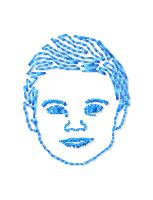
This was my first attempt at drawing in Embird
I just imported a Photo of my son, and draw freehand
this was 3 years ago lol ..:-)
I joined the Rose Cottage Monthly challange and this is where I really learned the most.
Vivian gives you a project once a month
she gives you an image + veryclear instructions with photos showing how she would digtise the design.
everybody who partakes then uploads there design and at the end of the month you can download everybodies entry.. its really fascinating to see how different minds work with the same picture, also along each challange everybody helps each other with advice..
mostly have fun
big hugs from London
maria xx
I just imported a Photo of my son, and draw freehand
this was 3 years ago lol ..:-)
I joined the Rose Cottage Monthly challange and this is where I really learned the most.
Vivian gives you a project once a month
she gives you an image + veryclear instructions with photos showing how she would digtise the design.
everybody who partakes then uploads there design and at the end of the month you can download everybodies entry.. its really fascinating to see how different minds work with the same picture, also along each challange everybody helps each other with advice..
mostly have fun
big hugs from London
maria xx

26714✽
THank you for this question i was about to ask the same one. I read the comments and learned new things. I maybe Dl pre-designs studio and see. I have been thinking sign in in one of those Embroidery classes. For you experience Bonny Accademy, Rose Cottage or Flying Needle? I am not very nimble with computers. Thank you.
2 comments
Flying Needle is the absolute best and most reasonably priced VIDEO tutorials for Embird.
Thank you!