













12821✽
I was telling me that I needed to scan it. Well, I didn't want to click on what appeared before me.
So I went to download some free antivirus for Macs (I went to Komando.com to see what she recommended). It found I had just been infected with 8, yes 8 trojans!!! The thing is not letting me clean them up. Or do anything about that. I put them in the trash and try to delete them but I couldn't even do that.
I don't know what to do. I was going to load a picture of what it says but I think I better not, cause I don't know if that will give this site a problem... I am so upset!
I am running another scan.
Comments (16)

63240✽
I know how you feel! I hope that your computer will be in 100% working order in no time *2U
1 comment
Thank you so much. I hope so too.

463492✽
I know there are ways to fix it but I'm not good enough to figure it out n my own. Try using the All Topics search on the left to find help. Try entering virus or software.
1 comment
Thank you so much.

33986✽
Will ask my husband; maybe he has a good idea for a program to help you ;o)
Greetings, Bettina
Greetings, Bettina
1 comment
Thank you so much. I also appreciate all the Private Messages before this happened.

122866✽
You need to download rkill and MalwareBytes anti malware, do it from another computer if you can and put them on a usb stick.
Put the stick in your computer and click on the rkill program to run it, it will disable the trojans so you can remove them with the anti malware program.
Good luck.
Put the stick in your computer and click on the rkill program to run it, it will disable the trojans so you can remove them with the anti malware program.
Good luck.
2 links:
[1]
http://www.bleepingcomputer.com/download/anti-virus/rkill
www.bleepingcomputer.com
[2]
http://www.malwarebytes.org/
www.malwarebytes.org
2 comments

ta-da!
Thank you so much for posting these links here and for your advice. I'm in the process of contacting them to see if they work on a Mac.
Last night I found a file in my downloads that I had not downloaded, and I deleted it. I have not had the Java files appear again. I kept getting them to reappear over and over and over.
I do want to thank you so much for always being ready to help us. Your help is always appreciated!
My most recent scan shows the infected files are gone. But as you pointed out, Norton had missed some Malware in your computer. So, I am actually considering doing what you are suggesting here. Downloading the software into a flash drive, and then trying to see if it will work on my Mac. It will be easier to delete it from the drive if it doesn't work.
Thanks again Meg. Have a really nice day!
Last night I found a file in my downloads that I had not downloaded, and I deleted it. I have not had the Java files appear again. I kept getting them to reappear over and over and over.
I do want to thank you so much for always being ready to help us. Your help is always appreciated!
My most recent scan shows the infected files are gone. But as you pointed out, Norton had missed some Malware in your computer. So, I am actually considering doing what you are suggesting here. Downloading the software into a flash drive, and then trying to see if it will work on my Mac. It will be easier to delete it from the drive if it doesn't work.
Thanks again Meg. Have a really nice day!

3368✽
Yes I agree with meganne I had the same thing. DO NOT click on it belive me I found out the hard way. I too had to put it on a stick and run it from there. Even if you do not have this problem now down load the rkill and Malware for safety on a stick.
1 comment
Thank you I will.

6340✽
by
marcellelewis
29 May 2011
+8✽
Would you please share the name of the website for graphics with us so we can be sure to avoid it?
Thanks
Marcelle Lewis
http://embroideryavenue.com/
http://embroidery.gotop100.com/
Thanks
Marcelle Lewis
http://embroideryavenue.com/
http://embroidery.gotop100.com/
1 comment
Please see above... I am running out of time.

913✽
This is an insidious virus that is making its way around the web. contact your virus protection company (may have to use a different computer) and download the fix to a flash drive. Whatever you do do not go to the site that they are trying to direct you to. This is a form of blackmail and they want you to purchase their "virus" protection software which is bogus. This is why you should always purchase your virus protection. good luck
1 comment
Thank you

70773✽
I know how you feel - I picked up 2 Trojans two days ago. I was able to clean them using ESET Cybersecurity. It's not a free program, but it works on all the nasties I've come across, so far. I also have a MAC. Could you name the site, so we can avoid it? I hope everything works out for you. Good Luck! ✿4U
1 comment
I will have to check this out, since it does work with a Mac...
The site is
http://graphicsfairy.blogspot.com
It is a blog, and it is really nice. I'm going to try to contact the owner so I can notify her.
The site is
http://graphicsfairy.blogspot.com
It is a blog, and it is really nice. I'm going to try to contact the owner so I can notify her.

22300✽
by
mysugarfootswife
29 May 2011
+6✽
What was the site address, please?
1 comment
This is it...
http://graphicsfairy.blogspot.com
But as I mentioned above... I have been to her site several times and never had a problem. Her blog is really nice, and she might not be aware of the problem.
http://graphicsfairy.blogspot.com
But as I mentioned above... I have been to her site several times and never had a problem. Her blog is really nice, and she might not be aware of the problem.

2308✽
Darn, that happened to me yesterday and I knew right away that something was wrong. now what are we to do? I have malware, I r n it as soon as it happened. what is wrong with people?/all we are trying to do is make the world a pretty place one embroidery at a time.
1 comment
Meganne has provided some links here for software to remove them. I hope you try them if you haven't already. I hope your computer works well.

26714✽
What is the name of this site????? Please no link of course.
1 comment
It is http://graphicsfairy.blogspot.com
But I will tell you something... It is not her fault. I have been to her site several times and nothing happened. She might not even be aware of the problem. Her site is really nice.
I'm trying to figure out a way to notify her.
But I will tell you something... It is not her fault. I have been to her site several times and nothing happened. She might not even be aware of the problem. Her site is really nice.
I'm trying to figure out a way to notify her.
12821✽
by
stitchship
30 May 2011
+4✽
Thank you all for your replies... I will give flowers right now, but I will have to reply to you all later. I am still working here. I downloaded Norton Antivirus Through our server... for all of you that use Comcast, I want to tell you that they have free antivirus through Norton for up 7 computers in your household, and you have free technical support. My problem is that having a Mac creates a problem, everything has to be specialized. Tech don't usually know too much about Macs, just PCs.
The site to avoid is Graphicsfairy.blogspot.com It was a site I got through Bernina, at a webinar I attended. The graphics have no copyright as they were made long ago, and they are beautiful. They can be used for scrapbooking and more. But it all turned ugly when I got these trojans. :(
I'm not a computer genius. I have built a computer, changed parts on my old 98's when used those, and I have taught people how to use a computer... but I have never in all my years on line had to deal with a virus, or a trojan...
At this point I have 3 trojans left that I can't seem to get rid of... Norton can't repair them. Just the Scan took more than 3 hours, and I 've been on the phone hold for way over an hour with them. I guess that I will try to visit the sites that Meganne sent me.
Thank you all for caring. You all have a blessed day.
The site to avoid is Graphicsfairy.blogspot.com It was a site I got through Bernina, at a webinar I attended. The graphics have no copyright as they were made long ago, and they are beautiful. They can be used for scrapbooking and more. But it all turned ugly when I got these trojans. :(
I'm not a computer genius. I have built a computer, changed parts on my old 98's when used those, and I have taught people how to use a computer... but I have never in all my years on line had to deal with a virus, or a trojan...
At this point I have 3 trojans left that I can't seem to get rid of... Norton can't repair them. Just the Scan took more than 3 hours, and I 've been on the phone hold for way over an hour with them. I guess that I will try to visit the sites that Meganne sent me.
Thank you all for caring. You all have a blessed day.
4 comments
I was looking at macwelt.com (big special jpournal here in Germany just abot Mac) but didn't find something useful about this new trojans but I send them a mail and asked about your problem. Maybe they have more experiences with that ;o)
Greetings, Bettina
Greetings, Bettina
I have to tell you that I have the full version of Norton's Internet Security, running three licences and paid up ongoing support, upgrades and virus updates.
Norton's did not stop a trojan I came across recently on a website that had been hacked.
Rkill stops the processes that prevent you from accessing the Trojans that other programs can't remove, followed up by running Malwarebytes and you should be clear.
It is worth giving a try and both programs are freeware.
Please don't blame the website, the mongrels that create these identity theft viruses usually move from one website to another so they can't be traced. Tomorrow that same website could be perfectly safe.
No one is immune from these hackers and whilst there is a dollar to be made they won't be stopped.
When they can hack into big businesses, with all their million dollar security systems, what chance does small web owners stand?
We have to be ever vigilant and whenever we see something suspicious don't be afraid to SWITCH OFF THE POWER BUTTON on the back of your pc's tower or pull the plug from the wall.
Most pc's can handle that these days as Microsoft is aware that sometimes pc operators need to take DRASTIC action.
Hugs and sincere empathy, Meganne
Norton's did not stop a trojan I came across recently on a website that had been hacked.
Rkill stops the processes that prevent you from accessing the Trojans that other programs can't remove, followed up by running Malwarebytes and you should be clear.
It is worth giving a try and both programs are freeware.
Please don't blame the website, the mongrels that create these identity theft viruses usually move from one website to another so they can't be traced. Tomorrow that same website could be perfectly safe.
No one is immune from these hackers and whilst there is a dollar to be made they won't be stopped.
When they can hack into big businesses, with all their million dollar security systems, what chance does small web owners stand?
We have to be ever vigilant and whenever we see something suspicious don't be afraid to SWITCH OFF THE POWER BUTTON on the back of your pc's tower or pull the plug from the wall.
Most pc's can handle that these days as Microsoft is aware that sometimes pc operators need to take DRASTIC action.
Hugs and sincere empathy, Meganne
I agree it is not the website owners fault. I have been to her website and have had no problem before. I don't even know if she is aware of the problem. I don't know her contact info, and I don't want to go back to the website again for now.
I am still looking to see if it is gone. I deleted the files and emptied my "trash" It still has about one more hour. I intend to set my alarm and wake up earlier, and run the programs Meganne recommended just to be safe. I have looked for the infected files and I can't find them. They were hidden in one of the Java folders.
Apple told me that I am going to have to reinstall my system all over...
The bad thing is that tomorrow is a Holiday here in the US and We have plans, so I won't have the time to do all I want to do with the computer.
Bettina, I really appreciate all your help and your advice. I don't know if you got antivirus on your Mac, tell your husband to stay vigilant. Apple told me that whoever is creating the malware directed to Macs, has changed the name several times. So please stay safe.
It's so sad that there are people out there that are so smart that they can create something that will harm others, instead of putting those brains to create something that will help many.
I am still looking to see if it is gone. I deleted the files and emptied my "trash" It still has about one more hour. I intend to set my alarm and wake up earlier, and run the programs Meganne recommended just to be safe. I have looked for the infected files and I can't find them. They were hidden in one of the Java folders.
Apple told me that I am going to have to reinstall my system all over...
The bad thing is that tomorrow is a Holiday here in the US and We have plans, so I won't have the time to do all I want to do with the computer.
Bettina, I really appreciate all your help and your advice. I don't know if you got antivirus on your Mac, tell your husband to stay vigilant. Apple told me that whoever is creating the malware directed to Macs, has changed the name several times. So please stay safe.
It's so sad that there are people out there that are so smart that they can create something that will harm others, instead of putting those brains to create something that will help many.
We have some antivirus-programs but like soozie said: The bad guys are always one step further...
We made a complete back-up yesterday on an external drive. If it is necessary I could do what Apple told (and my husband guessed the same yesterday): Delete everything and reinstall the system (still hope I never have to).
What a pity for the owners of the blog; seems they have nice stuff on their page (did I mentioned that I love fairies ;o) and now people stay away cause they are frightened. Think the same happened to turquoise cause somethimes I've read posts from cuties that they get malware there. I was often at her page and love her desigsn and the talent she shares with all of us and never had trouble with dl from her.
Hope you can delete all the rest of the trojans :o)
Greetings, Bettina
Greetings, Bettina
We made a complete back-up yesterday on an external drive. If it is necessary I could do what Apple told (and my husband guessed the same yesterday): Delete everything and reinstall the system (still hope I never have to).
What a pity for the owners of the blog; seems they have nice stuff on their page (did I mentioned that I love fairies ;o) and now people stay away cause they are frightened. Think the same happened to turquoise cause somethimes I've read posts from cuties that they get malware there. I was often at her page and love her desigsn and the talent she shares with all of us and never had trouble with dl from her.
Hope you can delete all the rest of the trojans :o)
Greetings, Bettina
Greetings, Bettina

255066✽
Hope you have come right by now. Horrible thing to have happened. Sarah.
1 comment
Thank you. i hope so too.

25169✽
by
snowbird42
30 May 2011
+3✽
Hello form australia...i work for a computer repair company and there is NO I REPEAT NO antivirus that will give you 100% protection because they are alwayS 1 day behind the 50 or so new viruses posted on the internet daily so until the virus is posted the virusprotector can not find a cure for it so unfortunately some get through and infect your computer some are so bad they completly imobolise your computer some have fake micdrosoft logos i could go on and on and the bottom line is that you will PROBABLY have to take it to a repair establishment...sorry to be the bearer of bad news.....hope your virus is not to bad....soozie
1 comment
Thank you so much. I have considered taking it somewhere, just to be safe.

1657✽
by
wishfulthinking
30 May 2011
+2✽
Hello
I am sorry to read the problems you have had, but as the same thing happened to me with trojans everywhere! I can sympathize with you. I have not read all the answers you have received as I am in a frightful hurry, so if someone has already given you the following advise, please forgive me for repeating it.
Firstly, I swear by a virus programme named Bullguard, found at Bullguard.com. It truly is amazing and worth every penny. This programme has saved my computer several times. It has 24/7 LIVE online help and if they cannot talk you through it, they will take over your comp and do it for you. The more years you buy the cheaper it is and you can cover up to 7 computers with one licence. I recommend to everyone. The other thing to have is a FREE DL named CCleaner, (just type the latter into google) run this once a week and it will clean your computer, this is also an amazing programme.
Now if you need to download or run scans start your computer in 'SAFE MODE' by turning your computer on and keep tapping the F8 key, the screen will appear completely different to what you are use to. click on START IN SAFE MODE and follow the instructions from there on. This will enable you do work/clean your computer safely. If you had Bullguard, this is the way you would talk to the tech guys, without fear of the Blxxdy virus eating everything.
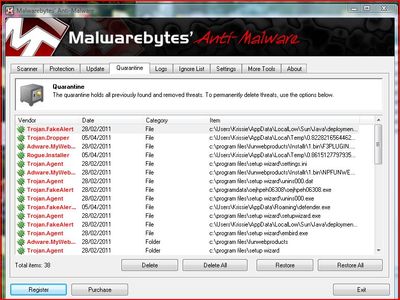
Also download 'MALWAREBYTES' Anti malware by also typing into google to find the free download. Once installed run it. A SAFE way of deleting virus infected files is to hold down the 'SHIFT' button at the same time as DELETE, as some virus can escape your rubbish bin...By doing as I say bypass's the bin and send the little blighters straight into Cyber Space.
I hope this helps. If I have not been clear enough for you please feel free to contact me and I will walk you through it.
Kind Regards
~x~
I am sorry to read the problems you have had, but as the same thing happened to me with trojans everywhere! I can sympathize with you. I have not read all the answers you have received as I am in a frightful hurry, so if someone has already given you the following advise, please forgive me for repeating it.
Firstly, I swear by a virus programme named Bullguard, found at Bullguard.com. It truly is amazing and worth every penny. This programme has saved my computer several times. It has 24/7 LIVE online help and if they cannot talk you through it, they will take over your comp and do it for you. The more years you buy the cheaper it is and you can cover up to 7 computers with one licence. I recommend to everyone. The other thing to have is a FREE DL named CCleaner, (just type the latter into google) run this once a week and it will clean your computer, this is also an amazing programme.
Now if you need to download or run scans start your computer in 'SAFE MODE' by turning your computer on and keep tapping the F8 key, the screen will appear completely different to what you are use to. click on START IN SAFE MODE and follow the instructions from there on. This will enable you do work/clean your computer safely. If you had Bullguard, this is the way you would talk to the tech guys, without fear of the Blxxdy virus eating everything.
Also download 'MALWAREBYTES' Anti malware by also typing into google to find the free download. Once installed run it. A SAFE way of deleting virus infected files is to hold down the 'SHIFT' button at the same time as DELETE, as some virus can escape your rubbish bin...By doing as I say bypass's the bin and send the little blighters straight into Cyber Space.
I hope this helps. If I have not been clear enough for you please feel free to contact me and I will walk you through it.
Kind Regards
~x~
1 comment
Thank you so much for your information. I am now in the process of finding out if the work with my Mac. :)
33986✽
I get an answer from MacWelt and they describe a way that should work for Apple/Mac. My english isn't the best and most of the translation-programs mix/match all together so nobody understand anything.
They said that Apple knows about the problems and will change something for the next update to provide malware.
If somebody here coud translate this (I'm affraid that I does it wrong and this get's more trouble then the malware itself).There were also 2links to helping articels.
Greetings, Bettina
Um die Trojaner selbst entfernen zu können, muss man im Diensprogramm Aktivitätsanzeige die Prozesse unter dem entsprechenden Namen unterbinden. In den Artikel finden Sie die Namen und die genaue Erklärung, wie man dabei vorgeht. Des Weiteren hat Apple auch versprochen, mit dem nächsten Update gegen das Problem vorzugehen.
They said that Apple knows about the problems and will change something for the next update to provide malware.
If somebody here coud translate this (I'm affraid that I does it wrong and this get's more trouble then the malware itself).There were also 2links to helping articels.
Greetings, Bettina
Um die Trojaner selbst entfernen zu können, muss man im Diensprogramm Aktivitätsanzeige die Prozesse unter dem entsprechenden Namen unterbinden. In den Artikel finden Sie die Namen und die genaue Erklärung, wie man dabei vorgeht. Des Weiteren hat Apple auch versprochen, mit dem nächsten Update gegen das Problem vorzugehen.
2 links:
3 comments
Just found the english version of "how to avoid or remove MacDefender malware". Maybe it works also here?
http://support.apple.com/kb/HT4650
Last modified on may 24th 2011 seems to be updated.
http://support.apple.com/kb/HT4650
Last modified on may 24th 2011 seems to be updated.
Thank you so much. We have sites here that are good too. I was going to have to go there and see what they recommended, but I will check these out first.
The only reason Apple told me to reload the system again is because I had to delete some Java files. They are afraid that I might have delete a folder that was needed for the proper running of this Mac.
Last night... I found more files and when I was going to delete them, it told me that they were infected. So... I deleted them. I have run several scans and it is showing me that I am free of them. But as Meganne pointed out, they can escape detection.
I hope that this is the end of this problem. I do want to run some of the software that Meganne has suggested. I will also check out the links that you suggest here. Thank you so much.
The only reason Apple told me to reload the system again is because I had to delete some Java files. They are afraid that I might have delete a folder that was needed for the proper running of this Mac.
Last night... I found more files and when I was going to delete them, it told me that they were infected. So... I deleted them. I have run several scans and it is showing me that I am free of them. But as Meganne pointed out, they can escape detection.
I hope that this is the end of this problem. I do want to run some of the software that Meganne has suggested. I will also check out the links that you suggest here. Thank you so much.
I was forgetting another thing that was mentioned by the Apple Tech is that MacDefender has had several names one of them is MacGuard.
MacGuard is also the name of software being offered to help get rid of Malware, so be careful.
MacGuard is also the name of software being offered to help get rid of Malware, so be careful.