













38558✽
How do you load more than one picture in projects or do you have to do them separately?
Comments (6)

109920✽
by
crafter2243
06 Jun 2011
+8✽
I believe you have to do them separatly. Never saw more than one. Looking forward to your post in project.
1 comment
thanks

72398✽
I could only do one at a time.
1 comment
I think that's what I will do.

22354✽
by
sewfrenzie
06 Jun 2011
+7✽
In order to get more than one picture to show you need to use a photo shop program where you make projects and can "Collage" pictures together, or make a "scrapbook" page to upload. I have done this in the past using Microsoft Picture It! Photo Premium. You download it as one picture, but it has several pictures within the project you saved it as. There are other programs available that you can do something like this in also. Good Luck!
1 comment
I don't think I will go to all that extra and will just upload one project at a time.
Thanks for the info.
Thanks for the info.

169074✽
Sewfrenzie is correct. My husband did an insert picture with a picture using Adobe Elements. I posted it showing off my hand embroidered quilt several moths ago.
1 comment
thanks

211088✽
by
shirlener88
07 Jun 2011
+2✽
Yes, as stated - you need a photo program that you can put both of your photo's in one - then save it - that way you can upload it in PROJECTS or your other option is to upload the two photo's separately. Do you have the ability to do that with your photo's - do you need some help in doing so?
1 comment
I'll play around with a program my SIL gave me and showed me how to use, but I forgot about it and haven't tried it yet, so now I'd better have a look at it.
I already uploaded my projects - I did have 3 of them together.
Thanks - Linda
I already uploaded my projects - I did have 3 of them together.
Thanks - Linda

33986✽
I use a free online-tool to make mosaics. You have to register and then you can use the wonderful possibilties on that page (take "save" when your pic is ready and you can dl it as a jpg).
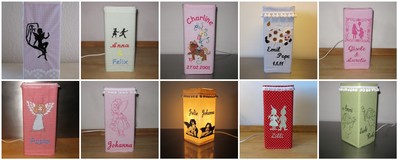
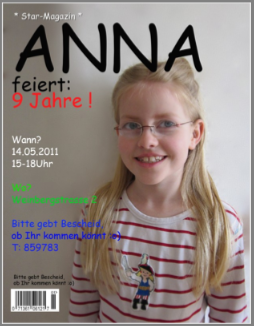
I love to play around with the motivator and also with the magazin covers (made the last invitation for Annas birthday like a magazincover). For the mosaics you can choose how many rows or columns you want. Made the overview of my lamps with that tool (this can save capacity in the projects and maybe Cute is a little bit faster if not every single name on a towel is posted seperate ;-). Best way to arange them is to use pics that have a little bit space around the motiv so you can move them in the frame if necessary.
Greetings, Bettina
PS: You have to try "popart-poster" for the Andy-Warhol-look ;o)
I love to play around with the motivator and also with the magazin covers (made the last invitation for Annas birthday like a magazincover). For the mosaics you can choose how many rows or columns you want. Made the overview of my lamps with that tool (this can save capacity in the projects and maybe Cute is a little bit faster if not every single name on a towel is posted seperate ;-). Best way to arange them is to use pics that have a little bit space around the motiv so you can move them in the frame if necessary.
Greetings, Bettina
PS: You have to try "popart-poster" for the Andy-Warhol-look ;o)
1 links:
[1]
http://bighugelabs.com
bighugelabs.com
1 comment
these are wonderful - I'll have to see what I can do. thanks
Linda
Linda