













10013✽
I don't know if anyone noticed this or not but Embroidery Library finally has downloadable color charts! It only took about 10 years. :) You can download them as a pdf or txt file. I had to email them and tell them thank you.
Lori
Comments (16)

24826✽
by
mranderson
19 Jun 2011
+6✽
Yes, I got this info in an e-mail several days ago. They have also added two more formats, VP3 and XXX. You can go into your order history and DL previous orders in these formats FREE.
http://www.emblibrary.com/EL/help.aspx?page=helpneednewformat
Marg
http://www.emblibrary.com/EL/help.aspx?page=helpneednewformat
Marg
1 links:
[1]
http://www.emblibrary.com/EL/help.aspx?page=helpneednewformat
www.emblibrary.com
4 comments

Thank You!
das ist super vielen dank

yeah!! for VP3, although I can convert the others.

Good too know!!! thanks

33986✽
Did they send them with the file or do you have to dl them on yourself?
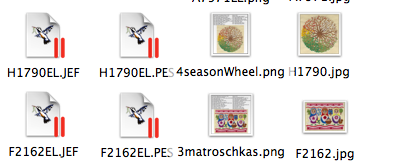
I always made a png from the colorchart and a jpg of the design alone. So I can see everything at once with the name and the number :o)
To try if different designs match well together I just have to click on the jpgs and can arrange them on my desktop.
Greetings, Bettina
PS: I have a janome and a brother that's why I store jef and pes.
I always made a png from the colorchart and a jpg of the design alone. So I can see everything at once with the name and the number :o)
To try if different designs match well together I just have to click on the jpgs and can arrange them on my desktop.
Greetings, Bettina
PS: I have a janome and a brother that's why I store jef and pes.
1 comment
What a pity I cannot read the 2comments :o(
Anybody an idea where there are gone?
Greetings, Bettina
PS: I have a big screen (24") and the new designpage fills it up completely. I prefer jpg to store my informations better than pdf (no pages you can scroll up and down ;o) On my mac it is the faster way to take a look at files.
Anybody an idea where there are gone?
Greetings, Bettina
PS: I have a big screen (24") and the new designpage fills it up completely. I prefer jpg to store my informations better than pdf (no pages you can scroll up and down ;o) On my mac it is the faster way to take a look at files.

255066✽

70914✽
by
jacquipaul
19 Jun 2011
+5✽
Thank you Lori, for letting us know; happy Father's day!
*4u!
Hugs,
Jacqueline
*4u!
Hugs,
Jacqueline


12102✽
34172✽
I'm not happy with the new ones. The old colorcharts were better downloadeble then this ones. So glad you are happy but I liked the olderones who were better and also downlaodeble, Yvonne
3 comments

I agree with you! I was OKAY with the old way! I just wonder if the code # changes, if we will have a problem finding older designs that we have on file. I would hate to lose the NOW filed info in my past orders.
I was there now for the first time after the change and I also didn't like the new style. So much space between the informations. The former color sheet had everything close together: Number/name/size/ stitchnumber, colors.
Greetings, Bettina
Greetings, Bettina
Takes 2 pages to print one design.
11271✽
I really like the changes. I always created my own PDF of the color chart with the picture but you had to go back to the design and make it - not available in the history. I like the new color chart format better - makes it easier to see how many colors you are working with up front (to do matching for the sewing). They said are planning to put the pdf in the download with the design soon - think they said next week. You can already go to your history and download the new format PDF (separate).

62461✽
I haven't checked out the new form. I really liked the way it was!!!

1752✽
Excellent site, love the search engine and the new format. Was Happy Hour this week-end and the 5 VIP freebies also great. The PDF colour charts file names are the same as the design, so easy to file and retieve, therefore time saving and cost effective as you don't have to print it. Big supporter of the site!
4 comments
I agree it is much easier and quicker to save the designs and colour charts together.It must be disheartening for Deb and the other EL people to see the whingeing that is going on. You couldn't find more helpful or nicer people to deal with.
i am sorry if it sounds like i am complaing, i really do love that site, and all the people are so nice and helpful, but it was so easy to print the picture and colors together, now it takes so much more ink, i put all my pictures in books, easier to show someone if they want toorder a design, better for you guys that know how to run the computer, i'm from the old school, so i will grit my teeth and carry on, sorry.. lildoll
Everybody's needs are different so you should not apologize.
Melnic your comment was quite mild to some I have seen on yahoo groups. Some have been downright rude. I personally find the Pdfs more convenient as I don't print all the colour charts out as with the number of EL designs I have that would be unmanageable. I would probably need to build another room on the house LOL. I find it easy to bring the colour chart up on the computer and follow it as I embroider but we are all different.
2685✽
they really messed it up for me!!! i always gotthe pictures of all the designs, now i won't be able to afford all that color ink. it was so simple before. why fix something that was not broken, i haven't emailed them yet but i plan too...... i did fine the way it was !!!!!

85867✽
So far , I am still out there trying to figure if I like the or or new. looks as if the design #s have changed also.
62461✽
Had to make another comment since I checked out the color sheets. Looks like a nice improvement. You can select how you want to view/save them!

57491✽

11542✽
I like it. I used to print out every color chart when I bought a design. Making use of the specials it sometimes took ages and the files really became too thick. Now I have it on disk and can print it only when I need it. I went back and downloaded them all over the weekend. Sure it does not look the same but I one will get used to it quickly. I also like the fact that you can print the whole set at once. Cannot wait for it to become part of design download zip.

122866✽
For anyone with Embird, if you download the TXT file, save it in the same folder as the design, Embird will recognise it and change the colours on the design automatically the next time you open the design.
Hugs and roses, Meganne
PS. I hope you all appreciate the amount of work that would have gone into creating txt & pdf files for all their designs. I'm glad I don't work for them.
Hugs and roses, Meganne
PS. I hope you all appreciate the amount of work that would have gone into creating txt & pdf files for all their designs. I'm glad I don't work for them.
122866✽
Please note:-
From what I have seen so far there is NO .txt extension on the TEXT file version of the colour chart.
THIS MEANS, when you download the text file to save to your folders you MUST add .txt at the end of every text file or Windows will not recognise it.
HNR, Meganne
From what I have seen so far there is NO .txt extension on the TEXT file version of the colour chart.
THIS MEANS, when you download the text file to save to your folders you MUST add .txt at the end of every text file or Windows will not recognise it.
HNR, Meganne