













17488✽
What am I doing wrong? This was just a sample stitch out so I didn't use wss.
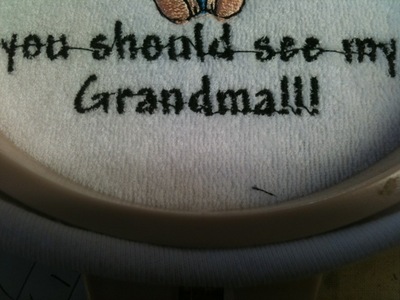
I used the Andy 0.50 text. If you note in the photo (I'll try to post one) when it goes to the next letter such as the "YOU" it starts on the far right of each letter, and jumps back to the left and leaves a thread to clip in the center of each letter. It just makes a mess of the whole design. Is there something I can do to change this? My old program started each letter on the left side.
Thanks
Mary Ann
Comments (6)
17488✽
Here is the photo
1 comment
Shut down Embird, reboot your computer and try again, but also see my post below for a fix for this problem.
HUgs n roses, Meganne
HUgs n roses, Meganne

145307✽
Do you use Font Engine in Studio or in Editor?
In Studio you can move the start and end points of each letter, that can come in handy at times.
I don't think you can do the same in Editor. Maybe one of the others can help you there. I never tried as I use Studio for all lettering.
In Studio you can move the start and end points of each letter, that can come in handy at times.
I don't think you can do the same in Editor. Maybe one of the others can help you there. I never tried as I use Studio for all lettering.
3 comments
I tried to bring a design into studio, but it doesn't let me. Am I doing sormthing wrong there? I have a design, and just want to add the text. I can only do it in editor.
Mary ann
Mary ann
Only way you can bring a design into Studio is by using RC in Editor and choose "Edit stitch file in Studio". Then you can do the text and save and convert it.
Yes you can change the start point in Editor, but you must do it manually individually, not automatically.

2109✽
If you are using FE in Editor make sure "Nearest Point " is checked for connection type. (On the insert screen)
Like Mops, I tend to use mainly FE in studio so that things can be tidied up a bit.
Like Mops, I tend to use mainly FE in studio so that things can be tidied up a bit.

122866✽
There is a patch available to fix these problems I will post the link below.
This message below is directly from Dusan Balara.
"We have updated FontEngine (Embird) with a fix for fonts that have
specific (in my opinion wrong) order of fills and holes.
Although official release with few other enhancements is planned for
end of the week, this fix is already available for those who have
problems with these fonts.
Please use installation file (updated today) from"
This message below is directly from Dusan Balara.
"We have updated FontEngine (Embird) with a fix for fonts that have
specific (in my opinion wrong) order of fills and holes.
Although official release with few other enhancements is planned for
end of the week, this fix is already available for those who have
problems with these fonts.
Please use installation file (updated today) from"
1 links:
[1]
http://www.embird.com/sw/embird/embrd2k10b88d.exe
www.embird.com
17488✽
WOW...Thank you all so much for the info. I did have the Nearest Point checked, but it sure was a mess. Now I have to give this a try again.
I knew I could count on you gals to solve my problem.
Thank you
Mary Ann ((HUGS))
I knew I could count on you gals to solve my problem.
Thank you
Mary Ann ((HUGS))

40399✽
Thanks for asking this question, I was "fixing" each and every font design in Editor....
Thanks Meganne, I didn't know there was an update..I found that I also had to check Auto Clipping to get the start stitch to move, besides the Nearest Point...
Thanks Meganne, I didn't know there was an update..I found that I also had to check Auto Clipping to get the start stitch to move, besides the Nearest Point...