













22354✽
all the shades of colors????? Do I have to draw it, color it and scan it so it only has a few colors instead of 6 shades of grey to black, same with browns, etc. It should maybe have 8 or 10 colors and I've got almost 30 colors. And some I don't even see in the picture but it digitizes them in.
Comments (4)

33451✽
by
marjialexa
27 Jul 2011
+4✽
Hi, first of all, what program are you using? Second, you're trying to auto-digitize, and I don't think you're going to be happy with the results of that. But, your program should let you reduce the amount of colors. However, when you do this, you're going to lose a lot of resolution in the photo. If you really want to try auto-digitizing, you're going to have to take the clip art into something like Paint or PhotoShop and reduce the amount of colors. If you have a very limited edition of those programs, you're probably going to have to do it manually, and that will take lots of time. If you draw it, color it and scan it, you're still going to get hundreds of colors. Honestly, it's not that hard to digitize manually, and will turn out a much better product in less time than trying to fix a poorly auto-digitized one. Hope this was of some help. If you let us know exactly what digitizing program you're using, we can be of much more help to you. So glad you're trying to learn, you'll find it's a lot of fun once you get the hang of it! Hugs, Marji
2 comments
my program is PE-DESIGN Lite. Looks like I need to pull out the manual and try to figure out ho to manually digitize.
Unfortunately you can't manually digitise in PE-design Lite. So you need the right clipart to get a design that stitches out well.

145307✽
It sounds as if you tried to auto digitize. In that case you need a nice clean picture.
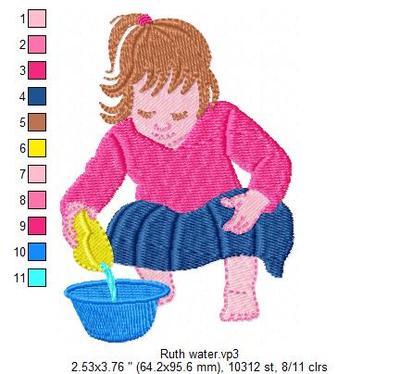
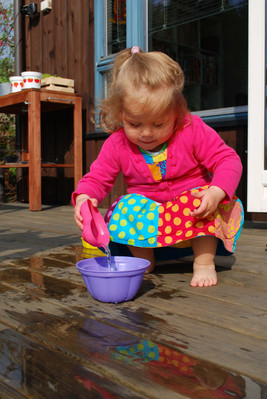
When you digitise manually it does not matter whether there are many shades, you click points around the area and set the colour. You can use hazy pictures, shaded clipart and decide for yourself. See the design I made and the original picture. I digitised over the picture, made the cardigan into a shirt, left out the coloured wide stripes in the skirt, simplified the shape of the bowl and so on. I still have 11 colour changes (and 8 colours), but auto digitising would have given enormous problems.
So try doing it manually, it's not as difficult as you think and much faster than auto digitising and correcting the lot - that takes days!
When you digitise manually it does not matter whether there are many shades, you click points around the area and set the colour. You can use hazy pictures, shaded clipart and decide for yourself. See the design I made and the original picture. I digitised over the picture, made the cardigan into a shirt, left out the coloured wide stripes in the skirt, simplified the shape of the bowl and so on. I still have 11 colour changes (and 8 colours), but auto digitising would have given enormous problems.
So try doing it manually, it's not as difficult as you think and much faster than auto digitising and correcting the lot - that takes days!
8 comments

Nice design. Did you use the carving tool, or how did you make the little creases in the arms and the skirt? I would like to try that.
Thanks
Mary Ann
Thanks
Mary Ann

Nice work
Martine, this is so nice!!! Hugs, Marji
Thanks I will look at it again. See if I can figure out how to manually digitize it.

Mops, This is just lovely - what a cutie she is.
Mary Ann, yes, I used the carving tool. I could have used lines in the shirt and digitised the panels of the skirt separately (and varied the stitch angle), but this was fast and easy. I liked the effect. Try it out, you'll love that tool.

Luv it! Great job!!!

That little girl is the definition of cute! Nice job on the design too. It really captures her little face, a job that often (IMO) fails.
22354✽
22354✽
by
sewfrenzie
29 Jul 2011
+1✽
I wondered about the manula digitizing, I couldn't find anything on it anywhere in my manual. I have been trying to redo it in paint. What a task that is!!!!! I've put it aside for now, its driving me crazy!!!