













5955✽
I have just bought embird basic and iconiser, should the designs show as pics when i open my designs folder.
Thank you in advance for any help you can give me :)
Comments (9)

27028✽
by
cherylgauteng
08 Aug 2011
+3✽
I cannot help you with this, sorry but the reply from me should keep it near the top of the list. Good Luck !
27028✽

113936✽
by
anitapatch
08 Aug 2011
+4✽
Yes they do, but it depends on how you install the program, you can allways afterwards alter the installation
1 comment
Thank you

92175✽
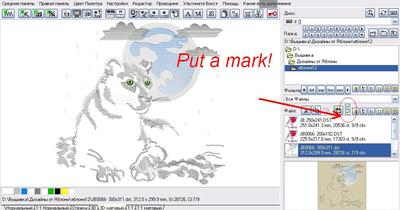
If I understood you correctly, you will not see the image!<br />Put a mark!
Please explain in detail, if not so!
Please explain in detail, if not so!
2 comments
The designs show up in embird but i thought they should show up as pictures in microsoft windows. Thank you
:)

8431✽
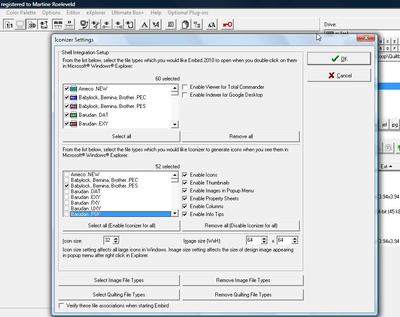
Yes, your designs should show as mini images in windows once you have set up iconizer. Open embird, go to options, then iconizer settings in the drop down menu, and you choose there which files you want to show as icons. I only have the few design files I use, but you can have them all show if you wish.

145307✽
Yes, you should see them in Explorer, a very useful feature. As Jasanne said: Open Embird, choose Options and choose Iconizer sttings from the pull-down menu. Then you have the choice which formats you want to show - see picture below.

22300✽
by
mysugarfootswife
08 Aug 2011
+3✽
Thanks. I've had Embird since 2007 and love it, but I learned a couple of things on this post.

843✽
by
chickaneedle
08 Aug 2011
+2✽
I spent hours installing and re-installing and trying to get the Iconizer to function on my computer. There can be a few factors involved, including which version of Windows you are using, whether it is 64 bit or another, etc. Go to this site for some tutorials and info:
http://www.secretsof.com/content/1862
Go to the bottom of the page and click on the last of three blue "Click Here"s.
http://www.secretsof.com/content/1862
Go to the bottom of the page and click on the last of three blue "Click Here"s.
5955✽
Fantastic Thank you I can see my pics now. Cuties to the rescue again:)
1 comment
Glad that it is sorted out and that you can see the pics.